CNC help

Linus Knives

Moderator
Knifemaker / Craftsman / Service Provider
Joined
Jul 13, 2023
Messages
1,150
Hey, is there anyone that designs their own knife scales for CNC's (Gcode) with Fusion 360?
I'm trying to figure out a step in the process of creating the Gcode and the program is not working for me. I'd appreciate any help if there's anyone out there that has done this before!
Just drop a message or PM me if you think you are familiar with CNC designing in fusion and I can explain the problem, just trying to gauge if it's even worth me trying to explain my problem if there's not anyone that could help me:)

Thanks,
Linus
 
I’m familiar with Fusion CAD/CAM, though I’ll admit I only know what works for my machine. Post your issue and maybe we can help.
 
So Contender Machine Contender Machine fixe my main problem I had yesterday- Thanks!
But what would be your preferred operations for a design like this? Also bit wise? I only can fit 1/8th bits in my router.
I did a 3d contour pass and it's not very detailed. I also did a flat pass first over the flats and it did not look good at all.
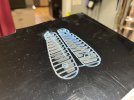
This picture is terrible because I never even finished the operations because my clamp moved and ruined the whole project. Silly me- not to tape/glue it like I have the other times. :confused:
IMG_8058.jpeg
 
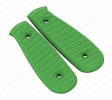
This is about how I want them to look but im not sure which operations or bits would suit this best. Screenshot 2026-03-03 at 5.05.57 PM.png
 
Looks like you’re well on your way. You may be able to use a ball nose end mill sized for your grooves to machine most of your features. You’ll have to experiment with different CAM tools to achieve your desired geometry and tool paths. You can simulate in CAM to see what your end result will look like. I haven’t done any true 3D stuff yet so unfortunately I don’t have any recommendations there.
 
Looks like you’re well on your way. You may be able to use a ball nose end mill sized for your grooves to machine most of your features. You’ll have to experiment with different CAM tools to achieve your desired geometry and tool paths. You can simulate in CAM to see what your end result will look like. I haven’t done any true 3D stuff yet so unfortunately I don’t have any recommendations there.
Thanks, I have some ball nose end mills that didn't really achieve what I want yet. I know I still have to mess with the tool paths a ton!
 
If you aren't particularly concerned with long cycle times and you are limited to an 1/8-inch tool, I would suggest using an 1/8-inch ball end and use a single toolpath to machine the entire thing. A 3D surfacing path (is Steep/Shallow an option on Fusion?) that starts high and works its way down. You will have to run a very small step over to get a good finish, maybe try .002 inches. The advantage to this is that you can probably get by with taping and gluing the material down and doing it in a single operation without any real fixturing. This strategy should work well on your machine. It won't be fast, however.
 
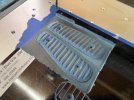
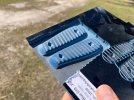
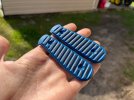
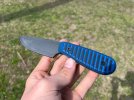
I did three operations- a flattening surface one with a flat end mill, a 3d scallop with a ball nose end mill, and then a 2d contour to cut it out. It worked wonderfully for the first try!
IMG_8068.jpegIMG_8069.jpegIMG_8071.jpegIMG_8072.jpeg
 
Pretty cool. Man....👌👌👌.....Congrats on your first successful scales...👍👍👍......
Good luck with your future endeavors with it.....😉
 
Pretty cool. Man....👌👌👌.....Congrats on your first successful scales...👍👍👍......
Good luck with your future endeavors with it.....😉
Thanks! Looking forward to messing with it some more today!
 
That's awesome!! Haven't tried doing that with mine yet!
 
Thanks! This is what I've had in mind for it for a long time!
 
Back
Top