Frustrations with Foto's

Joined
Mar 17, 2006
Messages
1,363
How do you guys get pictures directly on this page? I notice a certain few individuals have beautiful page set ups and the rest of us if we're lucky can figure out how in the world to get thumb nail size pictures that take us from one place to another. Now I'm not a computer wiz kid so I need things written out in detail. I appreciated the step by step explanation on how to use Picassa. I'm going to try it now just to see if I got it. Forgive me if I'm wasting anybody's time I just need to do this. Thanks.

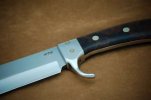
This is a small bowie my husband made out of D2, the finger guard is quite unique in that it is made out of one piece of metal and fitted around the shank. If you want more info. you'll have to ask him. I hope this works.
Wendy :o
 

Attachments

  • DSC_0003.JPG
    DSC_0003.JPG
    11.7 KB · Views: 62
What little I have posted have first been uploaded to photobucket. I then compose a message, just like I am doing right now, and click on the little square yellow ("yaller" here in South GA) mountain scene in the taskbar. It will i.d. the box as "insert image". That is where you insert the url of your photobucket pic. To make things easier, I open two internet explorers at once...one linked to photobucket and one to the blade forums. I choose the pic in photobucket and copy the url and then paste it to the "insert image" thingy on the blade forum taskbar. Works for me....

Good luck
 
If I can do it, I am sure you can too....Once you struggle through the first one, its a piece of cake afterwards....Just like this. The pic below is of a mama wren that took up residence in my shop right beside my grinder this spring. She worked so hard at raising three tweetie birds that I suspended my grinding for an entire month so she could concentrate on her work. Ain't I sweet.

Tweetie.jpg
 
P.S. Carolina wrens are one of my favorites besides this sweet little thing. No she's not mine but a close relative.
 

Attachments

  • dsc_0050.jpg
    dsc_0050.jpg
    15 KB · Views: 13
Bet that little cutie pie has stolen your heart! Mine & my wife's sweetie is 21 years old and a senior in college...in case you don't know, they get more expensive. Got a low maintinance little stinky boy as well.

Have a great weekend.
 
Dunno if you got it figured out, but here's what I do.

Go to http://imageshack.us/ for free image hosting.

Click the browse button, then select the image you wish to upload.


For larger images (bigger than 800x600 or so) you'll want to resize to 800x600 or less by selecting the box and size desired.


Click [host it!]


Copy the corresponding hotlink that you want to use (top one is for linked thumbnails, bottom one is for full size)


In the forum's dialog box, paste link where you want it to show up in your message.


And viola- you're a pro.
 
Including pictures inside a posting here on BFC is done is two steps:

#1 step -- Put the pictures somewhere on the web. One picture-hosting site that lots of folks use is Photobucket.com to store their pictures. Photobucket and some other sites are free -- you don't need to pay them to store your pics on their web servers -- while other image hosting sites charge for the space. Once you put the pictures on a site like that, each image will have a web address something like http://photobucket.com/blah-blah-blah/xyz-xyz.jpg.

#2 step -- To include your picture inside a posting here on Bladeforums, as you are composing your post you place an image link in your post. The image link would look something like this:
[img]http://photobucket.com/blah-blah-blah/xyz-xyz.jpg[/img]

Those letters inside the [] square brackets are called "tags". The first tag [img] tells Bladeforums that you're about to give it the web address of a picture. The web address starts immediately after the tag. So don't put any spaces between the tags and your address. The second tag, the one with the slash before the "img", [/img] tells Bladeforums to stop reading input as the web address of your picture.

When someone views your posting, as their browser loads the page, Bladeforums will go out and get your picture from the web and insert the picture into your posting where you put the image link tags and address of it.
 
Thank you both for the information. Maybe I should have titled my post frustration with computers. RokJok I appreciate all the threads to photo info.. I have made the light box that Coop posted in 2002 and working out the kinks. All this is new to me so I do appreciate the help.
Thanks again.
Wendy & Dave too. He makes the knives-I just shoot them.
 
Wendy,
I think you have it, but thought I would add, when using imageshack and maybe photobucket, it puts up your pic. Then someone can click on that pic and it will jump out to a larger version that may show more detail.
I stuck a test pic here... click on it and hopefully you can see what I am babbling about. But you also may have to shoot the original pic in a medium to high resolution.
You can click on this one, and then when it opens in imageshack, click on it again. If I did it right, it gets real close in

 
Back
Top