
Handground SIFU authenticity

Joined
Oct 19, 1999
Messages
2,836
In case Spark has trouble emailing me.

I got my hands on a Handground Sifu from Spark. It is the stonewash blade with no Bladeforums mark (he says the handful 5 or so were made after the first marked handmade run) The thing is.. it has no special markings I can notice and it didnt come wiht a box or documentation?

I trust Spark - but my friends might not trust me. Is this normal??

Thanks Sirs.

------------------
<A HREF="http://www.contrib.andrew.cmu.edu/~soo/balisong/balisong.html" TARGET=_blank>http://www.contrib.andrew.cmu.edu/~soo/balisong/balisong.html
</A> If you play with love you will be heartbroken; if you play with knives you will [bleed]

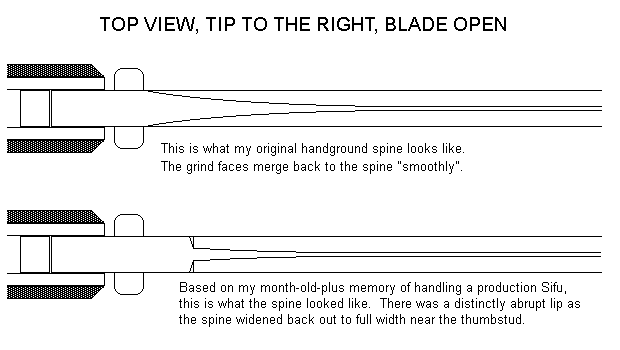
 
Maybe I can help. My hand-ground Sifu had one very noticable difference from a production version I handled at a recent gun show. I had mine with me at the time, and was carefully comparing.

On the spine, both have a false edge. On both, the false edge ends near where the thumbstud is.

On my handground serial number one, the false edge blends back into the spine "gradually" and smoothly near the thumbstud. On the machine-ground, that end of the false edge came "abruptly", with a bit of a "lip".

Hope this helps...

Jim
 
Thanks sir.. that post made me sigh in relief. I take it that your #1 doesn't have a box too right?

Anyways I examined the spine at the thumbstud.. it does seem a bit smooth and rounded off do you mean that the production is deal FLAT at the top of the spine?

------------------
<A HREF="http://www.contrib.andrew.cmu.edu/~soo/balisong/balisong.html" TARGET=_blank>http://www.contrib.andrew.cmu.edu/~soo/balisong/balisong.html
</A> If you play with love you will be heartbroken; if you play with knives you will [bleed]


This needs a picture:
oldnew.gif


Hope this helps.

Jim
 
much appreciated sir
smile.gif
thank you very much. Yep I guess this is legit... as expected...

------------------
<A HREF="http://www.contrib.andrew.cmu.edu/~soo/balisong/balisong.html" TARGET=_blank>http://www.contrib.andrew.cmu.edu/~soo/balisong/balisong.html
</A> If you play with love you will be heartbroken; if you play with knives you will [bleed]

 
Can someone with a machine-ground piece confirm my impression of the spine layout?

Last, my Sifu came with no box, no manual - it was in a sort of "mini poster shipping tube" affair.

Jim
 
My production rekat carnivore came in he mini poster tube as well (as do all rekats I hear - no papers too) but mine didnt even come with that.


..curious...


------------------
<A HREF="http://www.contrib.andrew.cmu.edu/~soo/balisong/balisong.html" TARGET=_blank>http://www.contrib.andrew.cmu.edu/~soo/balisong/balisong.html
</A> If you play with love you will be heartbroken; if you play with knives you will [bleed]


I have a Black-T BF logo Sifu (production). It has the "lip" at the back of the false edge as Jim illustrated.

------------------
Cheers,

--+Brian+--

He who finishes with the most toys wins.
 
Jim nailed it... the handgrounds have visibily different top grinds, with the machine ground ones having a much shorter, abrupt ending with visible vertical grind marks.

The hand ground ones have smoothly tapering grinds on the top, much more appealing, IMHO.

The last batch I got didn't have any tubes at all... which is why you didn't get one.

Spark

------------------
Kevin Jon Schlossberg
SysOp and Administrator for BladeForums.com

Insert witty quip here
 
Hey Jim really cool drawing. Care to share the wealth with me about how you did that drawing. I am interested in buying a somewhat simple drawing program for my knifemaking hobbie. I don't know alot about these kinds of programs.

Is that a CAD program you are using or is it simply the paint program supplied with windows.

I don't have alot of artistic experience so I am looking for a good drawing program to help.

Thanks,

Jim

------------------
The warrior will endure great personal hardship in order to stand on a hill, howl at the moon, and proclaim his domain over all he surveys. Fredrick Lovert- Author
 
That's plain ol' Win98 Paint.

The Win98 version is unique in that it can write out .GIFs and .JPEGs in addition to the native Paint .BMP format. If you've got Paint for '95 or NT4.0 you can only write out .BMPs. I'd be willing to bet the Win98 Paint will run under NT4 and it's probably included in Win2000.

The key to understanding Paint is, once you "encircle" something (using the square-with-dotted-lines tool) you can hold down "CTRL", click and move the selected bit and you'll COPY whatever you selected. Then, while the selection is off to one side, use the "flip vertical/horizontal" command and produce a mirror image version. In other words, on the top pic of the blade spine, I made a rectangle, then somewhere below made a broad flat circle. I then cut away 3/4ths of the circle, leaving only the bottom-left corner. That was then dragged into the rectangle to for the upper half of the spine curve. I then copied that upper half, flipped it vertical and lined it up below it's upper mate.

Ya just gotta play. Remember, select something, hit CTRL and drag to copy it, flip it and move it back into position.

The lower pic was the easiest - grab and copy the top pic, erase out the gradual fade on the spine, draw in two little lines, copy that, flip it, move it to the other side, presto.

I'm more comfy using Paint now than actually taking pen to paper. I'm surprised more people ain't using it.

If your Paint cannot write out a .GIF file, there's a number of freeware/shareware graphics format converters that'll turn .BMPs into .GIFs/.JPEGs. Because I'm using "straight mono" the net file size as a .GIF in this case is only 5k, which is why it loads so fast.

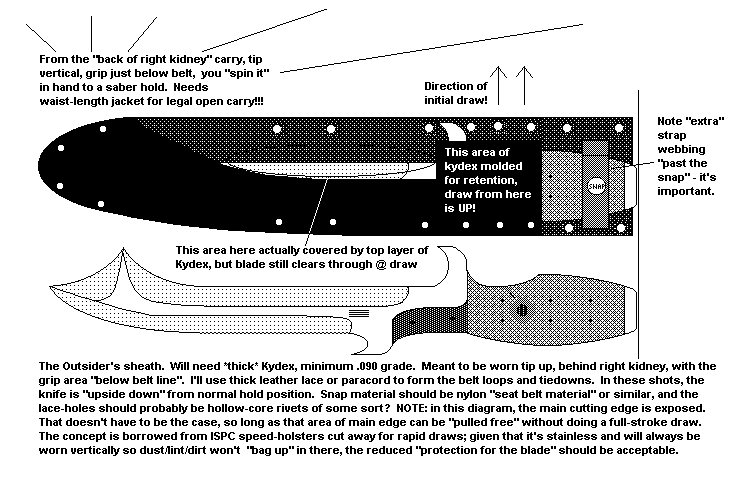
Another example of this sort of thing:
outsheth.gif


Jim
 
Back
Top