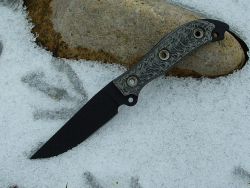
History of the meaner (recently sold at Bcs)

Joined
Mar 1, 2006
Messages
1,357
Hey all,

Haven't been into Busse's for long and was curious about the meaner recently available at the Bcs. After searching all I could find was the old one and the milganza ones. I ordered a black one with logo (I am guessing it is the same as the milganza but with logo and black/black). Anyway, my question is was this meaner a regular production model (the Bcs is 0.20) or was it conceived totally for the military order (and overrun) and a black bladed one with logo was created at the same time. Also, if anyone has received a black meaner do you have a pic? I will have my own soon enough but wouldnt mind seeing a pic while I wait.

thanks
 
I got an blk/blk AD over the weekend, It's ground the same as the Milli AD's, different from the original AD and HD.

My belief is that it is a BLK/Blk version of the Milli MrS. I'll know today when the mail comes ;).

My guess is that they're made from the same blanks as the Milli's.

Comparing the MAD's, AD's, Hd's I like the new ground, much beefier. More metal at the spine.


Here's the link to the way back machine, Company Store when the Meaners where first offered

mrsbcbc1.jpg


http://web.archive.org/web/20050418001210/www.bussecompanystore.com/knives.htm
 
Can't give you the histroy lesson -- ThatMguy may be along soon for that...

But I can tell you you will love this blade - one of the best designs Busse ever did IMO, CONGRATS!
 
I'm trying to send some photos but I used them in a previous thread, and photos won't download. It says "you have used them in a previous thread" ....I have renamed the file, and each photo, and it still won't work. any help! thanks
 
tman999, go to the thread you used them in, right click on the pic and copy the image location. Come back here and paste the image location from your clip board between the following
, that ought to do it. Also, you can find all your images uploaded easily if you go into your User CP and look down the left hand side for the area titled "Manage Attachements".
 
Thanks for the link, Jimmyjones! I'm waiting for the mailman, hoping for a box from Skunk. Can't wait for my Meaner!
 
Thanks, Progunner. Still not there. I found the images under user CP. Can I just take the image from there and add it to this thread? when I copy it it does not allow me to put it in my post under Attach Files, manage attachments. Paste does not appear. Also, when I try the other way, where do I find im)gpasteimagelocations here(img. sorry for the questions. maybe if I just delete the photos from the old thread, I can then use them. Thanks
 
thanks, JJ, but its a lost cause. I'll just delete the photos and add them in again on this post. I'm just not seeing something. When I get to this box, quick reply, I click GO ADVANCED, so that I can add the pics. under Additional opts, I clik Manage attachments. The box appears: upload file from Pc-browse-upload. I try to put photos in there, but when I right click photo and bring it there, the PASTE does not appear on my right click. I'll just keep trying, but thanks for your help. Tman
 
you have to copy and paste the image location (hosting URL location), you can't just copy the image and use it.

Me think :confused:
 
Thanks, JimmyJones. Still trying. I have to fool around with it somemore. I'm not a young Yahoo anymore, you have to give me some time. I deleted the photos from the other thread, lets see if I can send them over this way. Vickie at the store helped me get this set together. An AD and My first LM, and I really like it. Enjoy your knives. Thanks again, JJ. Tman
 
You find the image location by right clicking on an image. A properties window will open and there is a location that will look like this:

http://www.bladeforums.com/forums/images/editor/insertimage.gif

When you create a post, there is this little icon above the text window:

insertimage.gif


When you click that icon, a small window will pop up that says:

"Please enter the URL of your image:"

URL means location, so once you know the picture you want to insert, open the properties and select the image location, then right click-copy. Now click on the
insertimage.gif
icon and paste your image location in the text rectangle and click OK.

In my post I have done this twice already to show the icon. Now I'll do it again with one of your pics:

attachment.php


If you want to see the nuts and bolts of how this is done, click on the quote icon for this message:
quote.gif
.

Then you can see all of the code that is used to insert pictures.
 
Thank you all. You have been very helpful, and you don't hesitate to come to the rescue. I will try these suggestions out, and I'll let you know how I make out. I have used Photobucket before, and I guess once you have the photos downloaded there, you can add them to the Forum as many times as you want. I'll try a few things that were suggested. I'll let you know how I make out, and I promise to keep adding photos whenever I can. I like it when the guys show their stuff, also. regards, Tman
 
mrsbcbc1.jpg


I believe the knife pictured here is the Model T, which is sterile unlike the ones offered now. Its .20" thick and was offered a few years back at the BCS.
 
I believe the knife pictured here is the Model T, which is sterile unlike the ones offered now. Its .20" thick and was offered a few years back at the BCS.

Well the it ssems to be that the only difference is the logo.
 
Back
Top