How do you use shop credits?

JohnTheTexican

Gold Member
Joined
Jul 1, 2006
Messages
8,260
How do you place an order using shop credits? There's an option to enter a "Coupon/Gift Certificate," but you can't just type in shop credits and have it work, and there doesn't seem to be an option that doesn't involve PayPal, venmo, or a credit card.

It's not like the old days when you didn't get billed at the time the knife ships. Now the website wants money up front, and there doesn't seem to be an option to apply shop credits.
 
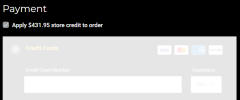
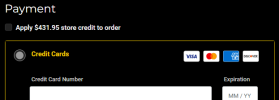
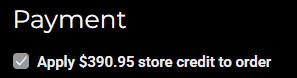
Add item to cart. Go to checkout... when you get to the billing page... look for a selectable checkbox (directly underneath "Payment") where you can select to apply shop credit, or not.

Default (if you have shop credit) is the box is checked and credit card fields are locked (shaded all white).
1763775638339.png

If you don't want to use shop credit, you can deselect the checkbox and credit card fields will be unlocked.
1763775596705.png
 

Attachments

  • 1763775249718.png
    1763775249718.png
    6.3 KB · Views: 1
Last edited:
Order like normal, then send a follow-up email saying you want to apply credit. They deduct credit instead of charge your card.
 
How do you place an order using shop credits? There's an option to enter a "Coupon/Gift Certificate," but you can't just type in shop credits and have it work, and there doesn't seem to be an option that doesn't involve PayPal, venmo, or a credit card.

It's not like the old days when you didn't get billed at the time the knife ships. Now the website wants money up front, and there doesn't seem to be an option to apply shop a
Once the girls get to the office they will enter your shop credit into your account and it will be available to use at checkout.

Garth
 
Back
Top