How to make videos in the shop. Tutorials and process documentaries.

Joined
Mar 12, 2013
Messages
1,167
Hey Guys,
I've had a few people ask about tips for making videos. I won't claim to be an expert at making videos yet, but it is something that I've put a bunch of time into learning over the last year or so.

Below I've tried to put together a basic guide to help you get started with your own videos. I've added a lot of embedded videos and stills to help illustrate the points I'm making.

Just for reference here's a couple of my recent videos. I'm proud of these two videos in terms of narrative and quality, but I'm still working on lighting and various other aspects of making the videos.

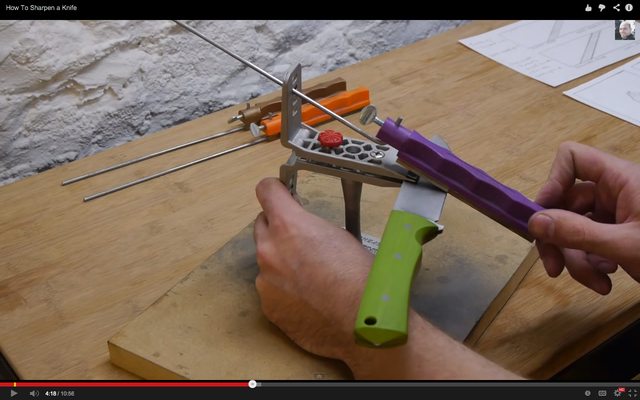
The first video is a tutorial detailing how to sharpen a knife using the lanksy system. It took about 3-4 hours to get all the footage for this video, then took about 2-1/2 days to edit the video and do the voiceover.
[video=youtube;ZlI5PaXsfOk]https://www.youtube.com/watch?v=ZlI5PaXsfOk[/video]

The second video is a 'process documentary' showing some steel testing I did a while back. The footage was taken over the course of about 5 weeks of testing. The editing took about 2 days as well.
[video=youtube;TSVs2LCZ-TQ]https://www.youtube.com/watch?v=TSVs2LCZ-TQ[/video]

Many videos could be completed in less time, but anything fairly complicated (like showing a knife being made start to finish) will take quite a while to edit. That's just the nature of the beast unfortunately.
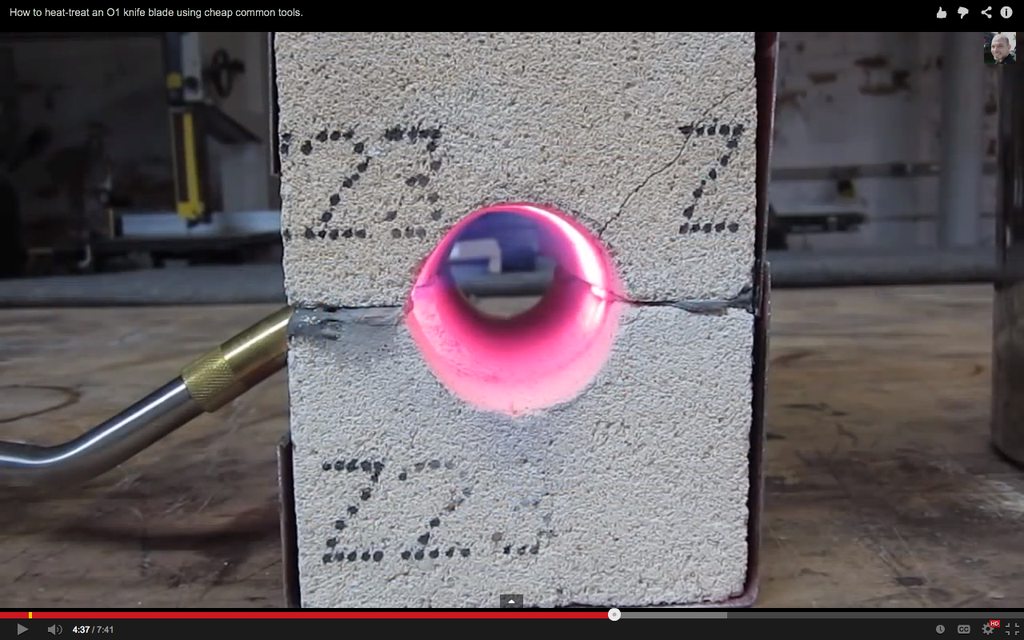
 
Part 1: The Camera

Having a half decent camera is a good place to start in all this. My first videos were shot with a Canon ELPH100HS, which is a very small point and shoot camera. The footage from this camera was acceptable, but somewhat soft.

A small point and shoot (or even your iPhone) can turn out videos that are just fine for instructional purposes. If you want to make videos that are more about showcasing your work then I think it's a good idea to step up a little in terms of camera gear. This will help you achieve nice sharp high-definition video.

For my videos I currently use a Panasonic Lumix G6, which is a very nice camera, but it's a little on the expensive side. The two less expensive cameras that I would recommend having a look at are the Canon G15, and the Panasonic Lumix FZ200. Both of those cameras are capable of shooting very sharp beautiful video.

If you want to keep things simple and inexpensive then have a look at the smaller 'point and shoot' cameras that can also take video. I've used the Canon Powershot ELPH100HS (an older camera) quite a lot and it produced acceptable results.

Don't be tempted too much by 'action cams' like the GoPro. They have their place, but their lack of a built in screen makes them annoying to use when you're trying to frame your shots.

My camera recommendations, from cheapest to most expensive (and also going up in quality) are:

$100 - Canon Powershot ELPH 100HS
$150 - Canon Powershot ELPH 150IS
$399 - Canon G15
$750 - Panasonic Lumix G6

All of these cameras will also serve to take nice photos of your work for sharing online.

Here is an example of the difference in video between an inexpensive camera and a more high-end camera. These are both stills from video taken in the same place, with the same subject and the same lighting, the only difference is the camera. The differences are a bit more obvious in the videos than in the stills.

First image is from a Canon ELPH100HS (~$100):

hfts7r6h.png


Video link: https://www.youtube.com/watch?feature=player_detailpage&v=8bunCG6W6dA#t=278

The second still is from video taken with a Panasonic Lumix G6 (~$750):
Note the extra sharp detail (like the knurling on the blowtorch head) and also the more natural feeling color.

W57jpsJh.png


Video link: https://www.youtube.com/watch?feature=player_detailpage&v=TSVs2LCZ-TQ#t=182

As you can see the quality of the less expensive camera is certainly acceptable, but if you're going for a high-end look for your process documentaries then the second camera will make it easier to get that. The more expensive cameras also give you more control over various settings which can become useful as you learn more about how to shoot video, and the look you're after.
 
Part 2: Lighting

Having a good camera and poor lighting will make for poor quality. A mediocre camera and great lighting will provide quite decent quality. Lighting is VERY important.

The lighting that makes sense for shooting documentary/informational scenes is very different to the kind of lighting that makes sense for a movie. For us there are a couple of important main points:

1) Make sure all your lighting is the same color temperature. Sunlight is a different 'color' to the light produced by fluorescent lights, or incandescent lights. Ideally you would setup the area where you're filming so it's lit by only one type of light, then set the 'white balance' setting on your camera to match the type of light you're using. If this is not done correctly then the image will have a blue, orange or green cast, and colors in the video will be distorted.

2) Having a shop with bright sunny windows is nice during the day, but is pretty inconvenient for shooting video. Sunlight is very hard directional light and will cast sharp dark shadows. This can make it very hard to discern important detail in your video. For this reason I recommend either diffusing the sunlight by hanging up thin white cloth over your windows, or removing the sunlight all together and relying on your workshop lighting instead.

3) When you're thinking about shooting video in your shop, make sure to get as much light on the subject as possible. Trouble lights, desk lamps and clamp lights are all great for doing this, just make sure they all have the same type of bulb in them.

4) Position your lights to give depth to the scene, but still light all parts of it well. If you light your work area equally from both sides or from right next to the camera, then the lack of shadow might 'flatten' the image and make it hard to see depth. The ideal lighting setup would be something like 2 lights to the left and 1 light to the right, or overhead lighting plus a small light off to the side of the camera. That way you have shadows to add depth, but the details in the shadows are still visible. This is something you'll have to play with a bit to get a feel for it.

Lots of overhead lighting really helps with overall light levels and makes it much easier to get good shots.

Here is some example video and stills showing both good lighting and poor lighting. Both were taken in the same area of the shop, with the same camera.

Bad lighting:
In this case there is too much light *behind* the subject (my hands) and that has made the subject dark and hard to see.

jpgZW4Xl.png


Video link: https://www.youtube.com/watch?feature=player_detailpage&v=PGmydrLT2Fo#t=98

Good lighting:
In this shot all of the lighting is coming from behind the camera and is also spread out to the sides. The scene is well lit while still showing slight shadows that provide depth.

HxqReQ0l.png


Video link: https://www.youtube.com/watch?feature=player_detailpage&v=ZlI5PaXsfOk#t=260
 
Part 3: Framing your shots

There are a lot of different ways that shots for movies are framed, but for our purposes we generally want to focus on one thing at a time, so simply placing the subject in the center of the shot is usually your best bet.

Sometimes though it will not be obvious initially what/where the 'subject' will be. Assume for example that you're making a video showing belt grinder technique. When you're behind the camera framing the shot your instinct will be to aim the camera right at the platen of the belt-grinder. However when you move to the belt grinder with a blade in your hands ready to grind, your hands will not be in the center of the shot. Given what you are trying to demonstrate it's likely that your hands should be the primary focus, and therefore in the center of the shot. You will learn over time when you need to adjust the frame to allow for things like this.

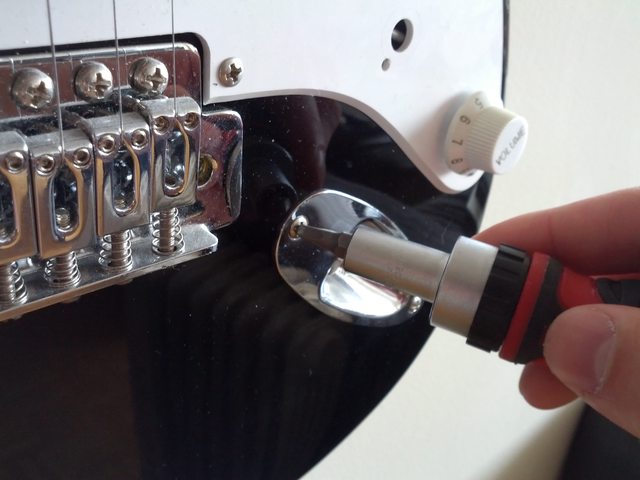
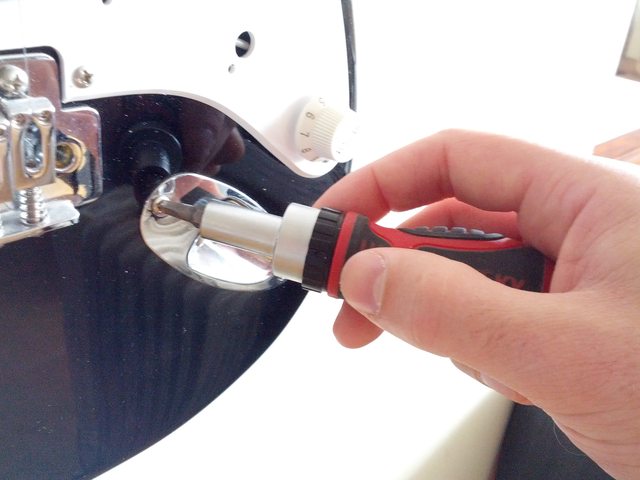
Bad framing for showing technique:
Note that even though the screw is at the center of the frame, it's not obvious that the screw/screwdriver/hand is the subject of the shot.

PFdsHyAl.jpg


Good framing for showing technique:
Now we have the screw/screwdriver/hand as the primary focus of the shot. Getting this kind of framing is obvious in a lot of cases, but may take more thought when you're not initially in the shot because you're setting up the camera.

1r27lOul.jpg


It should be noted that ideally all your shots should be taken with the camera mounted on a tripod. Shooting handheld turns out shaky video that looks unprofessional. Using a tripod also means that you'll be able to easily take videos just by yourself in the shop.
 
That's great Aaron and the timing is perfect. I Wanted to shoot a video tour of my shop this week and after a few attempts I quickly realized that I needed to be better prepared. :o Downloaded a bunch of stuff to do some reading. This tutorial will be a great help. I might even pm you with a few questions if you don't mind.

Thanks for doing this. :thumbup:
 
Patrice Lemée;13393784 said:
Can I ask what software you use for editing?

Hey Patrice! Answer coming soon, unfortunately the forum is not liking me trying to post again and again quickly and is locking me out...
 
Part 5: Narrative

Having your video 'tell a story' in a way that makes sense is very important. You could have the best camera work in the world, but if you show your process out of order or don't clearly have a goal with your video then it's not going to be very captivating.

Before starting the video you should have a good idea of what it is you want to convey with the video. Are you teaching the audience a technique? Then you should write down a list of all the steps to make sure you don't miss anything.

If you're trying to document your process, then you need to make sure you show the process in a logical fashion, and that each shot or series of shots has enough detail in it to show what's going on.

For instance if you're peening handle pins then showing a shot of you wailing on the handle with a hammer is not going to explain to the audience what's going on. Instead you need several shots: drilling the handle holes, cutting the pins to length, inserting the pins into the handle, moving to the anvil, then peening the pins with a hammer, showing the mushroomed head of the pin up close, then grinding the pin off flush. All of these would ideally be separate shots, which gives you an idea of the level of work that can go into some videos.
 
Last edited:
Part 6: Voiceovers

I learned pretty quickly that it's a bad idea to talk to the camera while you're demonstrating a technique or going through a process. Splitting your attention makes mistakes more likely, but more importantly it's pretty rare that what you said on camera will actually line up with what you end up wanting to show in the final edit.

The best strategy I've found is to talk to the camera only when you're filming intros and outros (if those are necessary for your video).

In most other cases it's much easier to demonstrate the technique on camera and then record a voice-over separately after the video has been edited.

The exception to this is when you've got a tool or other object in your hands and you're demonstrating it's form or use to the camera. This can be hard to reconcile with a voiceover later so it's often easier to just talk to the camera.

You'll have to play with both methods and see what works for you.

Part 7: Editing

After you have worked out a narrative, then taken all your footage, you'll need to edit your video.

It is sometimes possible to get away without editing the footage, but generally it results in a sub-standard video with a lot of 'dead time' that isn't really all that appealing to the viewer.

In a process documentary for instance you'll generally never want to show a continuous shot of a process for more than 6-12 seconds. Any longer than that and people will get bored. They've already understood what you're doing in just a few seconds. Obviously this is not going to happen without editing.

I use Final Cut Pro X for my editing, but there are other options out there (Like iMovie) that serve the purpose perfectly well, especially for simpler videos.

Setup and use of the editing software is not really something I can go into as there are many different systems.

To put it simply: if you have a Mac, use iMovie, it's a great program. Watch YouTube tutorials to learn how to use it.

If you're on a PC then your editing choices are less clear cut and I don't have a lot of experience there, so it's something you'll have to research.
 
Last edited:
Part 8: Developing your taste

It's very hard to make good videos if you haven't watched a bunch of other videos and had a think about what makes them good. Below I've linked a bunch of videos that fall into the overall good and bad categories.

The good videos will have good lighting, camera work, editing, and also present a consistent narrative in a timely fashion.

The poor videos either have bad lighting, camera work, editing, or fail to present a consistent narrative in a timely fashion.

Good:
https://www.youtube.com/watch?v=I0Z3pDGI9vo
https://www.youtube.com/watch?v=4fgXGs07W0U
https://www.youtube.com/watch?v=J3nojb-gFH4
https://www.youtube.com/watch?v=XBAST6i4gdc
https://www.youtube.com/watch?v=7Fp8b0qeNOc

Poor:
https://www.youtube.com/watch?v=gh4mdoR4Tdk
https://www.youtube.com/watch?v=ClULe1DfsRM
https://www.youtube.com/watch?v=S0RS2tIvJ_o
https://www.youtube.com/watch?v=Og5GL5PGo_U

Part 9: Publishing

YouTube is pretty ubiquitous these days. If you want people from all over the world to see your video then YouTube is the way to go.

Creating a channel on YouTube is easy. If you have a Google account (or a gmail account) then you actually already have a channel and you can just go upload a video.

Be warned that until you have a verified YouTube account you won't be able to upload videos longer than 15 minutes. To be honest most web videos should be a lot shorter than that anyway, if you're going over 10 minutes or so that's likely a sign you need to cut things down more unless you're presenting a very complicated topic.

Part 10: Getting the word out about your video

Here's another hard part. You can have the best videos in the world, but they could still go unnoticed if you don't tell anyone about them...

The best thing to do is simply to make sure that you try to provide value in your videos (don't just make them to try to get people to buy your stuff) and then tell people that might be interested about them.

If you make a video demonstrating how to handle a hidden-tang knife for instance then posting it on BladeForums to help others might be a good way to get some people seeing your videos.

If you make a video showing how you make your knives, then you might send it to the people that are on your order list, send it to your past customers so they can see how their knife was made, or post it to one of the forums or boards where people are interested in custom knives.

In general if you try to force it on people (think billboards and traditional advertising) then people won't be too interested. If you make a good, valuable, video and show it to the people that are interested in such things, then stick around afterward to actually have a conversation about it, then you'll get a much warmer response.
 
Thanks Aaron, sorry for jumping the gun. I am on PC (Linux or Window$) so I'll see what is available as far as editing software.
 
The short version

Making videos can get as complicated as you like. But if you want to reduce the process to its bare essentials the requirements are like so:

  • Get a half-decent camera
  • Get a tripod
  • Learn how to use some video editing software
  • Always tell a story
  • Make sure your scenes are well lit
  • Make sure your scenes are centered around the subject
  • When editing, make the video as short as possible
  • Upload the video to Youtube
  • Show people that will be interested


Hope this is helpful to someone!

If you've worked out any tips/tricks for shooting photos or videos in the shop please let me know!
 
Last edited:
Patrice Lemée;13393848 said:
Thanks Aaron, sorry for jumping the gun. I am on PC (Linux or Window$) so I'll see what is available as far as editing software.

No worries Patrice! It can be hard to get these longer posts up on the forum because of the spam filtering setup unfortunately.

Others might be able to chime in with recommendations for PC video editing software. One of the things that has really kept me on the mac is how good/inexpensive the Apple creative apps are (iMovie/Final Cut/Aperture/Garage Band/etc).
 
Wow... this is one hell of a thread Aaron! :eek: :cool:


Thanks for not using my videos in the examples of shitty ones. ;) :D

I see my knife videos much like I saw my knife making around 20 years ago. I had a good idea of what I wanted, I was able to kind'a do it, but there were lots of things that I knew I wanted to be better... just didn't know how to do those things better at the time.

Honestly, I didn't even put too much thought into any of that up until a few months ago. I was just sharing things here and there... but as I have been paying more attention to the big picture, it's been very eye opening.


I think the kicker that got my wheels turning, was a message where a guy said, "You're one of my favorite makers on youtube, can't believe you have so few subs."

At first (well, after it registered what he was saying, LMAO) I was like, "What's he talking about, I've got like over 800 subs and 180,000 views."

Then I realized there are guys like "Trollskyy" that has over 46,000 subscribers and 5.6+million views!!! :eek: :eek:


It's really made it sink in that I don't know just how much I don't know. :foot: LMAO ;)


Thanks for the great post Araron! :thumbup: :cool:
 
Great Thread. Thanks Aaron for a great tutorial...it's just what I needed to know.
 
Wow... this is one hell of a thread Aaron! :eek: :cool:


Thanks for not using my videos in the examples of shitty ones. ;) :D

I see my knife videos much like I saw my knife making around 20 years ago. I had a good idea of what I wanted, I was able to kind'a do it, but there were lots of things that I knew I wanted to be better... just didn't know how to do those things better at the time.

Honestly, I didn't even put too much thought into any of that up until a few months ago. I was just sharing things here and there... but as I have been paying more attention to the big picture, it's been very eye opening.


I think the kicker that got my wheels turning, was a message where a guy said, "You're one of my favorite makers on youtube, can't believe you have so few subs."

At first (well, after it registered what he was saying, LMAO) I was like, "What's he talking about, I've got like over 800 subs and 180,000 views."

Then I realized there are guys like "Trollskyy" that has over 46,000 subscribers and 5.6+million views!!! :eek: :eek:


It's really made it sink in that I don't know just how much I don't know. :foot: LMAO ;)


Thanks for the great post Araron! :thumbup: :cool:

Hope the thread is helpful Nick!

Making videos is a really deep subject, just like knifemaking. However everyone here has an advantage in that they've already had to refine their aesthetic sense to be able to design knives. Re-purposing those sensibilities for other things should be easier than starting from scratch.

Last video I saw of yours (the hand sanding one) was pretty good!

Trollsky is a great example, and a hard act to follow. His camera gear is pretty modest if I remember right, he's just gotten the hang of what needs to be shown and is good at editing. He's a great example of 'doing it right' and one that I've been emulating for a while!
 
Patrice Lemée;13393746 said:
That's great Aaron and the timing is perfect. I Wanted to shoot a video tour of my shop this week and after a few attempts I quickly realized that I needed to be better prepared. :o Downloaded a bunch of stuff to do some reading. This tutorial will be a great help. I might even pm you with a few questions if you don't mind.

Thanks for doing this. :thumbup:

Glad the timing worked out mate! Always nice when that happens!

Please let me know what editing software you end up using, and how you like it as I'm sure that will help others!

If you have questions I'm happy to answer them! If you're comfortable asking in the thread that would be great as it will help others, but I'm more than happy to answer via PM or email too.
 
The youtube thing is pretty crazy.

To me, it's fascinating and frustrating all at the same time, that a knife maker's success on youtube has very little to do with his success (or even abilities) as an actual knife maker.


That's just part of our current society and the interwebz though... :)


Thanks again for the very detailed thread Aaron. Obviously you put a lot of work into it! :thumbup: :)
 
The youtube thing is pretty crazy.

To me, it's fascinating and frustrating all at the same time, that a knife maker's success on youtube has very little to do with his success (or even abilities) as an actual knife maker.


That's just part of our current society and the interwebz though... :)


Thanks again for the very detailed thread Aaron. Obviously you put a lot of work into it! :thumbup: :)

It is interesting, there was a quote some time ago about "successful youtube knife-makers" and I let it slide, but I was thinking that.

However unless a maker is on a forum, or in a magazine I don't know about them.

I suppose it's true for the people that don't belong to forums or read the magazines, if you're not on Pinintrest, youtube, twitter, facebook, whatever else there is.. you don't exist for them either.

I think that sort of strategy is suited to low cost high volume production, but

Look at how Bob Kramer and the Cut Brooklyn made a big splash with those videos, to the rest of the world, they looked like the first ones doing it and that pushed Bobs pricing and volume up.

Plus there are real dollars in advertising if you can make videos and get subscribers, enough to keep you in sandpaper.

Look at
averageiowaguy
we all told him that lawnmower blades were NFG, but that video has a quarter million views,
50 X times more views than any other video of his - so those ideas are popular with the public.

https://www.youtube.com/watch?v=0iyB7Lw7-p4
 
Last edited:
Thanks for the thread Aaron. I feel like in this day and age youtube could really make or break someone. If they have good work and make good videos then they are good to go. That being said if they get a following, and don't do good work the youtube community will spread that word fast. Another version of that scenario is that a really great maker could make bad videos and nobody will take him seriously. The sad part is, like the count said, if you are not EVERYWHERE you are not marketing yourself correctly. You really do need to have a social media presence and I feel youtube is the greatest presence you can have, as long as its well thought out and well done. People can see your work that way, you can demonstrate how well it works, and you can sell yourself as a maker. Thanks again for all the info!
 
Back
Top