

- Joined
- Jul 23, 2015
- Messages
- 19,001
I realize I need to use an image that is nothing but outlines to convert to .dxf, the question is about sizing.
Usually, when I design a knife, I make a file like this, and then simply trace it out on paper, then onto the steel with a sharpie before cutting the blank our with an angle grinder. The ruler in the file is sized so that it is exact when at 100% zoom on my computer screen. If I should use high res, I wonder if this is all I need to do, just blow up the ruler to 400%, then redraw my blank, measuring all my design elements up against that ruler in my pic, and then convert the image to .dxf and tell the waterjet operator "the knife is supposed to be exactly 6 5/8" from butt to tip". Should that produce a blank of the right size and with properly sized holes? Or is there something I'm missing. Any tips, tricks or suggestions would be appreciated.
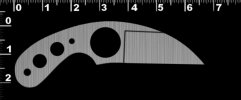
P.S. I love the Fred Perrin "LaGriffe" (that's French for the claw, did you know?) style knives, but always wanted a more negative blade to handle angle. This design will solve that for me, and I plan to do some in 5/32 AEB-L and 1084 with a flat zero ground blade.
Usually, when I design a knife, I make a file like this, and then simply trace it out on paper, then onto the steel with a sharpie before cutting the blank our with an angle grinder. The ruler in the file is sized so that it is exact when at 100% zoom on my computer screen. If I should use high res, I wonder if this is all I need to do, just blow up the ruler to 400%, then redraw my blank, measuring all my design elements up against that ruler in my pic, and then convert the image to .dxf and tell the waterjet operator "the knife is supposed to be exactly 6 5/8" from butt to tip". Should that produce a blank of the right size and with properly sized holes? Or is there something I'm missing. Any tips, tricks or suggestions would be appreciated.
P.S. I love the Fred Perrin "LaGriffe" (that's French for the claw, did you know?) style knives, but always wanted a more negative blade to handle angle. This design will solve that for me, and I plan to do some in 5/32 AEB-L and 1084 with a flat zero ground blade.
