The Trough Is Open !!!!!! . . . . Let The Blood Bath Begin!!!!

Status
Not open for further replies.
I'm in!

attachment.php


∞
 

Attachments

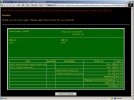
  • small_Order_12.02.07.JPG
    small_Order_12.02.07.JPG
    46 KB · Views: 509
Worked for me, but it didn't send out its usual e-mail.

Instead it mentioned the e-mail failure quoting a syntax error.

But ... I took a softcopy and a hardcopy of the order page, so I assume I'm alright. Also sent my e-mail off to the Busse Crew.

Now to bed.
 
how did we get in????

the link to the main site at the top still shows the sight closed for maintenance.
 
Ordered one CG, black/black standard micarta. Order Number 243670. Time stamp 01:05:35 CDT (The SE makes my limit of 2.) But I may go for the LE and HOG version if the INFI gods on Mount Wauseon deem me worthy of hogdom. E-mailed my blather to Amy-0 and Garth late Fri P.M. and don't expect a reply for a while.
0.32 for the CG. WOW! And/or WOO HOO! 'Night all. Pleasant dreams. Pete
 
Worked for me, but it didn't send out its usual e-mail.

Instead it mentioned the e-mail failure quoting a syntax error.

But ... I took a softcopy and a hardcopy of the order page, so I assume I'm alright. Also sent my e-mail off to the Busse Crew.

Now to bed.

I captured the screens on both my orders. :thumbup:
 
Clone7,
It should only effect the confirmation e-mail that they would send to you, not your order. But, just in case , print out your order screen w/ its info. for a hardcopy. Pete
 
How in the heck do you do that? I am not the sharpest knife in the drawer when it comes to computers, so don't be surprised that I asked. :D

Hit "print screen" button on your keyboard, then open any photo editing software and "copy and paste" into it - it will be a screen capture of your desktop.
 
Is the knife decriptions correct? CG at 0.32" and LE at 0.22"? In the past LE models have usually been thicker than cg models.
Ron Athay
 
How in the heck do you do that? I am not the sharpest knife in the drawer when it comes to computers, so don't be surprised that I asked. :D

Press the 'Prnt Scrn' or 'Print Screen' key
Open mspaint.exe
Paste into new file
Save

OR

Download a freeware screen capture software. I use Printkey v2.0, but there are newer versions available.


∞
 
Status
Not open for further replies.
Back
Top