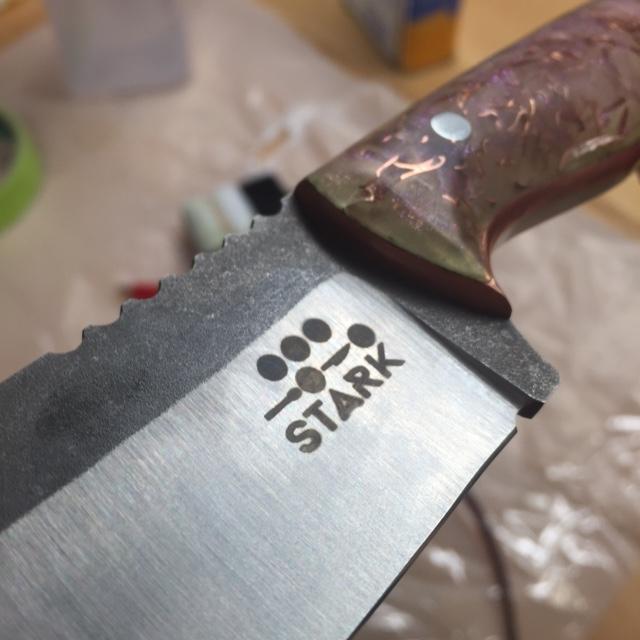
Bad Logo Etch?

Joined
Mar 19, 2010
Messages
1,154
I got some logo stencils in the other day from Ernie Grospitch that I tried out today and had some trouble with ghosting and not getting a clean etch. I’m using a Personalizer Plus so the etcher shouldn’t be the problem. Do you think this could be caused by not getting a good seal on the stencil to the knife? If so, how do you recommend taping the stencil to prevent air bubbles?

If you have any other tips I would love some help. :)

Thanks!

tmLZBqW.jpg
 
Erdbeerreis, I used to get ghosting on my etch if I etched too long. If you worried about the stencil conforming to the blade then spray a little Windex on the stencil before setting it in place and tape the edges well. If you already have some fuzzy edges on your mark then you can staple a piece of felt on a wood block and rub some buffing compound on the felt and drag it over your etch until the mark is crisp again. I'm no expert but this has worked for me. I can get a good etch with my Personalizer plus at 4 seconds each mark and etch on the highest (24 volt ) setting. Almost every thing I've read on this subject advises "trial and error" method. Use a piece of your steel left over from a bar and time yourself. I use the Marking Methods Green stencils and also the stencils from TUS with equal success. Good luck. Also I use #94 etchant from IMG in NY. Larry


KStRZ9gl.jpg
 
Put a little windex on the back of the stencil first which will help it seal off. Then tape it with scotch tape. Also I swipe mine with the etching pad instead of just holding it on.
 
I've also found that a little Flitz polish paste will remove ghosting.
 
Same as Matt, I've found that using Windex and swiping the pad across the stencil instead of holding it makes a really big difference.
 
Erdbeerreis, I used to get ghosting on my etch if I etched too long. If you worried about the stencil conforming to the blade then spray a little Windex on the stencil before setting it in place and tape the edges well. If you already have some fuzzy edges on your mark then you can staple a piece of felt on a wood block and rub some buffing compound on the felt and drag it over your etch until the mark is crisp again. I'm no expert but this has worked for me. I can get a good etch with my Personalizer plus at 4 seconds each mark and etch on the highest (24 volt ) setting. Almost every thing I've read on this subject advises "trial and error" method. Use a piece of your steel left over from a bar and time yourself. I use the Marking Methods Green stencils and also the stencils from TUS with equal success. Good luck. Also I use #94 etchant from IMG in NY. Larry


KStRZ9gl.jpg

Thanks Larry! So the polishing compound doesn't scratch the finish? And about how many 4 second passes do you make?
 
Same as Matt, I've found that using Windex and swiping the pad across the stencil instead of holding it makes a really big difference.

I tried the swiping method and I get an aura around the logo every time. Yesterday I just pushed down, and ran 15 passes of etch, and 15 of mark, and I got no ghosting at all. I didn't have to touch it up at all for the first time.
It could be that I just taped it down better, but so far it's working out just pushing straight down for me, holding till count of 2 each time.

This is just after etching, wiped with alcohol and a paper towel. YMMV...

MBrock-pushing1.jpg
 
Erdbeereis, I make sweeping passes for about 8 seconds on etch and 8 seconds on mark so that the pad contacts the blade for about 4 seconds each. I etch and mark with the power knob full on. If you tape the bottom of your stencil first and then the sides you can carefully lift the stencil from the top to expose you etch and see if all the letters are filled in...if not then push the stencil back down and press your pad down on the weak spots. This has always worked for me. If you still have problems then try the #94 etchant solution that I use. Larry
 
I always go back and "wipe" my mark with am abrasive finer than the last one that I used finished the blade like wet 1500-2000 grit wet-dry or dry 3M polishing paper. I etch very deep using like as many as 8-10 passes of 5-10 seconds each then at least 4 or 5 passes of 5 seconds on the mark setting, so i get a little bit of ghosting on the surface but it comes right off.
 
I tried the swiping method and I get an aura around the logo every time. Yesterday I just pushed down, and ran 15 passes of etch, and 15 of mark, and I got no ghosting at all. I didn't have to touch it up at all for the first time.
It could be that I just taped it down better, but so far it's working out just pushing straight down for me, holding till count of 2 each time.

This is just after etching, wiped with alcohol and a paper towel. YMMV...

MBrock-pushing1.jpg

There are quite few variable involved, type of machine, AC/DC, stencil, pad materials, etching solution, tape, Windex. Bottom line is, you have to use what works best for you.
 
I always go back and "wipe" my mark with am abrasive finer than the last one that I used finished the blade like wet 1500-2000 grit wet-dry or dry 3M polishing paper. I etch very deep using like as many as 8-10 passes of 5-10 seconds each then at least 4 or 5 passes of 5 seconds on the mark setting, so i get a little bit of ghosting on the surface but it comes right off.

That's pretty well the same thing we do. I like the etch to look like a stamp, you can go over it with paper with no worries at all.
 
There are more ways to make maker marks. For example I use photoresist foil for making PCBs. It works well for me. If made correctly there's no way for ghosting mark. If You want try this way You'll need UV light source and printer capable for print on foils and some chemicals (potassium hydroxide and washing soda). On YT are dozens clips that shows You what to do. Other method uses custom made stickies (made on plotter), one sheet A4 cost usually about $ 10-15. There no chemicals needed except etchant. With these both methods You can use ferric chloride or some acid as etchant too (without electricity).

Photoresist mark example
 
I talked to some other makers I know and tried just marking. It worked great! I actually prefer the non etched look anyway and it was much easier. Thanks everyone for all your help!

5BRePCi.jpg
 
Back
Top