
-
The BladeForums.com 2024 Traditional Knife is available! Price is $250 ea (shipped within CONUS).
Order here: https://www.bladeforums.com/help/2024-traditional/
You are using an out of date browser. It may not display this or other websites correctly.
You should upgrade or use an alternative browser.
You should upgrade or use an alternative browser.
can you post pics from your phone?
- Thread starter dieseldog
- Start date

UffDa
Gold Member
- Joined
- Sep 11, 1999
- Messages
- 42,596
I'm no expert. I can't transfer pics directly to my computer from my phone. I have to download them to the memory card, remove it and copy to my computer.
Then I can either use an image hosting service or use the attachment manager on BF. It's a PITA.
If you have a smart phone, it may be easier, but I believe that you will still need transfer your pics to your computer by email or some other means.
Then I can either use an image hosting service or use the attachment manager on BF. It's a PITA.
If you have a smart phone, it may be easier, but I believe that you will still need transfer your pics to your computer by email or some other means.

- Joined
- Apr 15, 2012
- Messages
- 774
If you have a smartphone, you can download an app called Tapatalk. It costs like 1.99 (IIRC) but to me it was worth it. It makes browsing the forums on the phone so much better and easier because you can post pics in the thread directly from your phone.

- Joined
- Sep 28, 2005
- Messages
- 4,527
I downloaded the photobucket app for free and download from photobucket to bladeforums. It's the easiest way I've found to get them here, plus I don't have to download to my computer first, which is good because my computer is very old and slow.
- Joined
- Sep 2, 2011
- Messages
- 833
I copy the img link from photobucket. In fact I don't think I've never made a post from my computer on this forum.

- Joined
- Jun 5, 2011
- Messages
- 166
I downloaded the photobucket app for free and download from photobucket to bladeforums. It's the easiest way I've found to get them here, plus I don't have to download to my computer first, which is good because my computer is very old and slow.
Got more details on how to do this for us tech-illiterate pepole.


- Joined
- Jul 20, 2006
- Messages
- 20,777
Got more details on how to do this for us tech-illiterate pepole.
It may depend on your phone or carrier. Some manufacturers and carriers lock out access to your file folders (where your pictures are stored on your phone) from applications.

- Joined
- Feb 6, 2012
- Messages
- 417
For smartphones, you should be able to take pictures as normal and use a photo-sharing service as others have mentioned. I, for example, use the Flickr app on my iPhone to upload pics to my Flickr account. Then, I just copy the requisite "share" HTML from Flickr to my posts here. Other services like Photobucket or Instagram work the same way via their own apps.
If you're trying to use BF's own picture hosting service, however, you're probably out of luck. While some phones do have a file manager system in place (the iPhone does not), most sites will not be able to call it up like we're used to on the PC. Apps are your friend.
If you're trying to use BF's own picture hosting service, however, you're probably out of luck. While some phones do have a file manager system in place (the iPhone does not), most sites will not be able to call it up like we're used to on the PC. Apps are your friend.
- Joined
- Sep 28, 2005
- Messages
- 4,527
Got more details on how to do this for us tech-illiterate pepole.
I'm pretty anti-tech so I hope this is clear enough how I do it.
Find photobucket app (free for basic app) in the app store and download it.
Open the app and log on/create photobucket account.
On the bottom of the screen is an upload media button, select it.

This takes you to select camera or existing picture. Fairly self explanatory- if you have the pic stored select existing, if you want to download as you take the pic choose camera.

For existing it takes me to my files- select the photo you want from the appropriate folder.
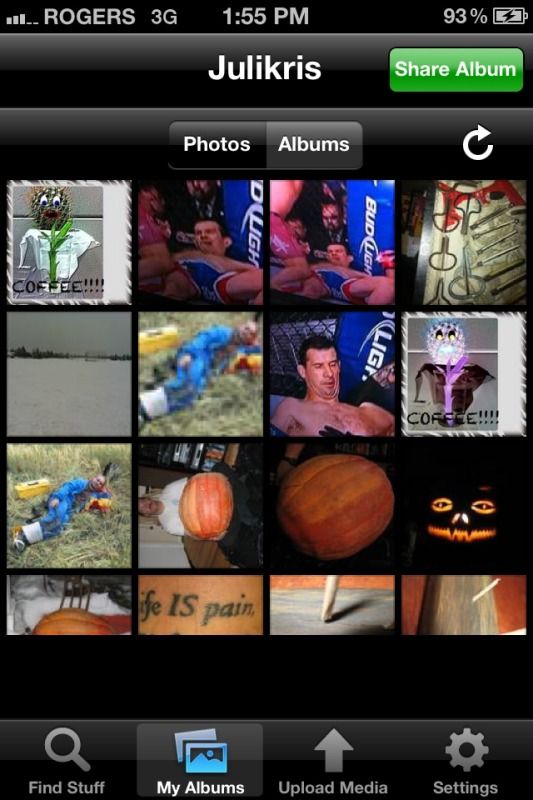

It downloads to the main folder, you can move it to another folder with the 'arrow in a bix' icon.
Get the direct website ID from the 'i' icon and tap direct.
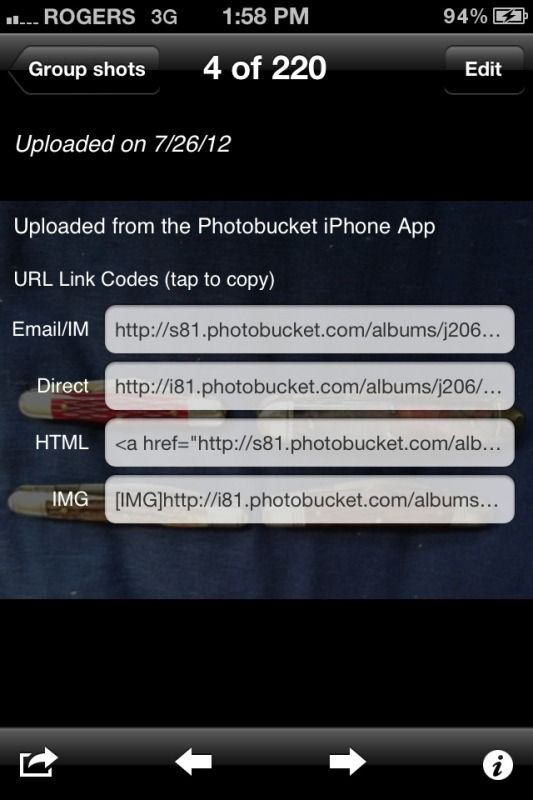
It will inform you that direct link Copied. Then go to your thread paste in the thread and add
Select 'reply with quote' to this thread if you need more clarity about what to add to the image address.
Hope this helps- BF has made me become more tech savvy for this reason- sharing the horde!!!