Design Build

Joined
Apr 8, 2014
Messages
682
There was a thread here earlier where a fellow was trying to design knives without taking into consideration the construction process. He seemed to have a handle on computer graphics but no practical application. It had me wondering if anyone else starts with a concept rendering,CAD sketch or do you just use a line drawing and a mental image for the other details. I've been starting my knife build with a concept drawing and I'm always pleased when the finished product at least resembles the initial concept. Here are a couple of examples. Feel free to add your own "Design/Build" - Sketch/Photo as I'd like to see what others might be doing.

designcomplete.png


designcomplete2.png
 
I'll occasionally draw something on paper and cut it out. Otherwise I just shoot from the hip and hope it works out. It usually does to some extent.
 
I've been using Inkscape for my drawings. I don't have a CAD background, so trying to figure out how to draw something in CAD was intimidating. Inkscape has a very easy learning curve. It's been very helpful for folding knives because it allows the blade to pivot. That way I can easily check fit even before cutting out a mock-up. Also easy to print out to scale.

To answer your question, I draw everything and usually cut out a mock-up before I start any cutting/grinding. I'm very inexperienced and suspect if I tried to shoot from the hip I would fail horribly :)
 
I do back and forth between CAD and cardboard mockups. You can also take a picture or scan your cardboard and transfer it to CAD. One thing that sounds obvious but always bites me in the ass is that even if you CAD something one way, you'll always hand grind it a little differently, usually smaller for me.
 
I do back and forth between CAD and cardboard mockups. You can also take a picture or scan your cardboard and transfer it to CAD. One thing that sounds obvious but always bites me in the ass is that even if you CAD something one way, you'll always hand grind it a little differently, usually smaller for me.
Best approach in my opinion.
What looks good on a small screen in cad looks different when printed / drawn in full size. Usually it turns out that the cad drawing of a sword for example was way too thin. No clue why. Just happens.
 
For stock removal, I always start with a hand sketch. For me, it is the best way to translate the feeling I have in my mind for the piece. Then I usually bring it into Adobe Illustrator to do a cleaned up line version where I can tweak proportions. Then I print out the final and glue to Masonite board to make the template. For a forged knife I pretty much let it be what it wants to be on the anvil.
 
You all just showed me what I missed in not at least learning a bit about computers and programs. I'm still in the olden days. This is just for liner locking folders because that's all I do. I draw my folder out on a piece of paper usually at my computer desk, but that's as much as the computer is
involved. I then lay 8 or 9 layers of masking tape on the back of the pattern, cut it out and transfer it to two pieces of Formica, one piece for the blade and one for the handle with the pivot center on each having a punch mark which I drill with the appropriate pivot pin size. The two pieces are contour ground and I check for fit.
This is not a procedure I recommend to someone that can use the help of a computer program, but it does work well for the uneducated. I'll bet I have at least two shoe boxes filled with patterns I have turned into folders. Yea, I'm a really old guy but not too old to have to stop making liner locks.
Frank
 
Last edited:
I sketch them on paper first. Then I cut them out of some sheets of PVC. This is nice because I can hold it and get some kind of feel for it. I draw my handle on it and drill my pin holes. Now I have a hard pattern to keep.
 
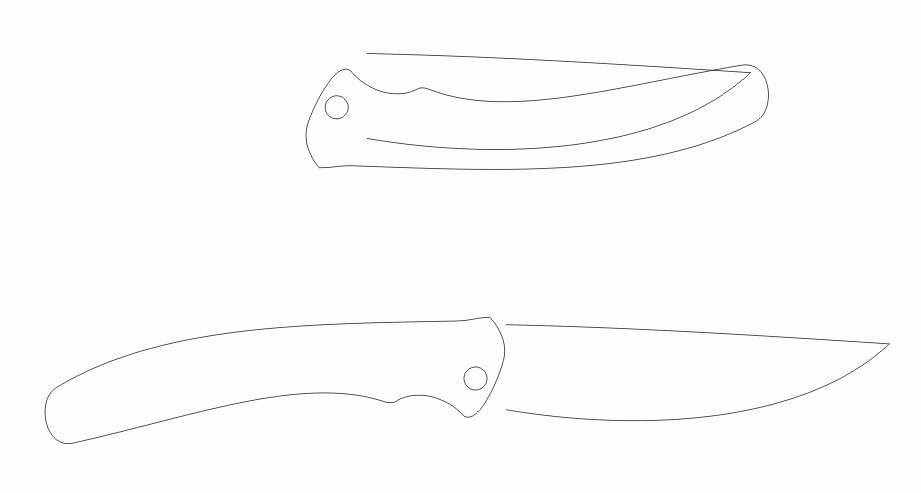
I haven't made any knives (yet), and I did my first folder design in CAD. But few days ago, I recommended using vector graphics software (Corel, or something like that) might be more productive for the layout, so I decided to give it a try myself. Actually, it's not only more convinient and easy to learn, but it's also practical, easy and fast for determining pivot location, &c... Here's what I've come up with in less than half an hour:

bMV4uXF.gif


(I sort of like it, and would welcome criticism on the design, naturally- except for the part that blade is attached with a force field to the handle... it's a design feature*)

* actually, haven't decided on the locking mechanism, and left it to be done in CAD if it goes that far. BTW blade length is 2¾".
 
Its an idea that interested me a bit before, the design part. The idea didnt stack up on the build side. I have a knife design that is only worth a damn if someone with automated machinery can turn it out fast. No maker could do the design to a reasonable price point, and that would defeat the other side of the design, simple and cheap.

I actually thought it would fit in the cold steel line up nicely. :-)
 
Generally in my shop I will sketch a design and then cut it out of polymer and make a blank that I can make adjustments to before its finalized.

I'll usually then use Solidworks and Corel to do my computer design work so I can lay it out and cut blanks out of sheets in an automated fashion.
Once they are CAD designed, they're a mouse click away from making blanks whenever needed.

Automated machinery can turn it out fast for sure. The cost of the process comes from the cost of materials for sure. Generally we charge a CAD fee and then theres a price per blank, which includes the cost of the material and the machine process (which is minimal)
 
Back
Top