EdgePro thoughts

Status
Not open for further replies.

Gary W. Graley

“Imagination is more important than knowledge"
Knifemaker / Craftsman / Service Provider
Joined
Mar 2, 1999
Messages
27,824
Hi folks, been using the EdgePro for my sharpening needs, and a FallKniven DC4 for on the road touch ups, all good stuff.

Recently been on a YouTube kick, saw a few EdgePro how to things and notice some guys do things one way, while another guy does it this way, but what I did notice was the relationship doesn't seem consistent, talking about the distance the edge is from the end of the table.

Now it seems obvious to me that when you go to set the angle of the sharpening stone, the designer had those coloured spots as indicators of what the angle you will be putting on the edge, BUT I think that WHERE the edge is also makes a big difference as to the angle you end up with.

If you have the blade sticking out a 1/2" away from the end of the table, you will end up with a more shallow bevel, does that make sense to you guys/gals of the sharp world of EdgePro?

I just checked the booklet that comes with the kit and that also seems misleading, basically saying have it overhanging, on page 6 it shows a chef's knife with a lot of overhang, to my eyes at least.

What I do it to have it overhang the table just a slight amount, just so you are not abrading the table by accident as you go out to the tip of the blade. In this way, I think you will be closer to what those coloured dots are indicating.

Just some thoughts I wanted to share, of course if you use the magic marker to set your angle to match an existing bevel, you'll probably be ok if it does over hang by a lot, as you are then not worried about where you are in relation to the dots...

Feel free to post any other hints or tips regarding the EdgePro, myself I would LOVE to make a more solid table and with the help of a friend at work in the machine shop, I may try to do that later on this year, out of Aluminum so it's a bit less wiggly ;)
G2
 
Last edited:
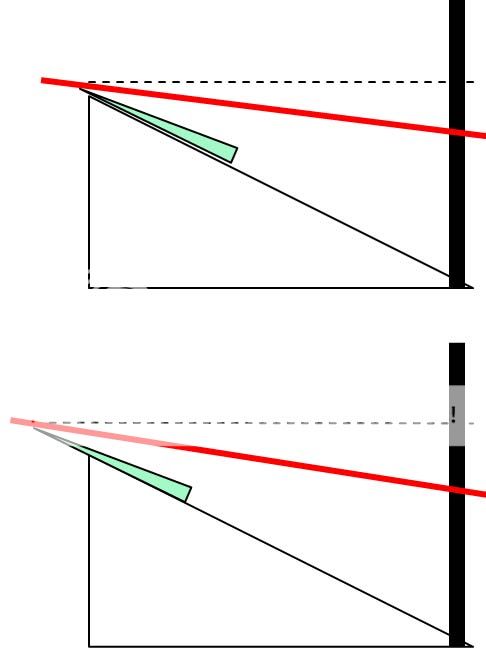
Here's a quick sketch in powerpoint to show the angle changes when you bring the edge far away from the end of the table...

Top is set to the edge of the knife is just overhanging the end of the table, the bottom shows moving the edge of the knife further out, it requires the stones to strike at a different shallower angle.

a closeup of the contact would show it better but I wanted to show the whole setup there.

edgepro.jpg
 
Your geometry is correct, the angles will be dfiferent. A simple plastic protractor will solve the angle question easily though.
 
Thanks and yes that certainly would help
My point and worry is that some folks will just set the blade any where and use the colored dots as exact angles, but they'd be off and will have a wrong angle set and maybe too thin/weak bevels
G2
 
Though im no user, knife sharpener, or expert in any sense of the word.. as I've been researching and reading about sharpening techniques including jig setups ive contemplated the difference in angles based on knife edge setup.

All i can offer is get a protractor and see where the contact point should be based upon the jig angle markings. Let alone properly compensating for the belly radius, you'd need a dynamic radiusing guide system.
 
Good ideas there, it certainly would take the guess work out of setting the angles, my own way is I do try to keep close to the original bevels and use the magic marker on the bevels to tell me if I'm striking them at the proper angles, so for me, I don't really use those coloured dots myself, but sharpen as thin or thick as I 'think' a particular blade can handle.

I come from a long long time of free hand sharpening, and I will say the EdgePro is simply amazing, certainly helps my stone time by a large amount, I still hand sharpen while away, if needed, it does take a practiced hand to keep the bevels evenly...

G2
 
I love the Edge Pro, wouldn't be without it. But I've sharpened enough different kinds of knives on it to know that the videos and manual leave much to be desired. You are correct that the edge's distance to the end of the table has a significant effect on the angle. There are some other factors at work as well. If you use the techniques from instructional videos to sharpen a blade with a lot of belly, you might be unpleasantly surprised by your result.

You kind of just have to learn as you go. I irreparably butchered the curve on on my ESEE-3 the first time I used the Apex on it. Damn thing is almost a tanto now. Granted, an unbelievably sharp one.:)
 
Yeah, curved blades can be torture on the EdgePro your first time, or second, or third, they are not fun but can be mastered, but it takes the time to learn and learn by doing, keeping in mind where that stone is riding, so always be careful as you start moving the blade/stone to get a curved portion.

The one thing that I've found that is really great about the EdgePro is the way you can get a nice crisp point sharpened, the way I go about it is to bring the stone all the way off, and not try to go back and forth once I reach the tip, so it's a clean single off motion, makes creating that tip pretty easy!
G2
 
Two things:

First, generally you should put your knife edge as close to the platform's edge in the Edge Pro as you can. This gives maximal support to the knife to hold it rigidly, plus increases consistency of your angle if you always do this.

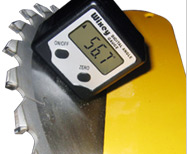
Second, some people use a digital inclinometer to set the angles for their sharpeners. They are typically accurate to about 0.1 to 0.2 degrees. Popular ones include:

(1) iGaging Angle Cube
http://www.igaging.com/page11.html
AxhGw.png


(2) Wixey Angle Gauge
http://www.wixey.com/anglegauge/index.html
IjNqJ.jpg


There are also several other digital inclinometers on the market. These are just the two most commonly mentioned ones.

These inclinometers measure tilt with respect to gravity; so you can think of them as a fancy digital level. You first put the inclinometer on your knife and then zero out the angle. Then you put the inclinometer on your sharpening stone or rod, and just the angle to what you want.

The accuracy of 0.1 to 0.2 degrees should be good enough for most things. If you need higher accuracy than that for setting the angle, things may require more work. There are are extremely accurate extremely high-resolution inclinometers, but right now they cost several hundred dollars, while the two mentioned above are in the $40-$50 range. I myself got one of the Wixey models (Wixey WR 360), although I think the iGaging Angle Cube is more popular.

Also, you might want to search for "Edge Pro stop collar trick" either in the forums or youtube; its a totally different topic, but related to setting angles.

And of course, you could make a protractor, or stencil/template/gauge at the angle you want and then use that for set-up. Before the inclinometer, I used a thin wood template that I made.

Sincerely,
--Lagrangian
 
Last edited:
Thanks Lagrangian, sorry didn't see your reply until today, I generally do try to keep the edge of the blade near the edge of the platform, but, I think I keep it a bit too close as I end up catching the platform edge sometimes, so I've changed slightly to move the edge out just a tad away, so as to be sure not to bang into the plastic platform.

and thanks for the idea of those gadgets, may give them a try at some point, but mostly it's been the magic marker to try and keep as close to the original bevels that were used when the knife was made, unless I chose to go for less an angle, and then I'd just magic marker that bevel the next time when it needs to be put back on the EP. Usually I'll free hand touch up as needed and strop and only go back to the EP when I need to correct a bevel/edge thing.

G2
 
I use a marker to mark the edge and then swipe it a few times to see where the stone is hitting. I try to keep the edge as close to the table as I think that is the way it is designed to be used. I'm not a stickler about edges, don't need a perfect one but I do want a sharp one. I've only done about 6 knives so far but like the results. I haven't gotten them scary sharp yet but sharp enough, a strop helps to refine it a bit.
 
The marker trick works pretty good. This is how I match all my factory angles before going at it with the Edge Pro.

If I may add to the thought process on the angles:

You have to take in to account the thickness of the stone as well.

Case-in-point - I got some diamond film plates for my system and, compared to the regular EP stones and tape blanks, are quite a bit thicker. In order to match the angle I have to mark the edge and pull the arm up. Once I get the edge clean of marker I know I'm at the right angle.

This also works in reverse - as your 120 and 220 grit stones wear they get thinner.
 
The problem of handling different stone thicknesses is brilliantly solved by the "Edge Pro stop collar trick" mentioned by Lagrangian in post #9. You can find perfectly adpated stop collars on a well-known site for $3.95.
 
The stop collars are great - but you still have to set them. Then when you go to change the angle of the grind you have to re-adjust the position of the stop collar. It may just as easy be to leave it off, unless you grind at the same angle all the time. I have too many varying edges to keep a uniform angle.
 
The stop collars are great - but you still have to set them. Then when you go to change the angle of the grind you have to re-adjust the position of the stop collar. It may just as easy be to leave it off, unless you grind at the same angle all the time. I have too many varying edges to keep a uniform angle.

I'm guessing you don't really understand how it works... because using the stop collar is easy to set, and very beneficial. You may want to take another look.

cbw
 
Status
Not open for further replies.
Back
Top