

- Joined
- Jan 28, 2008
- Messages
- 3,223
I recently had Ernie Grospitch make up some stencils and purchased a Personalizer Plus. I've have been trying to get the hang of etching my mark on A2 steel but I'm having some trouble. What I'm experiencing is a little blackening around the lettering and a fading of the mark after the neutralizing agent is applied.
Below is a picture of the unwanted blackening that I'm referring to. I know that the bleeding is occurring during the etch process because I peeled up the stencil and snuck a peak before I set the machine to mark. It was much worse the first few times I tried to etch my mark and I've reduced it by turning down the power on the etcher and by only applying a small amount of etching solution to the pad with a Q-tip. This particular mark was made with the etching machine set on "etch" with the power dial on 2. I did five separate bursts that were four seconds long with a cool down period of fifteen seconds between each burst.
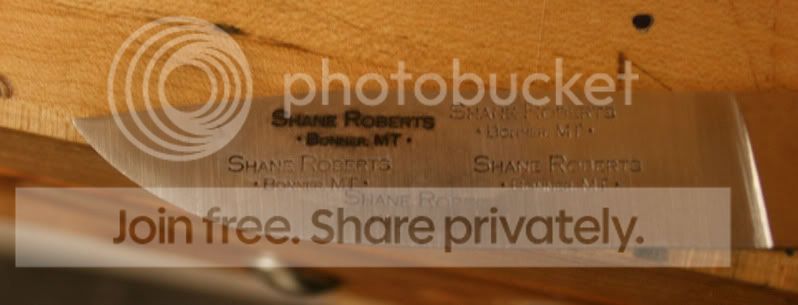
I'm hoping that someone can help me with figuring out what is causing the bleeding so that I can fix it. Is it just a matter or turning down the power even more and shortening the duration of time that I have the pad in contact with the stencil? Is this what it should look like after using the "mark" setting on the etcher?
My other issue is that I'm experiencing fading of the mark after I apply the neutralizing agent. some of the bleeding is removed and I'm happy with that but I'm also losing color in the etch itself. I'm not sure if that is normal or if I just need to try spend more time applying the black with the machine on the "mark" setting. Below is a picture of the same mark as above after the blade has been wiped down with neutralizing agent and been cleaned with Windex and a rag.
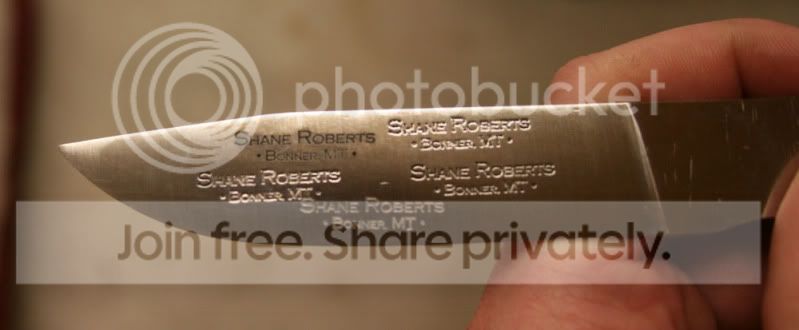
Thanks for any help you all might have to give. This has been driving me a bit crazy over the last couple days.
-Shane
Below is a picture of the unwanted blackening that I'm referring to. I know that the bleeding is occurring during the etch process because I peeled up the stencil and snuck a peak before I set the machine to mark. It was much worse the first few times I tried to etch my mark and I've reduced it by turning down the power on the etcher and by only applying a small amount of etching solution to the pad with a Q-tip. This particular mark was made with the etching machine set on "etch" with the power dial on 2. I did five separate bursts that were four seconds long with a cool down period of fifteen seconds between each burst.
I'm hoping that someone can help me with figuring out what is causing the bleeding so that I can fix it. Is it just a matter or turning down the power even more and shortening the duration of time that I have the pad in contact with the stencil?
Is this what it should look like after using the "mark" setting on the etcher? My other issue is that I'm experiencing fading of the mark after I apply the neutralizing agent. some of the bleeding is removed and I'm happy with that but I'm also losing color in the etch itself. I'm not sure if that is normal or if I just need to try spend more time applying the black with the machine on the "mark" setting. Below is a picture of the same mark as above after the blade has been wiped down with neutralizing agent and been cleaned with Windex and a rag.
Thanks for any help you all might have to give. This has been driving me a bit crazy over the last couple days.
-Shane
