
etching advice/problems

Joined
Jan 5, 2014
Messages
1,495
I ordered some new stencils from Marking Methods, and I am starting to get going with them, I still don't know if my power supply is OK or not. Here is a pic of it:
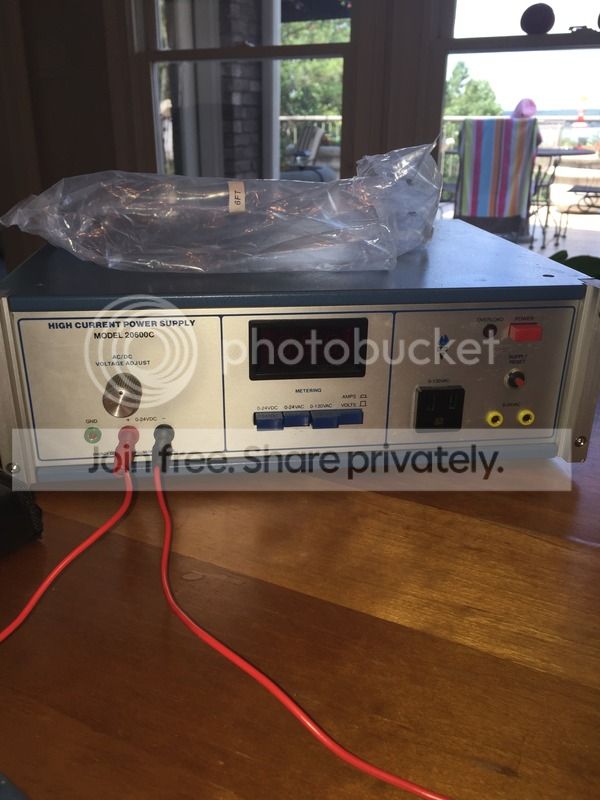


One issue I need advice on is that when I am making a mark, even though I am careful masking off the blade--there is some etching going on where the electrolyte gets under the stencil itself--I don't know how this is happening--when I put my marking pad against the blade/stencil it turns black pretty quickly--maybe this is an issue with my Power Supply?
When I switch my power supply to AC to try and darken the mark it makes a sizzling noise almost instantly, and I am afraid to leave it on the stencil any longer, but suffice it to say I am not getting a dark mark at all. My mark is being etched into the metal very well, I'm just not getting any darkening of the mark. One quick aside, the power supply I have has a light on it labeled 'overload' and it has always been on since I got the unit, even if I push the reset button it has the overload light stays on--have no idea why, or what it might mean even???

I'm using some Electrolyte of a generic brand I bought from Mcmaster Carr-so I don't really know much about it, I have some saturated salt solution I can try if folks would recommend that, but I don't think that is the issue--although I
am unsure... I am also open to purchasing a new power supply if folks think I should--I just thought this one would do the job when I found it on E-bay for $69--I don't know where to look or for what for a better supply--the Personalizer ones I've seen at knife suppliers, seems overpriced to me for some reason.

Anyway, any advice/recommendations would be appreciated.
 
Sounds like the pad is to wet and etchant is flowing under the stencil. Dab it on a paper towel before applying it to the stencil. Why are you switching to AC to darken? You want to reverse the polarity and leave it on DC at a lower voltage for etch and mark and you should get a clean crisp dark mark.
 
Well R Appleby, that's why I love BF's, I certainly don't know everything--in fact I'm often amazed by how much I don't know, but I thought I had read in several places, that you just changed the current to AC from DC to get a darkening of your mark. I certainly don't know about changing polarity, the one time I did that I burnt up my stencil :eek:
 
I don't know all either and have thrown away a lot of stuff and still do sometimes. I use a personalizer plus, its a one time purchase and I like it a lot and its easy to use.

If you're burning stencils the voltage is to high. To get the etch depth I like I am at about 9-12 volts for about 1- 1 1/2 minutes and about 20-30 seconds reverse polarity to darken the mark.
 
I can't really tell at what level my supply is powering my held marker. I can try and turn it down to the minimum, and see what that does--I am using one of the hand held markers from Marking Methods, I am thinking of just clipping the + lead to a q-tip and seeing if that does any different. I am also wondering if the electrolyte I got from McMaster is maybe inappropriate??
I think I'm gonna go look at the video clips I can find, and see if there's something obvious I am missing--frustrated:grumpy::rolleyes:
 
Etch on D.C., mark on A.C. Looking at your power supply, I see that the button on the far right, under the display, is pushed in. This is a constant current setting which you do not want. This button should be out so that the supply is regulating voltage and not current. For etching set the supply to 12V D.C. For marking, unplug from the D.C. output and plug into the A.C. output (the yellow jacks) on the lower right corner of the supply. Set the supply for 12V A.C. 12V is a good starting point and you may want to adjust a volt or two different depending upon your setup. Also, it looks like if you're plugged into the D.C. output, you need to select the 0-24VDC switch, and if you're plugged into the yellow A.C. jacks you need to select the 0-24VAC switch.
 
Hey Tony, thanks very much--I didn't know if my pic of the power supply was good enough, I really appreciate you taking a hard look at it and giving me the correct approach--appreciate it a lot. I haven't been sure at all as to what the proper approach should be. I'll try it exactly as you describe tomorrow, and I'll give some feedback as to how I do. I may come back with a couple links to other supplies I have located and see if you think one of them would be more appropriate.

Regards--Don
 
You're welcome Don. Now if you want to return the favor, maybe you could do something about that I-75 traffic through Atlanta next time I'm heading back to Florida. :D
 
Not sure how you have your pad and clip set up, but IIRC, your etch pad should be on the NEGATIVE side of the supply. It really doesn't take much voltage if you have a good electrolyte. I used salt water with fairly good results.

I try not to hold the pad against the stencil for too long at a time, but swipe or dab it so that no part of the stencil is getting too hot at once. Spraying the stencil and the blade with some windex seems to help as well; That's a tip I learned from Brian Fellhoelter.

Also, it really doesn't take much electrolyte. I always dab my pad on a paper towel, or swipe it on the edge of my electrolyte cup to drain some of the excess off.
 
You're welcome Don. Now if you want to return the favor, maybe you could do something about that I-75 traffic through Atlanta next time I'm heading back to Florida. :D
Heck Tony, if I could help I-75 I definitely would--our state gov, seems like they want to work on that road for all time :barf: I do appreciate your help though, next time your passing through Atlanta if you need a place to stop off at, I'd be glad to have you by my place, or maybe I can recommend a good steakhouse and we could grab a bite!
 
Heck Tony, if I could help I-75 I definitely would--our state gov, seems like they want to work on that road for all time :barf: I do appreciate your help though, next time your passing through Atlanta if you need a place to stop off at, I'd be glad to have you by my place, or maybe I can recommend a good steakhouse and we could grab a bite!

I may take you up on that Don. I'll be heading down there over Christmas break in December but won't be able to stop off in Atlanta then because of the limited time I'll be down there, but when I head back down in May, I'll definitely have time....because at that point, I'll be retired having finished my last school year after 30 years of teaching! :D
 
Tony, that sounds good--we often go down to the Destin Fla area in May--hopefully our schedules will match up in ATL.
 
Well, I tried again on a couple pieces of steel, and I am still having the issue of etching more than what is outlined in my stencil, it looks like there is electrolyte floating around under my stencil, and I am getting random etching all around my logo/mark--I have set the system up just as Tony recommended--it does seem like it is more functional that way, I was wondering if it was the electrolyte I am using so I tried some salt/white vinegar solution and it still did the same thing--my etching pad is just barely damp, as I am trying seriously to avoid excess electrolyte--I'm really searching for options at this point--I even ordered a Marking Methods Model 300 etching kit from e-bay just because I am so frustrated--any help I'd be glad to hear.

Best--Don
 
Fish I have a cheap homemade etcher, but there is always some etchant underneath when I'm done. I thought that it was normal.
I clean it up with some sandpaper pulls. I usually etch after a 600 grit finish, then go 800 and back to 600 grit straight pulls. By that time, the mark is cleaned up.
Is that different than your experience? Before etching I scrub the blade with dawn and hot water. Then I spray and wipe the blade with windex. After I pull the stencil off I spray it again with windex.
 
You always have to touch up the mark a bit with 800-1000 grit paper. A block of wood with a leather pad glued on it and some used sandpaper will remove the excess dark areas. Pull in long straight strokes.

That said, the pad should be almost dry. It should only hold enough solution to carry the electricity. I moisten my pad with just a tiny bit of etching electrolyte and them blot on a folded paper towel. I re-blot it again until it barely leaves a damp spot. Then I etch the blade.
 
I have had the same problem, in the past. I think that it is mostly due to excessive masking, insufficient pressure during etch cycle, and some small movement of the stencil throughout the process.

If the stencil is masked tight all the way around, it is still very difficult to entirely burnish the seams down to the point where etchant won't wick along them and etch a line from time to time. Also, I think more etchant tends to get trapped under the stencil and have harmful effects when all of the edges are taped. Burnishing the tape down at the seams will exacerbate this by tending to "lift" the center of the stencil a bit during use.
Another thing to consider is that the stencil will expand a bit when exposed to the heat of the process. It's taped down flat and cold, and expands to become a little loose- this also helps to trap etchant, as well as allowing the edges of the mark to lose some definition to to slight movements of the stencil when applying/removing the pad.

I have had much better success, only taping one side of the stencil, like a hinge. I cut the stencil rather large, so that I don't run a big risk of contacting the unprotected blade with the pad or with excess etchant. As noted above, you don't need a lot of etchant- just enough to wet the pad but not sopping.
With one side (preferably a wide side) taped down, I set to DC and kind of "swipe" the pad quickly onto the mark. I hold it firmly on, so that while current is cutting the steel, no current can bleed out into areas of etchant outside the mark borders. This combines Fellhoelter's "swipe" which I found effective, with Ernie Grospitch's admonition to "apply pressure, you want the stencil slap against the steel, double slap pressure if you can do it."

I do that for 10 cycles of about 5 seconds each- I do like to interrupt the etch regularly to let it gas off and reduce heat buildup, but I find a q-tip or 2 second cycles like some folks use to introduce more motion than I want for consistency.

I switch to AC and repeat the process, then neutralize. Normally a light sand over with 4 or 600 grit with a flat block will yield a dark crisp mark with no shadow. Like so:
VbvXzZUxDsX0-xIQ8hnvjeefxszZztNZ00e7IwPcWx8FirXK2aThLxPghZWd7fZqHR2iMloopAZY-g=w1366-h768-rw-no


Another thing that helps me, is every single mark I etch, I replace the felt pad on the handpiece, and clean off the metal underneath the felt. Mine is homemade- your handpiece may differ, but I do find that it is super worth it to me to eliminate any possible source of a dirty etch. Nothing is more frustrating than an amazing knife with a blemished etch.
 
Salem is pointing out an important thing - the pad needs to be pressed down fairly hard .... and not move.

If the pad is just barely moist, the firm pressure will wet the screen of the stencil and provide just enough electrolyte to carry the current directly from the steel to the pad This is the DC etch mode where steel is carried away. When it is switched to AC, the rapidly reversing current direction oxidizes the steel that has been deposited in the pad and plates some of it back in the etch recess as a dark oxide (magnetite, IIRC).
 
Helpful stuff Stacy and Salem--thanks--I feel that will help me get a mark that just needs a little cleanup. I think that even though I am blotting my etching pad, I may still have a bit to much electrolyte on the pad, especially when considering the press down factor. I also think Salem is onto somethin with the masking it off and taping it down too much--I have definitely been doing that, and it stands to reason that that could exacerbate the etchant getting 'trapped' under the stencil. All these thoughts much appreciated folks.
 
Back
Top