Give up

Joined
Mar 13, 2001
Messages
1,157
Well, I completly give up on figuring out how to post pictures. I think I figured out how to get one from my computer to Photobucket but I cannot figure it out from there to here :mad: A stick of dynamite seems appropriate at this point of messing with this computer.
 
Walt, just store the photo's on your hard drive in your documents/pictures, etc. Size them at about 480X680, or a little less. They have to be 100K, or less.


When you post, scroll down below you post, and click on manage attachments, click on browse, and that will allow you to choose the place your photo's are stored, like your documents, click on that, find the photo, click on that, and click "open", then you are back to manage attachments, click on upload, and WAIT till it uploads and shows there. Once that's done, scroll down from manage attachments, and click on submit. It takes a lot less time to do, than it took me to type this. Real easy.
 
They have to be 100K, or less.

Well, this is the problem, I guess. It says I have 446.1. I've never done this sizing, something else to learn.
Thanks Mike, I have the picture in My Documents/My Pictures.
 
Do you have any image editing software on your computer?
Most computers come with some sort of program for free. If your saving it as a JPEG it will usually meet the 100K requirement when the dimensions are under the requirements. I usually make my pictures 550 wide and however tall they need to be to be in scale.
Also, when you save an image as a JPEG there is a slider at the bottom of the window that says image quality or something like that. You can reduce it down fairly far since it will be viewed on a computer screen. That might help with the 100K.
 
Walt, I had trouble a while back figuring it all out. Now it's a piece of cake.
Send it to me and I'll downsize it and either post it or send it back so you can.
kcknives@bbtel.com
Kit
 
This computer has Image Expert in it and when I attempted to "resize" it gave me a message about some of the features had expired and that I could upgrade by clicking this link. Next thing, was a message that that site cannot be found. It is www.sierraimaging.com. Just my luck. Thanks Kit I will see if I can email it.
 
Nice piece of workmanship there Walt.

P.S.
Try just cropping the image you have. The one Kit posted for you could problably be cropped down enough to fit. Just crop, then save that pic to your folder then try up loading that.
 
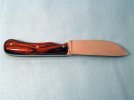
I guess I should add some details about the picture Kit posted for me. The blade is 35/8" from scales to tip, 71/2" overall. It is 3V, Desert Ironwood, and Mosaic pins. Blade has been etched.
 
Walt, here's a photo program that freeware, without any spyware, and many people that are professional computer people use it as it's so fast, and easy.

I never could figure out M/S picture it publishing, but this program, "Irfanview" is real easy to use.
I can resize, and lighten/darken, retouch a photo in just a couple of minutes total.
http://www.tucows.com/preview/194967.html
 
Thanks Mike. I may have solved the problem by cropping. I downloaded the program, now to figure out how to use it if I need it.
 
Walt, I don't associate it with any files at all. On the file tab up top, click that, and near the bottom of the list, you will see MRUD's, click that, and my documents should appear, you click that and it takes you to all your photos. Find the one you want, click it, click open in IrfanView, and you're ready to do whatever you want. Most everything I do is in the third tab from the left at the top, called "Image". In there it has sesizing, enhance colors, sharpen, etc. Just play around with it for a bit, and you'll get it in no time. If you screw one up, just hit return to original, or in the image tab, hit undo.

When you get the picture the way you want it, click file again, and click save as. It will require you to rename the file, so I usually just add resize to the end of the current file name. and save it. After that, go to the edit tab, second from left, and click on "delete(clear display), and that's it.
If you want to save space on your hard drive, go back into your documents, and delete the original photo that you resized a copy of.

 
Thanks Mike for all the assistance. I have the program replacing the Image Expert now.
 
but Kit.............you posted it UPSIDE DOWN!!!!!


send it to me and I will get it right!!!! :p :eek: :p


:D
 
Wow Walt, that is a nice knife! Nice going.

You sound like my Dad trying to figure out his computer. :D :D :D I'm the only one that has the willingness to sit through his learning curve and he's picking stuff up. It won't take long and before you know it it'll all seem like second nature to you. I'm a middle aged guy who'd never touched a computer ten years ago and I can fumble my way through most stuff now. You will too. Mike gives good directions, and that's not easy to do in writing!
 
Thanks for the comments on the knife. Kit, I wound up using that picture because I had a lot of trouble with light, shadows and such things. That was the best of three that I took. I cannot figure out the tint on the blade area. I took pictures of two other knives that had been etched and they all came out that way, don't know if the etch caused it or not.
 
Don't forget, Walt, you can lighten them up, change the contrast, etc with IrfanView.

Send me one of them and I'll show you. I would have used the one that Kit put up but he has it protected by some anti capture device that called me a whore.:eek: ;)

One thing I forgot to mention before, always save your photo's as JPEG images.
 
Back
Top