help diagnose my scratch lines from a kmg ?

Joined
Feb 27, 2006
Messages
5,191
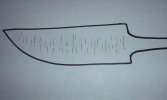
hello, i have a consistent situation when i grind the bevels on my kmg. every time i start the hand sanding lengthwise from the ricasso to the tip, the kmg scratch lines always disappear at the spine, and the edge first, and persist to be deeper in the center of the blade. i use a grinding jig, and always keep the bottom of it flat against the work rest, so i do not understand how i could be putting more pressure at the spine or edge. are my belts too loose, or too tight ? i get the spring tension arm about horizontal when tightening it. or is it my technique ? here is a diagram of the kmg scratch lines that linger in the center of the blade. thanks for any advise.
 

Attachments
  • DSCN9419.jpg
    DSCN9419.jpg
    37.9 KB · Views: 85
Last edited:
I think it may be an issue with your hand sanding. You are possibly putting more pressure on the outsides of your sanding block causing uneven sanding.

What is your hand sanding technique? What are you using as a sanding block and what are its dimensions?
 
First thing put a straight edge across your blade and make sure you are grinding flat. If you are I agree with Shane, It is a problem in your sanding.
 
yes, its a flat platen, i forgot to mention that. i use a 1/8" piece of 1095 steel i flattened on sandpaper/granite tile by hand as a backer for the 120 grit paper when i hand sand. the piece of 1095 is about 4 inches long, and 1 inch wide, i cannot feel any flex in it. for technique i try to do it as close to nick wheelers hand sanding 101 tutorial on youtube as i can. i try to keep the pressure on the spine and edge the same. i will try the straight edge across the blade and look for light sneaking underneath on the next blade, and do the same thing to the platen. thanks guys !
 
i grind 36, 80, 120, 220 before heat treat. 220, 320 after heat treat, then go to 220 hand sanding or 120 if the scratches look real deep.
 
Try to put pressure in the center. I think 1/8 inch steel willm flex enough to cause your problem.
TJ Smith
 
thanks tj. i am a small thin man, (135lbs lol) i did not think i was strong enough bend it, but will try something thicker to rule it out.
 
36 grit marks you did not clear out all the way.

Grind at different angles and see if those grind marks change direction, if not it probably is not your platen and simply you progressed up the grits to quickly.
 
i went to check my platen for flatness on the machine. i noticed there is a space almost 2mm wide between the platen and straight edge because the two rollers are not flat with the platen. is that normal ? (see photo). that would make whatever belt touch the edge and spine with more pressure than the center ? after taking the platen off, there are no waves worn in it , but some lengthwise gouges. i flipped the platen upside down so on the next one i will have a nice fresh unused surface so i can rule those lengthwise gouges out as part of the issue.
 

Attachments

  • DSCN9420.jpg
    DSCN9420.jpg
    55.7 KB · Views: 60
thanks avigil, maybe i need to do more time with the finer grits with less pressure as don suggested. they are definitely 36 grit marks. i am still curious about the rollers standing the belt out farther than the platen from my last post.
 
sbuzek, maybe that is the problem ! its not adjustable i don't think, so i will try some washers to make it stand out 1/8".
 
That platen alignment would lead to a slightly slack belt, and a convex grind. If you were grinding it like a flat grind there would be excess pressure on the spine and edge. Your finer grits on the grinder would clean up the coarse scratches on the spine and edge easily but wouldn't be as effective in the center of the blade. That's why you are seeing the 36 grit marks when hand sanding.
 
thanks s.alexander and lu1967. the platen brackets will adjust where they connect to the arm ? i will go check it out. i have made about 45 knives on this machine since i got it, and spent at least an hour just getting those 36 grit scratches with 120/220 grit out of the center on each one by hand. i hope this is the problem.
 
you were right lu1967. all adjusted and i am excited to make the next blade. thanks everyone for the help !
 
Back
Top