Home wireless network just a toy?

I do a lot of online banking and just switched to wireless in my house, using all D-Link products. Everything WORKS great - but how do I make sure my network is at least as secure as when I was using cable? The booklets accompanying the hardware are a little vague about that. :confused: :( :confused:

(edited to add: I'm a non-techie. Be gentle with me.)
 
DaveH said:
I

1) Can't have another computer with wireless in the same room.
2) Can't use cordless phone in the same room.
3) Can't use cell phone in the same room.
4) Can't run a firewall on the computer with the wireless network.
5) Can't run VPN through the wireless.

1) BS. I do it all the time..
2) BS I have two cordless phones in the same room as my notebook (which uses 802.11, and yes it's the same 2.4Ghz spectrum)
3) BS I have one sitting 1 foot away on my hip (totally different frequences)
4) BS. I do this all the time to get into work
5) BS I have both a server, and client I can run a VPN too


Dave.. I'm not sure where you are getting this info from, but it's obviously from people who do not know wireless networks.....NOW.. speaking of the problems you have.. YES.. I have had and seen the problems you have been experiencing.. there can be several causes., then most common is when the "local" card determines the speed that is being used is to "noisy" and tries to lower the speed, and does not do it properly/cleanly, and you end of with th e problem (I had it all the time)..

this is how you can see if that is the problems.. put youe mouse "over" the wireless icon on the bottom tool bar.. it should tell you several things.. look at the "speed" .. when you start to experience problems. see if the speed has dropped.. if so. then this is most likly the problem.. there are some things you can do to tweak the timeouts for noise or the retry time (depending on the card/driver).. you can also get an external antenna, (eg, I was having this problem when I was about 15 feet awat, but once I install the antenna it went away).. it has to do with the higher frequenxy ways that tend to react to the angle of the walls. (it's wierd) but I can put a book between mine, and as I rotate the book, I can see the noise singals changing..

the other thing you can do is use a tool like netstumbler to "sniff" the access point and look at the "signal to noise ratio" and when you get problems, see if the signal is low, or the noise is high (different problems which can cause th card to drop the speed and have to resetablish the connection).

Email/PM me if you need more help.

 
cockroachfarm said:
I do a lot of online banking and just switched to wireless in my house,

in short terms (EM/PM me for more details)

make sure you use mac address filtering
make sure you turn off the SID broadcast
make sure you use WEP/WPA (128 bit)
make sure you change the default password on the wireless router!
 
I use a Microsoft wireless network (about 2.5 years old) and it works great. My old AT& T wireless phone died and I replaced it with 2.4 G one and the whole thing went nuts. It would drop the signal every time. I returned the phone for better one and it works great again.
 
ckc said:
in short terms (EM/PM me for more details)

make sure you use mac address filtering
make sure you turn off the SID broadcast
make sure you use WEP/WPA (128 bit)
make sure you change the default password on the wireless router!

Thanks! (I tried to send a PM, but received a message that your PM was turned off.)
 
I've had a home network set up for a couple months using Apple's Airport Express base station and it's flawless. I think PC's will work with it. Not a place in the hous that drops the signal, upstairs or down. Have a full size Airport base station in my office, which is smaller than my house, but it's a chiropractic/medical/dental office and I've never dropped a signal, even when surrounded by leaded walls or with the x-ray machines buzzing! Sounds like your router needs to be replaced!
 
ckc said:
2) BS I have two cordless phones in the same room as my notebook (which uses 802.11, and yes it's the same 2.4Ghz spectrum)

Yeah its not forced to cause a problem, they can be operating in the same frequency spectrum and work fine together, but depending on the setup they can sometimes cause problems. Could be your phones using a different area of the 2.4Ghz band to transmit in (eg your access points configured for a high end channel and the phone's using the lower end of the spectrum) or it could be using frequency hopping so it only interferes infrequently and for a short period of time before it hops to another channel in the frequency.

The point is really that there are a lot of things that can be problematic with wireless, but each of these things doesnt cause a problem in every wireless lan. It can be hard to pinpoint problems. This may be why you are getting so many conflicting answers from the support people (although I agree most of what theyre saying is BS) they are probably trying to fob you off because they dont know whats wrong either and cant be bothered to find out.
 
The good news is I got a laptop I was given connected via the wireless network, the bad news is on the router, I can't find anything that does anything other then set the bit encryption, WEP, etc. There no place to mess with the MAC addre as far as I can tell. it's also using a comcast setup so maybe I don't have acess to that stuff?
 
Setting up WEP is a good start

Some people argue MAC filtering isnt worth while as MAC addresses are easily discovered with a sniffer and then spoofed. I.E. someone sits outside your house with a wireless sniffer, looks as a packet you send across your wireless LAN, reads the MAC address (which isnt encrypted) and then spoofs is (sets their PC to use that MAC) the access point has no way of double checking the MAC address, as long as it looks the same as the one in its 'allowed' list it will let it through.

If you are concerned about security then you should use equipment which supports WPA as standard WEP can be relatively easily cracked, however you also need to consider some other factors re. security. Mainly is it worth it going for higher levels of security, are you at that much of a risk?

A lot of people I know use no security on their wireless LANs, I use an awful lot on mine. They think it wont happen to them, I think what if some freak parks on my street and starts surfing kiddie porn on my Internet link, or uploads the next 'code red' variant who will get the blame then? I run my access point through a firewall before it connects into my home LAN, which blocks everything except IPSEC traffic and then run a VPN over the wireless to the internal firewall. I also enable WEP on the Access Point to protect the setup of the IPSEC security association between the client and the firewall. Then again I'm a network engineer, they arent! If I had more up to date hardware I would run WPA and not bother with the firewall however, as I think its a bit of overkill! WEP alone is too insecure for my liking however.

Before I had the additional firewall I just used WEP but I used to change the WEP key on the devices once a week (in order to crack WEP you have to capture a certain amount of data encrypted with the same key, I only surf the web which isnt much data) and I used to power off the access point when I wasnt using it so even if someone did get the key their window of opportuniy was low.
 
my problem, I just hooked up a linksys router and have my brand new dell laptop. but I get poor signal strength in my house. The router is upstairs in my office but when I go downstairs the signal becomes weak. the Icon says either signal strength low or only good at best not ideal for surfing.

I live in a 100 year old house..lots of paneling and plaster ceilings..is this what is causing the problem? can I get a booster for the signal??

any help would be appreciated

Ren
 
It depends on the model of wireless router that you have but you should be able to attach an amplified antenna to your setup and aim it downstairs.
SMC has a few for sure but I cn't remember who else makes them off the top of my head. I'll post again if I can find the links.

N2
 
Neko2 said:
It depends on the model of wireless router that you have but you should be able to attach an amplified antenna to your setup and aim it downstairs.

An amplified antenna certainly is an option but it would mean loss of coverage in other places as they actually 'focus' the signal rather than amplifying it as the name suggests...

Other options include

1. A 'Wireless Repeater' Linksys actually make a specific product which will work as a repeater but PLEASE check compatability with your access point before buying it as they only work with certain linksys access points. Also its important to note that the repeater must be within range of the existing access point so may not be suitable if your house has walls and floors which are blocking the signal due to their construction. They may just block the repeater too. I probably wouldnt recommend this solution if youre having problems with signal propagation through the building structure. Also wireless repeaters effectively cut the throughput of the wireless network in half because theyre only half duplex, so if you transfer a lot of files between multiple home computers this could be noticable.

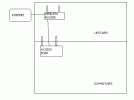
2. You can have several access points wired into one wireless network. In a commercial environment there can be several tens of access points wired back to the wired network to provide the coverage needed in a large office. There is no reason why you cant use a scaled down version in your house. Plug one end of a cat5 cable into the switch on the back of your router, run it from where your router is down through the celing to your downstairs in the room you want to use wireless in, buy another linksys access point (you only need an access point, not another router) and plug it into the other end of the cable, plug in the power, fix it to the wall, set it up so it uses the same SSID and WEP keys or WPA settings as the router, change the channel so its at least 5 channels away from the one your router is set to and you *should* be good to go!

Its important to remember that wireless can be easily obstructed by a lot of common objects, and can also be interfered with quite easily. It would be a good idea to take your wireless router downstairs and set it up in the room where you want wireless coverage. You dont need to be connected to the internet, all you are doing it testing the signal in that room to make sure there isnt some interference before you splash out on another access point and find that it doesnt do the job because somethings interfering. If you get a good signal in the downstairs when the router is downstairs but not when the router is upstairs then installing another access point should fix the problem.

I have attached a (very) simple drawing to illustrate the setup
 

Attachments

  • untitled.GIF
    untitled.GIF
    2.7 KB · Views: 6
Back
Top