Laser Cutting and non native autocad files

PEU

Gaucho Knifemaker
Joined
Aug 6, 2006
Messages
1,182
Hi Guys, Im having this problem, I use coreldraw (since 25 years ago) for all my computer drawings, I face the same problem when I send stuff to be laser cut: they complain the files were not drawn in autocad but exported from corel.

I check every time the files with a free aotodesk acad viewer and they always look OK even at the max zoom, and most of the time, but not always they cut just fine, BUT, when they have problems they always blame the files, regardless of the 95% of the parts cut perfectly in the same sheet from the same file.

I tought this was one provider, but I checked three and they always complain about the same, one (sadly the less expensive one) quoted but refused to cut.

So my question is: Is there a way to import a coreldraw file into autocad so it becomes native with a script or something?

Thanks!


Pablo
 
Will Coreldraw export in the dxf format? This file format can be imported into Autocad using the dxfin command.
 
1. Export as a dxf from Corel.
2. Open dxf in AutoCAD.
3. (Optional/recommended) Clean drawing by converting splines and ellipses to polylines/lines/arcs. Delete duplicate geometry. Fix overlaps and gaps. Run the 'purge' command and get rid of non-essential stuff.
4. Save as dxf in an older version year.
 
Hi Guys, Im having this problem, I use coreldraw (since 25 years ago) for all my computer drawings, I face the same problem when I send stuff to be laser cut: they complain the files were not drawn in autocad but exported from corel.

I check every time the files with a free aotodesk acad viewer and they always look OK even at the max zoom, and most of the time, but not always they cut just fine, BUT, when they have problems they always blame the files, regardless of the 95% of the parts cut perfectly in the same sheet from the same file.

I tought this was one provider, but I checked three and they always complain about the same, one (sadly the less expensive one) quoted but refused to cut.

So my question is: Is there a way to import a coreldraw file into autocad so it becomes native with a script or something?

Thanks!


Pablo

I hope I'm addressing the right problem here -

I don't know Corel draw but in Autocad it used to be called the snap function. Are you using object snap to join lines and arcs together?
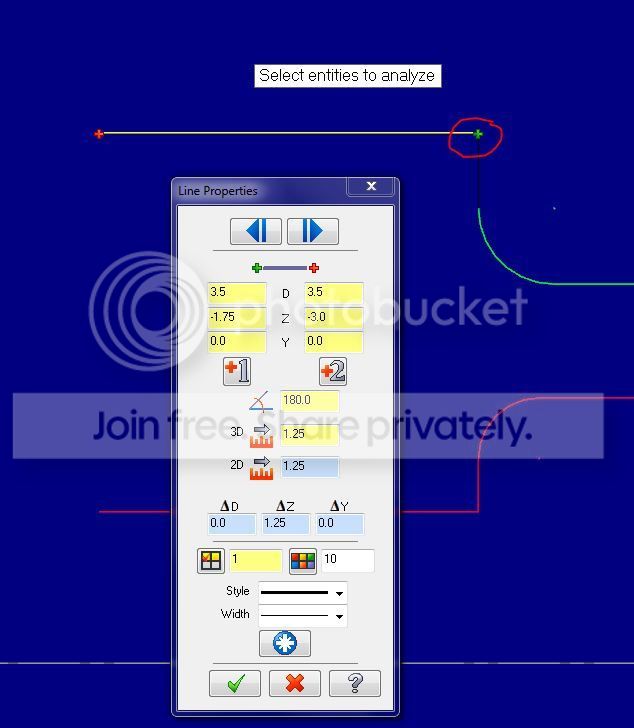
I'm concerned because you mentioned "looks ok at max zoom" Zooming in is not the accurate way to do this, checking the XY values of start and end points is one way to check for contiguous profiles.
Here is an example in MasterCAM - analyze geometry, you would read the values with a high decimal resolution of. It doesn't matter how much you zoom in, if they are off, they are off.

Capture_zpshqmqyybd.jpg


It could be that your native CorelDraw geometry is not as clean as it should be? Do you have a chained contiguous geometry profile in Corel Draw before you export?


just a thought here...
 
Last edited:
Autocad file is not needed, they can use any 2d vector file. Not familiar with Corel but all those programs including illustrator can export dxf, eps or iges. They can use any of those files as they are universal.

Change your export settings.
 
It could be that your native CorelDraw geometry is not as clean as it should be? Do you have a chained contiguous geometry profile in Corel Draw before you export?

This is my thought as well. Their CAM software may be complaining that a shape isn't closed.

Both DWG and DXF are very complex file formats. I would export to DXF and then save it from AutoCAD (which requires an AutoCAD license).
 
I think it is a conspiracy. I have the same issue but reversed. I use GIMP for graphics and when I send them off to the laser engravers they complain that they are nor Corel. I don't understand why there is not a universal format standard. I guess they would not sell as much software.
 
The dxf file format (drawing exchange file) is as close to universal as you'll get and it's only for exchange from one cad program to another. It's important to contact the people who'll be doing your work and ask them exactly what file format they need.

Even among engineers and architects we quite often call and ask what file format the people receiving the files will need.
 
I do laser cutting and have the same problem as the people I'm sure you are sending your files to have. Its that the lines do not actually meet in the file, although they may look like they do they may be 0.000001 inches apart and the program does not know what to do with it. This is not a big deal if there isn't to many, but because most of these files are irregular shapes there could be thousands of line all of which are not connected. I have spent hours working on some of these files. What P. Brewster and hsc3_90293 have mentioned is pretty much what has to be done to the file to make it work properly. You should try and find a program that can vectorize the drawing, as P. Brewster was mentioning. It does not need to be autocad, just a program that turns all the arcs and splines into line fragments. For some reason this normally fixes the problem, I usually use my machining software "BobCad"
 
The Boundary tool in Corel will make a single outlining entity out of any geometry. You can then delete the original or set it to another layer/color.
I've used it a bunch to prep cad files to cut on the Kern laser we have at school.
Their software interfaces directly w/ Corel.
 
Stop using Corel Draw; start using Adobe Illustrator. Illustrator will output clean DXF/DWG files. Or even better, switch to a real CAD (free) program like Draftsight. As long as you use Corel Draw, you will have problems.
 
I'm trying to post a multiquote reply but I can't..
 
Thanks for the replies guys, will address your comments below. As a general reply what puzzles me of the lasercutter excuses is that the same file that they say its failing or having problems cuts fine 95% of the profiles included in it...

3. (Optional/recommended) Clean drawing by converting splines and ellipses to polylines/lines/arcs. Delete duplicate geometry. Fix overlaps and gaps. Run the 'purge' command and get rid of non-essential stuff.

My knife profiles are always closed, never use splines, everything gets converted to lines/arcs or in corel jargon: to curves. There are no overlaps or vectors that intersect themselves


Pablo
 
Continued, had to split the post...

I hope I'm addressing the right problem here -

I don't know Corel draw but in Autocad it used to be called the snap function. Are you using object snap to join lines and arcs together?
I'm concerned because you mentioned "looks ok at max zoom" Zooming in is not the accurate way to do this, checking the XY values of start and end points is one way to check for contiguous profiles.

As I said above, profiles are closed when exported, will check if ACAD imports them as disjointed lines or not, will ask a fried who is proficient with ACAD to check the file for me.

I would export to DXF and then save it from AutoCAD (which requires an AutoCAD license).

I found that If I export to DWG from Corel, and open this file with ACAD it complains its not a "genuine autocad dwg... blah bla blah" but if I export to DXF, open this file in ACAD and then save to DWG, bingo, my file is now genuine ACAD and it does not complain... Which leads me to think that this genuine autocad is pure marketing bullsh...

Stop using Corel Draw; start using Adobe Illustrator. Illustrator will output clean DXF/DWG files. Or even better, switch to a real CAD (free) program like Draftsight. As long as you use Corel Draw, you will have problems.

Sorry but no, Corel vs Illustrator is like Mercedes vs BMW, both are great, no need to switch just for this issue. For real CAD I use Solidworks :)
I don't buy blaming corel for the issues when most of the profiles in the same file cut OK.

You guys gave me a couple of things to check in ACAD, will do and report back. Maybe all my trouble is having lousy/lazy providers of laser cutting services :D


Pablo
 
If you have Solidworks, for God's sake use it!

I've done graphic design for 30+ years and Corel Draw was always second rate. It was cheap to buy, which was its only advantage. The files output from it for lithography were always crap too.

Back in the day, Aldus Freehand ran rings around Corel for graphic design, then Illustrator came on very strong and now dominates the market. Illustrator is a very good program. A promising newcomer now is Affinity Designer which looks pretty good too for illustration.

If you need clean CAD files for industrial production, do your drawings with a professional CAD program. Otherwise - for an illustration program - Illustrator is pretty reliable. If you keep using Corel Draw you will keep having problems as you have evidently been having for quite a while.
 
Back
Top