
-
The BladeForums.com 2024 Traditional Knife is available! Price is $250 ea (shipped within CONUS).
Order here: https://www.bladeforums.com/help/2024-traditional/
You are using an out of date browser. It may not display this or other websites correctly.
You should upgrade or use an alternative browser.
You should upgrade or use an alternative browser.
Light Boxes
- Thread starter Ken C.
- Start date

- Joined
- Sep 2, 2001
- Messages
- 8,276
Or you could go to your friendly camera store and buy a 18% gray calibration card for a couple of bucks. Set your white balance against that card and you should be as neutral as your camera's sensor will allow you.Gollnick said:The best solution is to take your picture with light that is 33 1/3% red, 33 1/3% green, and 33 1/3% blue and then not dicker around with either the white balance on your camera or the color balance controls in your photo editting software.
Edited to add: Which Pantone settings are you referring to when you say "red" "green" and "blue"? I'm interested in trying out this experiment using 3 of my tungstens lights and the appropriate color filter...
- Joined
- Sep 2, 2001
- Messages
- 8,276
They certainly work great to create "mood". Plus, there's plenty of filters you can use to help with the color settings, including one for countering florencent's infamous green tinge.Gollnick said:Those would be the same wedding photographers who buy all those "soft focus" filters to mount on their cameras?
No kidding. One doesn't move around, and can hold a pose as infinitely long as you need to set up the shot...Gollnick said:There's a huge difference between photographing people and photographing tiny objects.

- Joined
- Jan 15, 2003
- Messages
- 1,690
Gollnick said:Those would be the same wedding photographers who buy all those "soft focus" filters to mount on their cameras?
There's a huge difference between photographing people and photographing tiny objects.
Nope. Wedding photographers using digital cameras rarely use soft focus filters. They do that in photoshop if they want to. Wedding photography actually involves almost all the skills of photography.
Wedding photography involves detail shots of wedding cakes, shoes, cufflinks etc. Also involves landscape in environmental portraits. There's candid photojournalism, traditional portraits etc.
And we're not talking about tiny objects here. It's a knife. Tiny is macro photography like insects.
If you can show me a comparison picture of any differences then i will gladly consider myself wrong. But i'm quite sure there wouldn't be a significant difference on anything smaller than an 8"x10".
Another point you should consider is that ALMOST 100% of all digital cameras need some sort of sharpening before printing or posting on the web to produce the best results. Digital cameras also have in-camera sharpening but they are not the best and photoshop usually delivers better results. So sharpness of the photos really depends on a whole lot more than the white balance settings.
- Joined
- Jan 15, 2003
- Messages
- 1,690
tonyccw said:Or you could go to your friendly camera store and buy a 18% gray calibration card for a couple of bucks. Set your white balance against that card and you should be as neutral as your camera's sensor will allow you.
Edited to add: Which Pantone settings are you referring to when you say "red" "green" and "blue"? I'm interested in trying out this experiment using 3 of my tungstens lights and the appropriate color filter...
Dude. You don't set white balance on 18% grey. That's for exposure.
You set white balance using a white card. But according to Gollnick even setting white balance this way would produce soft pictures since it relies on the camera adjusting the white balance.
- Joined
- Sep 2, 2001
- Messages
- 8,276
I know. I was just trying to suggest an easier option.Point44 said:Dude. You don't set white balance on 18% grey. That's for exposure.
Personally I can't decide. I've gotten mixed results with my Canon 10D and my L series lenses. There have been times when my results are nice and sharp, while others when the image is too soft. Got the same results in AF or MF mode (using a remote release to minimize shakes)....Point44 said:You set white balance using a white card. But according to Gollnick even setting white balance this way would produce soft pictures since it relies on the camera adjusting the white balance.

Gollnick
Musical Director
- Joined
- Mar 22, 1999
- Messages
- 29,258
You can balance your white on an 18% grey card.
Grey is just dark white. There is less light coming back to the camera (because the card is absorbing some of the energy and turning it into heat) but the light that does reflect back will be the color of the incident light (just 18% darker) which is what we want to set white balance.
(And that tip just saved you buying a true white card. There is no charge.)
By the way, I'm not saying hands off the white balance button. But don't expect a miracle from it. Don't expect it to make bad light suddenly good. If your lights are deficient in red as the standard halogen work lights are, the white balance button can't magically put it back. What it does do is set the amplifiers up to compensate. That is accomplished either by attenuating blue and green or by amplifing red with the consequences I outlined above. Use the white balance button to fine-tweak the last few percent out of your light. Get your lights as close as you can, and then use the white balance button to balance out the last tiny imperfections. That's what it's for.
Exactly! And that takes us back to the old adage about free lunches. When you put a color correction filter on your camera, you are correcting color optically. You get the benefit of correct white point. But, there has to be a piper to be paid somewhere. And the place you pay the piper when you correct color this way is in exposure. Depending on how badly you have to correct, color correction filters can knock three or four f-stops off your exposure. This means opening the aperature of slowing down the shutter both of which have attendant problems. In physical systems there is rarely a free lunch.
The old florescent light filter, by the way, is no longer valid. The florsecent light manufacturers have dramatically improved the color temperature of their bulbs. But I do have a few of those around somewhere left over from the bad old days. Because the required correction was radical (the old florescent lights were really, really green), those filters knocked the life out of your exposure.
Now, you might say, "I can correct for a reduction in exposure by increasing the ASA setting on my digital camera! Free Lunch!"
Nope. There's no free lunch here. Sorry. What that setting controls is the gain of a set of amplifiers. More gain means more noise and your pictures have less detail. (Notice how analogus this is to film photography where higher film speed means larger grain which means less detail.)
The reason wedding photographers often use soft focus filters (or the same effect in software) is that it tends to hide minor skin blemishes, tiny wrinkles, that sort of thing. Sometimes, it's just not desirable to have the picture be really detailed.
How about the microserrations on the edge of a blade. Oh, photographed on a mirror, of course, so that you can see the underside too.
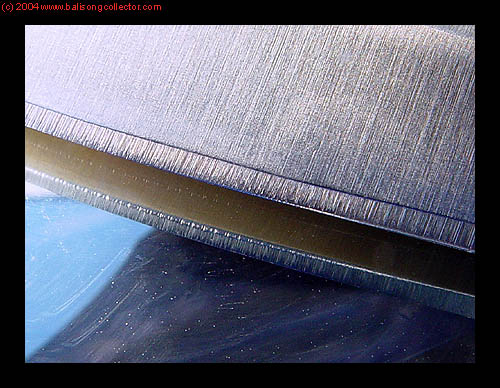
Now that's what I call sharp... and that picture is only 388 pixels wide including the black border.
Grey is just dark white. There is less light coming back to the camera (because the card is absorbing some of the energy and turning it into heat) but the light that does reflect back will be the color of the incident light (just 18% darker) which is what we want to set white balance.
(And that tip just saved you buying a true white card. There is no charge.)
By the way, I'm not saying hands off the white balance button. But don't expect a miracle from it. Don't expect it to make bad light suddenly good. If your lights are deficient in red as the standard halogen work lights are, the white balance button can't magically put it back. What it does do is set the amplifiers up to compensate. That is accomplished either by attenuating blue and green or by amplifing red with the consequences I outlined above. Use the white balance button to fine-tweak the last few percent out of your light. Get your lights as close as you can, and then use the white balance button to balance out the last tiny imperfections. That's what it's for.
there's plenty of filters you can use to help with the color settings, including one for countering florencent's infamous green tinge.
Exactly! And that takes us back to the old adage about free lunches. When you put a color correction filter on your camera, you are correcting color optically. You get the benefit of correct white point. But, there has to be a piper to be paid somewhere. And the place you pay the piper when you correct color this way is in exposure. Depending on how badly you have to correct, color correction filters can knock three or four f-stops off your exposure. This means opening the aperature of slowing down the shutter both of which have attendant problems. In physical systems there is rarely a free lunch.
The old florescent light filter, by the way, is no longer valid. The florsecent light manufacturers have dramatically improved the color temperature of their bulbs. But I do have a few of those around somewhere left over from the bad old days. Because the required correction was radical (the old florescent lights were really, really green), those filters knocked the life out of your exposure.
Now, you might say, "I can correct for a reduction in exposure by increasing the ASA setting on my digital camera! Free Lunch!"
Nope. There's no free lunch here. Sorry. What that setting controls is the gain of a set of amplifiers. More gain means more noise and your pictures have less detail. (Notice how analogus this is to film photography where higher film speed means larger grain which means less detail.)
The reason wedding photographers often use soft focus filters (or the same effect in software) is that it tends to hide minor skin blemishes, tiny wrinkles, that sort of thing. Sometimes, it's just not desirable to have the picture be really detailed.
And we're not talking about tiny objects here. It's a knife. Tiny is macro photography like insects.
How about the microserrations on the edge of a blade. Oh, photographed on a mirror, of course, so that you can see the underside too.
Now that's what I call sharp... and that picture is only 388 pixels wide including the black border.
- Joined
- Jan 15, 2003
- Messages
- 1,690
Gollnick...although i respect your opinions i really think you've gone way overboard on the techno stuff when it won't really make much difference to what the thread originally started from. I agree with you that there'll be no free lunches from changing the settings. It's just that i don't think it'll matter in this case. White balance settings will increase noise, however it won't be as much as increasing the ISO/ASA. I've used up to ISO 400 on my 7.2mp Canon G6 and on a 6"x4" print it's not that noticeable especially once you've run it through Noise Ninja or some other software.
He's using a 4mp Kodak camera. There's a lot of other stuff he's got to worry about than white balance.
And you don't need to increase the ISO/ASA in this case since it's still life. Just pop it on a tripod with a cable release and you're good to go...however long it takes.
yeap, wedding photographers who use film still use soft focus filters. Although when i shot a couple of weddings during the summer i didn't use any. Firstly is that almost everyone at weddings wear loads of make up on so they're blemish free anyway. If there are blemishes i would have just scanned the negatives and used photoshop.
In conclusion, it is actually easier if you don't have to mess around with white balance so i suggest again...get a couple of decent flash guns.
He's using a 4mp Kodak camera. There's a lot of other stuff he's got to worry about than white balance.
And you don't need to increase the ISO/ASA in this case since it's still life. Just pop it on a tripod with a cable release and you're good to go...however long it takes.
yeap, wedding photographers who use film still use soft focus filters. Although when i shot a couple of weddings during the summer i didn't use any. Firstly is that almost everyone at weddings wear loads of make up on so they're blemish free anyway. If there are blemishes i would have just scanned the negatives and used photoshop.
In conclusion, it is actually easier if you don't have to mess around with white balance so i suggest again...get a couple of decent flash guns.
Gollnick
Musical Director
- Joined
- Mar 22, 1999
- Messages
- 29,258
it's not that noticeable especially once you've run it through Noise Ninja or some other software.
Ah, but now you're looking for the mythical free lunch again. Noise filtering software has other effects.
Same thing with sharpening filters.
There is an old Chinese proverb: if pure water flows from up-stream, there is no need to filter is down-stream.
- Joined
- Jan 15, 2003
- Messages
- 1,690
DAmn...you never let up do you?? 
The whole point of what i was trying to say is that white balance, ISO, noise filtering etc. will have an effect eg. digital artifacts. However, will that effect be significant or even noticeable to what you want to do with the photo?
The way i see it, for the web you won't even be enlarging it that much. For prints, who really prints their knife photos at 8"x10" and displays them around the house?
Edited to add:
This is so good for my post count. I'm gonna go Gold when i'm closing in to a thousand.
The whole point of what i was trying to say is that white balance, ISO, noise filtering etc. will have an effect eg. digital artifacts. However, will that effect be significant or even noticeable to what you want to do with the photo?
The way i see it, for the web you won't even be enlarging it that much. For prints, who really prints their knife photos at 8"x10" and displays them around the house?
Edited to add:
This is so good for my post count. I'm gonna go Gold when i'm closing in to a thousand.
I actually had a similar-style debate with a friend of mine, but not about cameras. In discussing an episode of Initial D (a japanese cartoon involving car racing) one of the characters braked without depressing the clutch in the midst of a race.
My problem was that this is inherently less efficient than clutching first, as now the brake is stopping both the wheels and the entire drivetrain.
Our debate eventually petered out because we realized that even had it been accurate (which I'm not even sure of anymore) it would be such a miniscule change in anything that you'd never be able to actually test for it, much less win a race with it.
I think that, at the levels of accuracy that most sub-$1000 digicams can manage, what with the shoddy glass and sub-par sensor, not to mention JPEG getting in the way, the amount of change that white-balancing is going to have on your final image is going to be impossible to see.
I'm definitely feeling the limitations of the point-and-shoot Canon S200 that I use now, but can't afford a Good Digital SLR (I really want a 10D), plus the investment in lenses that goes along with it. With 2mp and a lens the size of a dime, you can't really get the shots you want to, at the angles you want, and certainly, with no aperture control the sharpness you want, so the effects of white-balancing or light temperature are so miniscule compared to the gigantic effects of the hardware that I'm using.
I guess my point is that when you're racing a rear-wheel-drive car on the ice with drag slicks, the thing you're complaining about is likely not going to be that your car doesn't have traction control
My problem was that this is inherently less efficient than clutching first, as now the brake is stopping both the wheels and the entire drivetrain.
Our debate eventually petered out because we realized that even had it been accurate (which I'm not even sure of anymore) it would be such a miniscule change in anything that you'd never be able to actually test for it, much less win a race with it.
I think that, at the levels of accuracy that most sub-$1000 digicams can manage, what with the shoddy glass and sub-par sensor, not to mention JPEG getting in the way, the amount of change that white-balancing is going to have on your final image is going to be impossible to see.
I'm definitely feeling the limitations of the point-and-shoot Canon S200 that I use now, but can't afford a Good Digital SLR (I really want a 10D), plus the investment in lenses that goes along with it. With 2mp and a lens the size of a dime, you can't really get the shots you want to, at the angles you want, and certainly, with no aperture control the sharpness you want, so the effects of white-balancing or light temperature are so miniscule compared to the gigantic effects of the hardware that I'm using.
I guess my point is that when you're racing a rear-wheel-drive car on the ice with drag slicks, the thing you're complaining about is likely not going to be that your car doesn't have traction control

- Joined
- Jan 3, 2003
- Messages
- 2,773
Here's my light box/tent.
Got the idea from Mistakeroo's post above THIS SITE
I made the frame bigger overall.
Mine is 31x26.5x19high. I'll probably reduce the width and depth a bit.
I press fit everything as I don't see a need to glue it. Easily disassembled
Lighting is cheapo reflectors, Reveal 120w daylight bulbs,. Craft store has inexpensive felt material, 12x8 and foam placemat sized things that are great backdrops also. I also use floor tiles as backdrops.
The gauzy stuff is packing material to diffuse the light if I wish.
AND moldable, non hardening clay to prop up the exhibits to the angle I want.

Tom
Got the idea from Mistakeroo's post above
THIS SITEI made the frame bigger overall.
Mine is 31x26.5x19high. I'll probably reduce the width and depth a bit.
I press fit everything as I don't see a need to glue it. Easily disassembled
Lighting is cheapo reflectors, Reveal 120w daylight bulbs,. Craft store has inexpensive felt material, 12x8 and foam placemat sized things that are great backdrops also. I also use floor tiles as backdrops.
The gauzy stuff is packing material to diffuse the light if I wish.
AND moldable, non hardening clay to prop up the exhibits to the angle I want.
Tom