New Camera - Need Critique

Joined
Aug 27, 2004
Messages
2,525
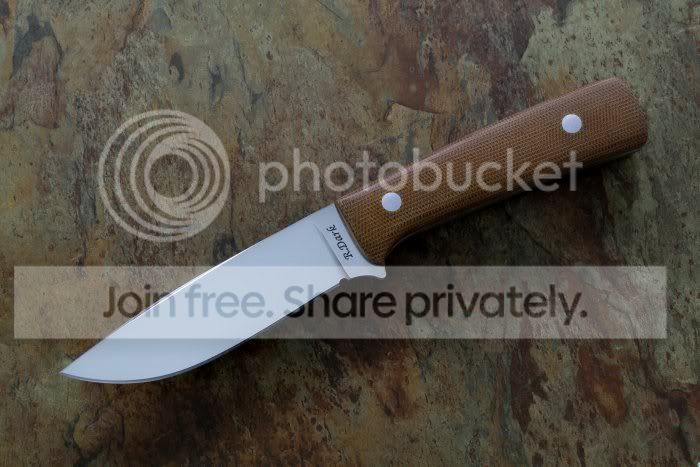
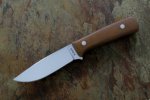
I finally got a little better camera and I have been playing with it. I don't know if it is my computer screen or what, but it just doesn't look right to me.

How does it look on your screen?

I know that Jim Cooper had a thread somewhere on photography, but I can't seem to find it. Any help would be appreciated.

Thanks,

Robert
 

Attachments

  • Test1.jpg
    Test1.jpg
    62.8 KB · Views: 201
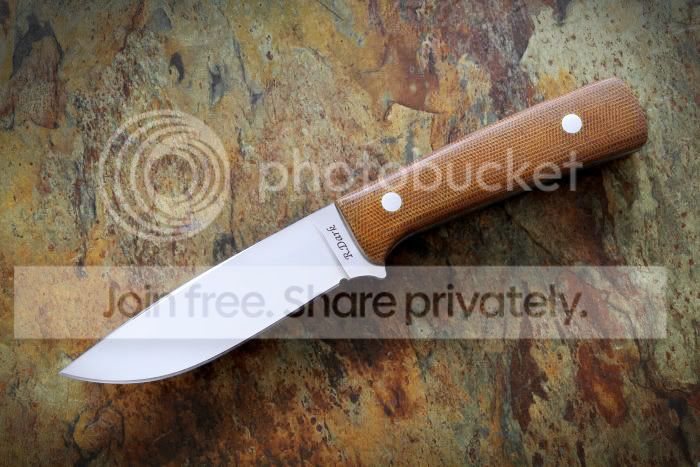
seems to have a blue cast to it, I removed it in this copy.
 

Attachments

  • knife-adjusted.jpg
    knife-adjusted.jpg
    66.5 KB · Views: 138
Other than the afore mentioned color cast, which is easy to remove and almost always necessary to some extent with digital photos, the only thing I notice is that the lighting is a tad bit flat.

You could either fix this in Photoshop or some other editing program but it's always better to do as much before you click the shutter as you can.

I think you're exposure is spot on, just the lighting needs a tad bit more contrast. Now this is where you will have to be very careful as it's easy to get hotspots as you start cranking up the contrast. Hotspots are of course a major no-no.

Great looking knife by the way.

Charlie
 
Calibrating your display helps too. That way if you do choose to post process it, you'll be heading in the right direction.

I know apple displays have a software calibration option, though it's not the most precise method and it won't work as well as a display ages. The other solutions are hardware ones.
 
definitely need another light in the front, then you'll be able to make out the liner and tang detail in the handle and get rid of the shadow in front of the knife.
 
I'm still trying to figure out this photography thing too but I will add my two cents.... Needs more light, I think it looks a little flat...like you took the pic straight down.
Nice knife.:thumbup:
Mace
 
That photo is really close. Clear and descriptive. The shadow under the knife can easily be lifted using a reflective card in front of the knife. Other than that, it's really just exposure and white balance that are a little off.

When setting your exposure, keep a close eye on your histogram (expose to the right). You want the data as close to the right side as possible without clipping you highlights off. The reason for this is rooted in the differences in our perception of brightness versus your camera sensor's perception. Our eyes are logarithmic, while sensors count photon exposure linearly. Because of these differences, more than half of your data is in the brightest 10% of the exposure scale. By pushing the exposure to the right, you ensure you have the best signal-to-noise ratio to work with in post. Never mind the fact that it looks bright on the camera screen, you'll be fine-tuning your exposure later in software.

Now that your file is exposed properly, import it into your RAW editor. This will allow you to perfect the image in terms of exposure and WB. First bring the exposure down to where it looks best (your file is probably slightly overexposed to begin with). White balance is much easier to adjust with a RAW file on your computer than trying to get it right in camera. You can either use the eyedropper tool on something neutral colored (often the blade) or you can adjust the sliders until it looks best. Adjusting these properties on your computer allows you to fine-tune each image until it looks perfect. Control over the final image is vastly improved by using computer software instead of in-camera programming.
 
Thanks Rat. Your version sure looks better.

Thanks also to PJ234 and rifon2. That is the thread I was looking for.

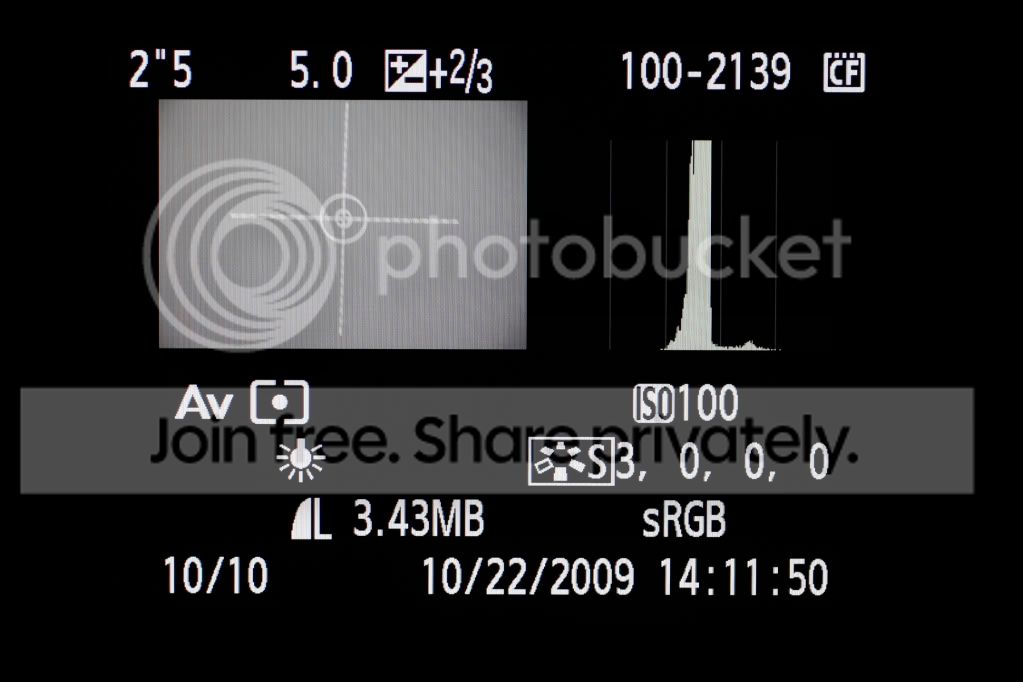
NOW.... I have to work on that "Flat" look and shadows. My camera will shoot RAW, but I have never tried it. It also has the histogram, but I still don't understand all I need to about it.

More studying and experimenting.

Thanks, you guys have given me a start in the right direction.

Robert
 
Robert,

Shoot a lot of pics of the same knife using different backgrounds. I learned a lot doing this; like which backgrounds worked best under different light conditions. There is no substitute for natural light.

Did your new camera come with one of those flash pan things that give off all the smoke? :D

Fred
 
I have to agree with what everyone else has said so far. I'm going to make a tutorial about 18% gray cards. Everything in your digital camera is based on gray. If you set it up with a gray card, you can set your white balance and exposure to be 100% spot on every time. I made an edit to your photo, but I'm on a home computer that is not calibrated, so it may or may not look right..:eek:
Original
Test1.jpg

Edit
Test12.jpg


What camera did you buy? I think the best thing to do is keep shooting as much as you can and keep your manual close by.

Scott
 
I have to agree with what everyone else has said so far. I'm going to make a tutorial about 18% gray cards. Everything in your digital camera is based on gray. If you set it up with a gray card, you can set your white balance and exposure to be 100% spot on every time.

What camera did you buy? I think the best thing to do is keep shooting as much as you can and keep your manual close by.

Scott

Scott, I know that in the days of film cameras I would use a Luna Pro light meter to get a reading from an 18% gray card. In those days, I shot medium format film with a Bronica ETR.

These new-fangled digital cameras have me buffaloed. The camera I just bought is the new Canon EOS Rebel T2i . In addition to the 18-55 lens that came with it, I bought a 50mm Macro lens. I agree that I need to spend more time with the owner's manual.

Your edit looks much, much better, however, I can see that I needed some reflective light back onto the bottom portion of the handle and blade in order to show more detail and reduce those harsh shadows.

Thanks,

Robert
 
I have to agree with what everyone else has said so far. I'm going to make a tutorial about 18% gray cards. Everything in your digital camera is based on gray. If you set it up with a gray card, you can set your white balance and exposure to be 100% spot on every time. I made an edit to your photo, but I'm on a home computer that is not calibrated, so it may or may not look right..:eek:
Original
Test1.jpg

Edit
Test12.jpg


What camera did you buy? I think the best thing to do is keep shooting as much as you can and keep your manual close by.

Scott

Basing exposure on 18% gray will not always get you the proper exposure. It's only a baseline. Exposing to the right and adjusting in post will always give you a cleaner, better exposed image.

Take this photo for example:

-mg_4082.jpg


This is a situation when keeping a close eye on the histogram and exposing creatively makes a huge difference. I metered on the ice and overexposed by two full stops. If I had exposed based on a gray card at 18%, the ice would have looked far too dark. I could have brought the exposure back up in Lightroom, but the noise in the shadow areas would have been unacceptable. By exposing to the right, I ensured that the ice was bright and the shadows (relatively) clean.

Many large format digital landscape photographers are doing away with their old fashioned light meters. The reason is that the digital camera itself has a much more detailed and accurate light meter: the image sensor. They simply guess at the exposure for the first shot, look closely at the histogram, and adjust their settings accordingly. This method gives better results and does away with an extraneous piece of equipment.

Phillip
 
Basing exposure on 18% gray will not always get you the proper exposure. It's only a baseline. Exposing to the right and adjusting in post will always give you a cleaner, better exposed image.
Phillip

The only problem I see with this, is camera light meters measure reflected light. All they can do is guess how much light is actually hitting the subject. Your Ice picture is good, but you lost a lot of detail in the ice. Snow is really hard to photograph. Expose for the snow and have your subject dark, or expose for the subject and lose detail in the snow/ice.. (time for HDR)

If you were going to photograph a dark skinned person from Tanzania standing next to an albino from Utah, who would you meter for? A gray card would give you the correct exposure for both. I agree there are times to get creative and toss all that aside and there are times you wont be able to use it, but it is a great way to get perfect exposure.

I use a gray card or a external light meter every day in my Studio. When I shoot the gray card I set a custom white balance, check the histogram, then use the light meter. (Seconic L-358) If the histogram is centered it always matches the meter. If I'm shooting jewelery with hot lights, Motocross, Soccer, Boudoir;) or whatever, I do the same thing.


Sorry for the hijack Robert. Your new pics look really good.
 
Other than the afore mentioned color cast, which is easy to remove and almost always necessary to some extent with digital photos, the only thing I notice is that the lighting is a tad bit flat.

You could either fix this in Photoshop or some other editing program but it's always better to do as much before you click the shutter as you can.

I think you're exposure is spot on, just the lighting needs a tad bit more contrast. Now this is where you will have to be very careful as it's easy to get hotspots as you start cranking up the contrast. Hotspots are of course a major no-no.

Great looking knife by the way.

Charlie

YOU CAN"T FIX FLAT LIGHTING IN PHOTOSHOP

Now that I got that out of my system. Your exposure looks good, your whitebalance is a little off. Use black and white reflectors to control your shadows and reflections. A black card or fabric will add a black line to a specular reflection to give a natural looking outline. Experiment.

-Page
( I used to do and teach this stuff for a living)
 
I use a gray card or a external light meter every day in my Studio. When I shoot the gray card I set a custom white balance, check the histogram, then use the light meter.

Are you using the gray card to "SET" the custom white balance?


sunshadow said:
Your exposure looks good, your white balance is a little off.

Still struggling with "White Balance". When I set a custom white balance according to the camera manual (i.e. shoot something white), the photo came out gray. When I used this custom setting to shoot other shots, the colors were way off.

sunshadow said:
YOU CAN"T FIX FLAT LIGHTING IN PHOTOSHOP

I know that there are certain things that just can't be accomplished with photo editing software. That is why I am trying to get it as close as possible in the camera.

I am currently using Paint Shop Pro 8. I have "Elements", but I am not too impressed with it. Maybe someday I can afford the full version of Photoshop.

Thanks,

Robert
 
Are you using the gray card to "SET" the custom white balance?
Robert

Robert, Try this, get everything ready to take a photo (Lights on, tent or whatever you use, background in place) Now place your gray card where your subject will be, set your white balance to "AWB" be sure to fill your lens with the gray card, set your aperture (F stop) to what you desire for the photo, and adjust the shutter speed until it shows properly exposed for the gray card. (make sure not to have glare on the card) Take a photo. you should see something like this (not my photo) spike in the center of the histogram.
photo11.jpg


Now go into your "custom white balance" and use that image to set it up. Replace the gray card with a knife and see what you get. This should properly expose the entire knife correctly. There is some debate to this, but I use it 60-70 hours a week. My only income is Photography. I own a Studio complete with a full Digital Minilab. Everything in my studio is wireless- I take a picture and it transfers over the wireless to 7 computers throughout the Studio. If you have any other questions feel free to ask or PM me.
I hope it helps,

Scott
 
I'm not sure about that particular camera but one thing I learned to do with my point and shoot was when it was set to get the exposure settings from a single point in the centre of the frame I would move the target to lighter or darker areas, depress the shutter 1/2 way to set up the image then re-centre the frame and take the pic. I would always take at least 3 pics setting the frame in this manner so I would have 3 pics with different exposure levels and choose the best one once they are on the PC.

Another trick is tape a white cloth or paper towel over the flash and use it to fill in the fore ground. the cover will reduce the sharp glare / reflection.
 
Back
Top