
-
The BladeForums.com 2024 Traditional Knife is available! Price is $250 ea (shipped within CONUS).
Order here: https://www.bladeforums.com/help/2024-traditional/
You are using an out of date browser. It may not display this or other websites correctly.
You should upgrade or use an alternative browser.
You should upgrade or use an alternative browser.
Nikon d40 camera
- Thread starter JTMCGUIRE
- Start date


- Joined
- May 27, 2009
- Messages
- 1,961
Just put everying on auto and you have yourself an exellent point and shoot! Also the A is for aperature priority and the S is for shutter priority . Both are still auto adjusting and will take good pics . Also make sure you flash is off and you have sufficient lighting!! Good luck with the d40 it's a great camera and with a bit of messing around you will get the hang of it in no time .

- Joined
- Nov 12, 2009
- Messages
- 13,678
Hi JTMCGUIRE -
I use program mode and matrix metering, then sometimes I will go -3 on exposure to get a little more color pop.
I have the color set to vivid.
Also - I use auto white balance most of the time.
That will get you about where you need to be, but if you are not 100% familiar with the camera and it's settings, I would go to the following link and get familiar:
http://www.kenrockwell.com/nikon/d40/users-guide/index.htm
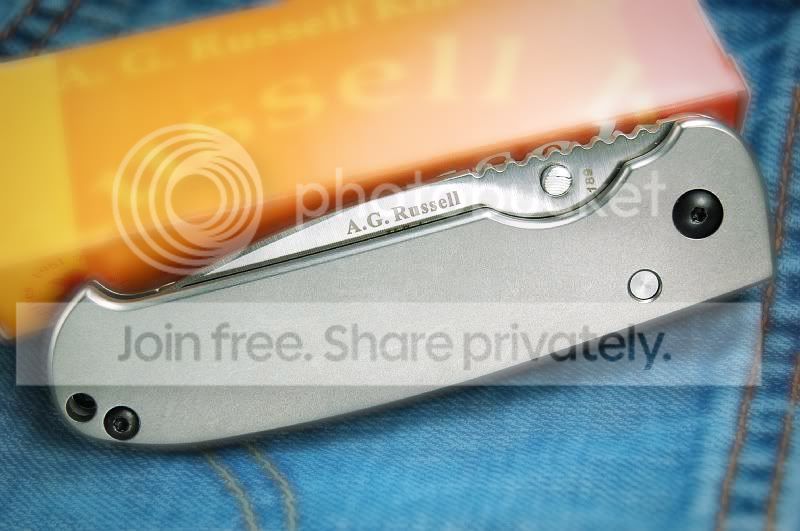
I use the 18-50 vr lens that came with the camera kit to take most of my pics of knives - here is one I took recently of my Acies -

and this one of my JK Kephart -

I use two of the fluorescent "sunlight" bulbs in clamp-on fixtures and I clamp them on two cabinet doors in my kitchen and set the knife up under them - that way I can easily move the lights in a great range of adjustment.
best regards -
mqqn
I use program mode and matrix metering, then sometimes I will go -3 on exposure to get a little more color pop.
I have the color set to vivid.
Also - I use auto white balance most of the time.
That will get you about where you need to be, but if you are not 100% familiar with the camera and it's settings, I would go to the following link and get familiar:
http://www.kenrockwell.com/nikon/d40/users-guide/index.htm
I use the 18-50 vr lens that came with the camera kit to take most of my pics of knives - here is one I took recently of my Acies -
and this one of my JK Kephart -
I use two of the fluorescent "sunlight" bulbs in clamp-on fixtures and I clamp them on two cabinet doors in my kitchen and set the knife up under them - that way I can easily move the lights in a great range of adjustment.
best regards -
mqqn
- Joined
- Feb 1, 2007
- Messages
- 2,624
Also the A is for aperature priority and the S is for shutter priority . Both are still auto adjusting and will take good pics
close , in aperture priority , you choose the ap and the auto choose the shutter , shutter priority is exactly the opposite.
Having a great camera like the D40 and leaving it on auto is not exploring the greatness of the tool.
mqqn
That first image has a green/blue color cast to it , 15 seconds in photoshop (7.0 its all have on the laptop ) and a quick levels adjustment ....

go to places like YouTube and search for Nikon D40 , lots of free tutorials out there.
Good lighting ( of the correct temperature ) will help your images a ton, find the book called " Understanding Exposure " , it has helped me remember a great deal of what I used to know.

- Joined
- Jun 26, 2009
- Messages
- 1,000
I don't have a d40, but the basics of DSLRs are all similar. There's too much to cover in a post, so I'll write you a short "study guide". Mastering these technical aspects will help you get the most of your new camera.
Learn how to get your exposure right (shutter speed, aperture, and ISO), and learn the effects each setting will have on your image. Keep an eye on your histogram as you're shooting (look up "expose to the right"). Shoot on full manual any time speed isn't an issue.
Good lighting is vital. Without light, there can be no photograph. I have learned to use natural window light, but others get great results with artificial lighting.
Lastly, learn now to post-process your images. The biggest advantage to a DSLR (perhaps aside from interchangeable lenses) is the ability to save RAW files. Proper processing of a RAW file helps you get the absolute best out of your image.
Phillip
Learn how to get your exposure right (shutter speed, aperture, and ISO), and learn the effects each setting will have on your image. Keep an eye on your histogram as you're shooting (look up "expose to the right"). Shoot on full manual any time speed isn't an issue.
Good lighting is vital. Without light, there can be no photograph. I have learned to use natural window light, but others get great results with artificial lighting.
Lastly, learn now to post-process your images. The biggest advantage to a DSLR (perhaps aside from interchangeable lenses) is the ability to save RAW files. Proper processing of a RAW file helps you get the absolute best out of your image.
Phillip
- Joined
- Feb 1, 2007
- Messages
- 2,624
Indeed Phillip , raw is the way to go if you are into post production.
And the picts in your FLICKR account are well done !
And the picts in your FLICKR account are well done !

- Joined
- Dec 6, 2004
- Messages
- 6,212
light box is a huge help and then its all about tring angles adn backgrounds (+ tops so that the reflections on the blade look right )
since you gto a digi cam take lots of pic and sort the good and toss the rest
as you go you ll pitch less overall
BTW what photo editor are you using ?
since you gto a digi cam take lots of pic and sort the good and toss the rest
as you go you ll pitch less overall
BTW what photo editor are you using ?
- Joined
- Nov 12, 2009
- Messages
- 13,678
close , in aperture priority , you choose the ap and the auto choose the shutter , shutter priority is exactly the opposite.
Having a great camera like the D40 and leaving it on auto is not exploring the greatness of the tool.
mqqn
That first image has a green/blue color cast to it , 15 seconds in photoshop (7.0 its all have on the laptop ) and a quick levels adjustment ....
Good lighting ( of the correct temperature ) will help your images a ton, find the book called " Understanding Exposure " , it has helped me remember a great deal of what I used to know.
Thanks John -
If I had set the WB correctly I would not even have to edit the picture.
And I agree 100% with you on auto - the only time I put the camera on auto is when I hand it to someone else to snap a pic. :thumbup:
best regards -
mqqn

- Joined
- Sep 29, 2009
- Messages
- 161
Buy yourself one of these Everything in your camera is based on 18% gray. This is a very simple way to get correct exposure and white balance. If you are interested in trying it, I'll show you how it works. Here is my 2 minute correction on the above image using the gray in the knife handle. (I also added a little Bokeh)
- Joined
- Nov 12, 2009
- Messages
- 13,678
Thanks muleskinner -
I appreciate the suggestions.
Photography is really an art, and is subjective.
I prefer warmer rather than colder hues, and I also wanted the packaging to be prominent in the image.
I really just took the shots of the Acies as a quick way to show people on the web my new toy.
Thanks for the link to the gray card.
Thanks again for the suggestions.
best regards -
mqqn
I appreciate the suggestions.
Photography is really an art, and is subjective.
I prefer warmer rather than colder hues, and I also wanted the packaging to be prominent in the image.
I really just took the shots of the Acies as a quick way to show people on the web my new toy.
Thanks for the link to the gray card.
Thanks again for the suggestions.
best regards -
mqqn
- Joined
- Sep 29, 2009
- Messages
- 161
Thanks muleskinner -
I appreciate the suggestions.
Photography is really an art, and is subjective.
I prefer warmer rather than colder hues, and I also wanted the packaging to be prominent in the image.
I really just took the shots of the Acies as a quick way to show people on the web my new toy.
Thanks for the link to the gray card.
Thanks again for the suggestions.
best regards -
mqqn
I couldn't agree more. I hope I didn't offend you with my edit, that was not my intention, I just wanted to show the OP how simple it is to correct/change things using gray.
- Joined
- Feb 1, 2007
- Messages
- 2,624
For anyone learning photoshop , be it 7.0 , CS3 , or CS4 , check out Deke's Top 40 , free down & dirty , nitty gritty to the point tutorials on some of the most common used tools.
http://www.deke.com/
http://www.deke.com/
- Joined
- Nov 12, 2009
- Messages
- 13,678
I couldn't agree more. I hope I didn't offend you with my edit, that was not my intention, I just wanted to show the OP how simple it is to correct/change things using gray.
Hi muleskinner -
Not at all - I appreciate the help! :thumbup:
I think the D40 does a great job of blurring out the backgrounds (bokeh).
I am still learning the camera having just bought it a year ago, so any suggestions are very welcome.
I did not see the greenish tint to the image until John showed me the corrected one, and your alteration does make the knife stand out much better.
Thanks again - keep the suggestions coming!
best regards -
mqqn
- Joined
- Jun 26, 2009
- Messages
- 1,000
Please don't take offense, but I think I'd call that nisen-boke.
 It's nearly impossible to make background blur look convincing if you do it in post. Fortunately, with something as small as a knife, it's very easy to get shallow DOF; just open your aperture a little. Usually it's a struggle to get enough light on the sensor while keeping everything in focus (that's why I usually use a tripod).
Back to the original topic. Aperture is probably the single most important dial on your camera. Here are a few bullet-points for you to research:
-Depth of field
-Bokeh (boke)
-Lens performance at varying apertures (MTF charts)
-Lens diffraction
-Hyperfocal distance (more for landscapes, but the theory is important)
Understanding these things will help you understand what is happening to your photo when you move that aperture dial around.
Phillip
P.S. Gray cards are nice to have when shooting RAW, and absolutely vital with jpegs.
- Joined
- Feb 1, 2007
- Messages
- 2,624
JTMcGuire:
I highly recommend this book : Understanding Exposure ( earlier I mistakingly called it Understanding Aperture ).
http://www.amazon.com/Understanding-Exposure-Photographs-Digital-Updated/dp/0817463003
Read it and then take pictures , study the settings you use and take notes ( physical notes ) of the changes the settings make so that when you view the pictures you will be able to make the connection of what the changes do.
Direct outdoor sunlight is about the worst for taking pictures , morning or evening light is better if using natural light.
What lightbox / light set up are you using ? Posting a picture of your setup , many will be able to provide suggestions on how to maximize the useage of what you have.
What lens are you using ? The kit lens ?
As Phillip mentioned , a tri-pod is a must ( granted there are some that can hand hold and get great images , I am certainly not one of them ).
as well as this book:
http://www.amazon.com/Nikon-D40x-Digital-Field-Guide/dp/0470171480/ref=pd_sim_b_1
also the Magic Lantern guides seem to be popular for some
http://www.amazon.com/Magic-Lantern-Guides-Nikon-D40/dp/1600591817
I highly recommend this book : Understanding Exposure ( earlier I mistakingly called it Understanding Aperture ).
http://www.amazon.com/Understanding-Exposure-Photographs-Digital-Updated/dp/0817463003
Read it and then take pictures , study the settings you use and take notes ( physical notes ) of the changes the settings make so that when you view the pictures you will be able to make the connection of what the changes do.
Direct outdoor sunlight is about the worst for taking pictures , morning or evening light is better if using natural light.
What lightbox / light set up are you using ? Posting a picture of your setup , many will be able to provide suggestions on how to maximize the useage of what you have.
What lens are you using ? The kit lens ?
As Phillip mentioned , a tri-pod is a must ( granted there are some that can hand hold and get great images , I am certainly not one of them ).
as well as this book:
http://www.amazon.com/Nikon-D40x-Digital-Field-Guide/dp/0470171480/ref=pd_sim_b_1
also the Magic Lantern guides seem to be popular for some
http://www.amazon.com/Magic-Lantern-Guides-Nikon-D40/dp/1600591817