picture help please

Joined
Feb 10, 2006
Messages
1,005
Hi guys,
Been trying hard lately to improve upon my severe lack of picture taking skill.
Improving was actually quite easy because I suck so bad at it:o, but unfortunately taking nice photos has been a little bit more of a chore.....
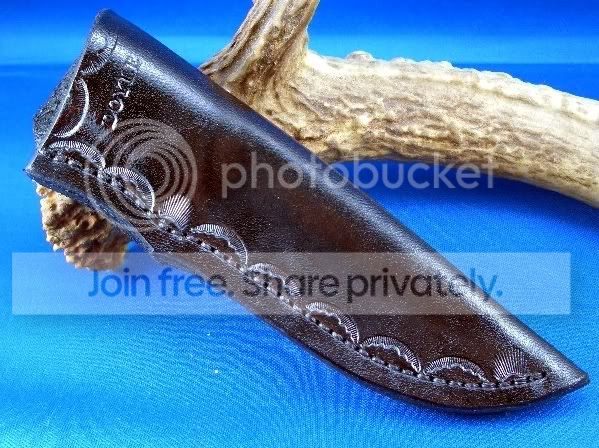
I am going to include a few pics I took yesterday with my new lightbox setup, and hopefully someone here with more picture savvy than I (that's everyone) can offer a little insight.
Please keep in mind that these are the best of the photos of many that I took, and after all the photoshop editing....
The knife pics are something I can live with, but the sheath pics are still terrible. I've tried to do what I can with the camera settings, but I'm really ignorant as far as my camera knowledge goes. Infact at one time I actually overheard the box laughing at me:D
Any help would be appreciated.
Thank you
Matt Doyle
CIMG0409.jpg

CIMG0410.jpg

CIMG0432.jpg

CIMG0434.jpg
 
Can you place a photo of the Light box?? I am interested in seeing your light source individually and how it faces the box.

Here are a couple of good items One is a Photo Cocoon the other is a light Tent. You simply add the back drop or Floor Color you want then place simple "Flood Style" Lights to either the sides or side and top to give the light you need with lower glare just remember to turn your flash off if your camera has a built in Flash. I would not purchase the light from them just go to the local hardware store youll save money that way. but the light boxes are relativly inexpensive to the quality you will get from them. Hope this helps.

http://www.bhphotovideo.com/c/produ...Paterson_INT297_Light_Pod_Medium_Cocoon_.html

http://www.bhphotovideo.com/c/product/331824-REG/Interfit_Paterson_INT296_Studio_Light_Tent_.html
 
Larry
My lightbox is almost identical to the "interfit" model in your second link. Actually it's so close (down to the reversible backdrop) that I would bet it was made by the same manufaturer for a different name. I set up the box on my pool table,and then mount my lights to face in from each side and down from the top. No other lighting on in the room @ the time.
Matt
 
mdoyle, what are you using for a camera, and what iso setting is it set at?
the white speckles could be specular reflections from a high gloss finish in the pores of the leather, you may be able to kill some of that through polarization or more diffusion, but the fact that they seem to be ubiquitous indicates possible dark noise/amplifier noise which the photoshop is going to accentuate

Please show us the unmodified, I will be able to deconstruct better

-Page
 
Page
the iso setting was @ 200 not even sure what that means but I do know that is where it was. There is a high gloss finish on the leather as you stated.
I went down and snapped another pic without any mods for you to see.
Here ya go.
Thanks
Matt
CIMG0453.jpg
 
what brand and model of camera? and am I seeing full resolution?
also does your camera have manual settings?

-Page
 
Page
Casio Exilim 5.0 MP
I would assume that it does have manual settings but wouldn't know how to use them if it did. Not sure what you mean by "Am I seeing full resolution"
Sorry to be such a complete lack of help, but this is an area that I really do not know my buttocks from the proverbial hole in the ground:o
Matt
 
did you size the picture down any before you linked it?

manual settings would be things like shutter speed and f stop. usually expressed as fractions of a second for shutter speed (60 translates to 1/60th second) and f stops are a mathematical relation of the area of the hole light goes through to pass teh lens expressed as a funcion of how the focal length of the lens relates to the square root of 2 (typically 1.2-1.4-1.8-2.0-2.8-3.5-4.5-5.6-8-11-16-22-32-64)

what you really need to know about that is every time you go one full number on the fstop scale you are doubling or halving the amount of light that hitsyou imaging chip, same with doulbling or halving your shutter speed.

Unfortunately my experience with Casio cameras has been that they are not made to allow customers to take control of the image, and they tend toward circus colors, kind of like sony but worse

-Page
 
Page
I do not see any adjustment for shutter speed of Fstop
There are adjustments for size, quality,EV Shift? White balance, Auto focus area, sharpness, saturation, and contrast. I did not resize the previous image at all.
Matt
 
Page
Okay here it is with the aforementioned changes. I'm sure it wouldn't get the thumbup from Coop, but it is still easily the best I've taken. The knife inside of the sheath is not finished, it is only @ a 220 finish so the color and everything is probably about right for it as well. Thanks a ton! I really appreciate your help!:D
Matt
CIMG0455.jpg
 
glad I could help, I used to shoot for a living, and have taught before the combination of the economy in upstate NY going to hell and changes in technology put most of us out of business. Photography used to be my life, and metalsmithing used to be a sideline that I would do professionally when the photo work was slow, now I am a metalsmith with a day gig farming a cubicle trying to figure out how to re-establish my photo business as a sideline in a new town that is slowly getting destroyed by the walmart disease. Try experimenting with your ev settings, also you may want to do some with a less brightly colored background unless you are using the blue for doing a chromakey knock out. The strong cbackground colors may in some cases adversely effect your color balances

-Page
 
ISO is your shutter speed 200 is for outdoor good natual lighting. also a good all around film speed. you may try upping it to 400 or so also.

and the new photo is way better with less glare. However what color is the Sheath it looked a little brown in the first photo.

also How many lights are you using? one from each side showing through the material or more?
 
Paige
Not sure what a chromakey knockout is but it sounds painful.:D I'll try grey next time.


Larry
The sheath is black. Dyed with feibings Black. I am using one light for ea side and one for the top. 3 total. 100w daylight flourescent 6500k

Matt
 
ISO is your shutter speed 200 is for outdoor good natual lighting. also a good all around film speed. you may try upping it to 400 or so also.

and the new photo is way better with less glare. However what color is the Sheath it looked a little brown in the first photo.

also How many lights are you using? one from each side showing through the material or more?

ISO is NOT your shutter speed, it is your sensor light sensitivity.
Shutter speed and Aperature can be used reciprocally to adjust the amount of light entering a photographic device to best suit the ISO of the sensor.
ISO stands for International Standards Organization which is the committee that standardized film speeds internationally, ISO rating supplanted ASA (American Standards Association)

Technically 100 is better for general outdoor, especially if you follow the sunny 16 rule, (in bright sunlight in the northern half of the US with an aperature of 16 your shutter speed will be your ISO, in the southern half of the US that actually works better at F22) at an ISO of 200 you will start to run out of settings on the typical camera.

Sorry to jump on you Larry, I get as uptight about photo misinformation as certain folks do about metallurgical misinformation

No hard feelings I hope

-Page
 
Paige
Not sure what a chromakey knockout is but it sounds painful.:D I'll try grey next time.


Larry
The sheath is black. Dyed with feibings Black. I am using one light for ea side and one for the top. 3 total. 100w daylight flourescent 6500k

Matt

Chromakey is when you use a strong primary color that is not used by any of your subject as a selection color for making everything that is not subject transparent. It's how the weatherman at your local TV station is standing in front of and pointing at a weather map that is not physically there, the weatherman is typically stanting in front of a Chroma Green wall

-Page
 
Back
Top