Solidworks Questions.

Joined
Oct 21, 2006
Messages
26
Possibly a thread for all to learn from?
I searched and couldn't find any "Q&A" involving solidworks.


Anyway...
I'm working with Solidworks to design folders. I find it very handy since i can update the blades pivot area to match the handle pivot area on the fly, modifying either. I don't have to delete entire parts and start over. Also good for making sure the blade locks in the right position, that the blade is properly covered by the handle when folded, etc. I can also print designs 1:1 for making mock-ups out of cardboard or whatever.

I'm feeling a little dumb though, modeling the actual blade edge. What functions do you guys use to get it right?
I want to be able to alter the angle of the grinds and/or how far into the body the grind goes. Any tips here?
Do things get more complicated for double edged blades?
 
I just avoid the bevels all together, in solidworks(because of the trouble I was having+my ROI was not worth it). I print out my finished design and draw in the bevels I am after. If I am looking to find out a certain angle needed I will trig it out.

I just asked my guy that only does solidworks to figure it out and let me know. I may have an answer in a few days. I'll post when I get it, if someone else has not already.
 
Couple ways to do it, easiest way is Chamfer but very limited in what you can do with that. Best way IMO is swept cut.
email me a blade and I will do it for you and you can backwards engineer it to see how I did it.
CW
 
Couple ways to do it, easiest way is Chamfer but very limited in what you can do with that. Best way IMO is swept cut.
email me a blade and I will do it for you and you can backwards engineer it to see how I did it.
CW

Yes, sweep or loft cut are by far the easiest way to go. In my experience modeling a blade on Solidworks is easiest if you think of it like stock removal, start with your bar, cut out the profile, then do the bevels, edges, etc...

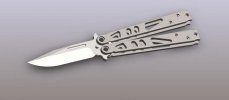
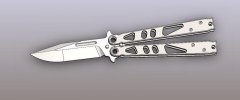
TachyonEDC3.jpg

TachyonEDC2.jpg

TachyonEDC1.jpg

You should be able to see the combinations of lofted and swept cuts on this blade.

Good luck!
 
Blindhogg, i emailed you through the forum options.

I'm having trouble making a loft/sweep cut here, i'm not getting the results i want. I've tried playing around with guide curves and all, but i can't get it right. Hopefully the picture explains it.
The cutting profile will change as it goes around. I can't get the program to follow the outer edges or inside guide path. It either gets it wrong by a lot, or goes bananas entirely.

8wgple.jpg


other questions:
how can i link two dimensions together? I want to be able to change one and the other changes to match.
 
I'm not Blindhogg, but I may be able to chime in here and offer some help.

I'm not 100% sure why your sweep cut isn't working, my best guess is that your relations aren't set right on your guide curve. Make sure it's specified to "pierce" on the planes. If that's not the problem try making a different guide curve that follows that same path, sometimes solidworks is just stubborn.

As for the two dimensions, that is also a matter of relations. select the two segments that you want to be proportional and set their relation to "equal", or you could use multiple distance relations is they are supposed to be different but related.

Hope this helps.
 
Looks good, Only thing I do is not put a sketch on the end plane. I just do a swept cut by creating a profile then the path and thats it. It ends at the end of the path line.
Shoot it to me and I will make it work and send it back so you can see what I mean. I usually have to add material to get my plunge where I want it but thats not much of a problem.
CW
PS One thing I try to do is make my edge profile by using the offset entities so it is the same distance from the edge the full length of the blade.
I got your first email and responded back
solidworks.jpg
 
Back
Top