Some cool stuff I've found with computer knife design...

Cool! It just so happens my current degree (architecture) is giving me a lot of experience with AutoCAD and I'm becoming fairly proficient designing knives with it, at least in terms of 2D.

It is most helpful I have found with my plan for trying out some folders soon. Lock geometry and pivot spacing is WAY easier to work with when all you have to do is move it around on a screen!
 
Patrice Lemée;10280029 said:
I am glad you posted this cause somebody who never did 3D CAD before and thought they were gonna get results like what you posted is in for a big disappointment. I'd give them about 10 minutes before they said the heck with this. ;)

PS: Not to hijack this thread but a reminder of something I did on GIMP to get you started if anyone is interested: http://www.bladeforums.com/forums/s...ed-Photo-Manipulation-Tutorial?highlight=gimp

And I'd love to visit Salem so "knifemakers and bladesmiths are a bunch of troglodytes and cretins"! When do I get my plane ticket. :p

Yeah, I shouldn't even make out like Inkscape is so easy to draw with. It is, but there will be many moments when you're frustrated at not knowing how to do something. Autocad and Alibre still stymie me. Sketchup wasn't too bad, but it all has a big learning curve if you're trying to teach yourself.

I was thinking about that photo manipulation thread you did when I started this thread. Once I get GIMP, I'll be reading back over that thread for sure.

And, it looks like you've got Phil on the hook there for a plane ticket over here! Yeah. We'll get to whuppin' on a bar of steel with the LG.

I do feel like a troglodyte often enough in my chronically chilly cave of steel, fire and grit.
 
I usually do everything in 3D CAD before making it because of my process. This helps with the design and also helps me figure out how to make it and simplifies fixturing etc.

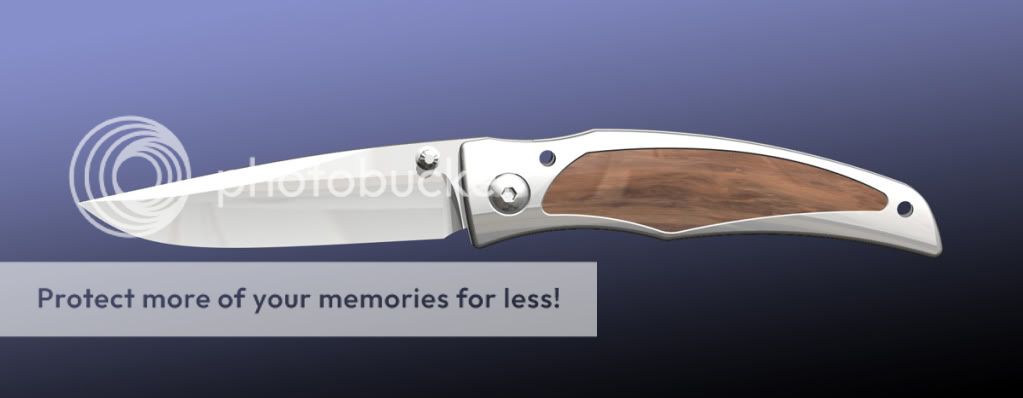
This was done in Pro/ENGINEER with ISDX:

cadknife.jpg


Slick programs like Rhino and Alias can help with the design process. I find other 3D CAD programs like AutoCAD too chunky to use on stuff like that and a hindrance. I feel that a good 2D tool like Illustrator or some of the programs mentioned earlier in the thread would serve most people well.

Unless you're going for a clunky, military, tactical look, I'd stay away from too many straight lines and constant radius curves and try the spline tools.
 
I usually do everything in 3D CAD before making it because of my process. This helps with the design and also helps me figure out how to make it and simplifies fixturing etc.

This was done in Pro/ENGINEER with ISDX:

cadknife.jpg


Slick programs like Rhino and Alias can help with the design process. I find other 3D CAD programs like AutoCAD too chunky to use on stuff like that and a hindrance. I feel that a good 2D tool like Illustrator or some of the programs mentioned earlier in the thread would serve most people well.

Unless you're going for a clunky, military, tactical look, I'd stay away from too many straight lines and constant radius curves and try the spline tools.

Looks good! Clean surfaces, good geometry, and the inlay is great.
 
Yeah, I shouldn't even make out like Inkscape is so easy to draw with. It is, but there will be many moments when you're frustrated at not knowing how to do something.

Salem,

Downloaded the program today and only fooled around with it for about 30 minutes. Guess I am gonna have to spend a lot of time with the HELP manuals. I mainly want to lay out folders WITH dimensions.

Robert
 
Looks good! Clean surfaces, good geometry, and the inlay is great.

Thanks William. I've done a little bit of product design here and there (medical mostly, not consumer), but have settled into a pretty good groove working in my little shop. Knives are a lot of fun. I think it is good that you're assembling a shop so you can make some of the things you design and then use them. Very rewarding and a valuable experience.
 
Killer looking design, Nathan. I even like the knife itself.

Thanks for posting your works of expertise, guys.
 
Inkscape is also easy to learn old designs from PDF screenshot and photos!!
It can "drag and move" import image files on canvas and we can draw paths to trace

but simple is sometimes difficult.... Nessmuk
Nessmuk.png
 
Back
Top