
• Happy Thanksgiving to all of you! I hope that you all have something to be grateful for this year and for many years to come
  • America has reached 250 years, and I am grateful to be here, in the best country in the world. Thank every one of you who helps make this country a better place, those who have gone before and risked it all, and those who've paid the ultimate price to make the United States what we are today.

    Happy Birthday America! Let Freedom Ring for all time!

Solved Unable to view Banned Member profiles

David Mary

pass the mustard - after you cut it
Moderator
Knifemaker / Craftsman / Service Provider
Joined
Jul 23, 2015
Messages
20,068
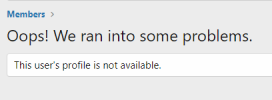
When I click on the link to a member's profile who has been banned, I get this:
1647895675482.png

It works for me - are you using a mobile device or PC?

I've tried on iOS device and my PC and it seems to work ok.

I'm on a PC, using Brave with Windows 10. It also happens in Firefox.
 
When I click on the link to a member's profile who has been banned, I get this:

View attachment 1772283


I'm on a PC, using Brave with Windows 10. It also happens in Firefox.

When you click on the name, are you right-clicking and opening in new tab? I do that out of habit and that definitely gives me the "Oops!".

But I just tried in Firefox and clicked the name in question, it pulled up the user window and then I could click on the number under messages.

eGEXoVP.png
 
It also bears mentioning that browser settings can impact how it treats a clicked link - i.e. open link in new window or tab, switch to linked window automatically, etc.
 
I stand corrected, thank you I had no idea it worked like that.

B benchwarmer380 I owe you an apology for dismissing what turned out to be correct information from you. Sorry sir.
 
Back
Top