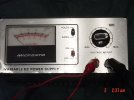
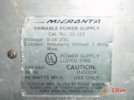
Will this work as an Etcher?

J.McDonald Knives

Basic Member
Joined
Jan 28, 2007
Messages
2,021
If so, how much voltage do I need? And which lead holds the pad?

attachment.php

attachment.php
 

Attachments

  • DSC01713.jpg
    DSC01713.jpg
    54.1 KB · Views: 283
  • DSC01715.jpg
    DSC01715.jpg
    37.1 KB · Views: 283
I think you have an etching machine! :)
can it provide AC and DC output? that could be perfect to etch and to black your mark
 
Yes it will work, I use one similar but with more amperage. The red one goes to the piece being etched and the black to the pad. I mostly just use a Qtip for a pad held with an alligator clip. I would use a minimum of 12v on it. You can somewhat clean your stencil now and then by reversing the leads and just dabbing at it with the Qtip, doing so will help it to last longer. I dont know if you can get AC on yours or not without looking inside the case, you would have to add a dpdt switch for if you can find a tap for it..
 
I wouldn't want to mess with it to try and get AC out of it. For a deep etch how much voltage should I use?
 
The depth of etch is all about the time, not so much the voltage. Lower voltage (like 12v) will take longer than if you were to etch at 24. I dunno if you had mentioned it or not as far as what you have read about so far but DC will only give you depth, no black. So, sure you can press on with only DC but if you want black you need AC.

I tape my stencil down securely on one edge only so I can flip it back and look at my progress. You want to see if you are missing a spot. So you hit it for one, maybe 2 min then flip the stencil back and check on progress, also gives the part time to offgas. If you are crankin at 24 then you will not go as long cause things heat up faster.
 
Thanks bro. Just need some contact info for a stencil. Later on I can get a better etcher unless someone knows something about this one and knows how to add some AC power to it and walk me through what I need to do and what parts I need.
 
Tus Tech is where I got my stencils from , it is like $20 startup fee then 13 for the stencils (I believe, dont remember. But as long as you do not change your stencil they have it on file and it is just the cost of the stencils. If you can find the font they can do it. Mine is out of the ordinary.
 
I'll second (well 3rd? since i recommended them in your stamp thread) the recommendation for TUS tech for stamps. One time setup fee for your graphic, and then just 13$ for a sheet of 5 to 7 stencils, and they're professional stencils, designed to be used with automatic etchers for thousands of etches, so for knives if treated right, you can still get practically a life time's supply of stencils for a few bucks.
 
Thanks guys. Anyone know how to modify this machine to work with both AC and DC? What parts will I need? I know there is someone here that is very knowledgeable with electronics and can walk me through the steps and parts I will need. I can solder electronics very well and have a soldering pen from rat shack and some solder.
 
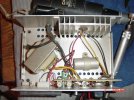
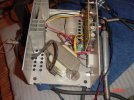
Well I popped the cover on this one. Here are the pics. Is there a way to modify this one for AC/DC or is it only gonna work for DC? I know I need to replace the power cord with a 3 prong cord.

attachment.php

attachment.php
 

Attachments

  • DSC01716.jpg
    DSC01716.jpg
    89.8 KB · Views: 167
  • DSC01717.jpg
    DSC01717.jpg
    78.2 KB · Views: 164
It'll work just check the link I gave you to see where to put the rectifier and switch. Just find a spot with enough room in your case and put them in.
 
Wouldn't I have to modify the components on the original circuit board or is there a way I can use some of the parts off of it to make a better etcher?
 
I woulnt mess with the circuit board, you've got the voltage already. All you need is to add the AC capability.
 
www.erniesknives.com

This is where I get my stencils. Ernie is a great guy (and a knifemaker), twice I have had stencils shipped the same day I contacted him!:thumbup::thumbup: Good Prices too.
Matt
 
I'm not sure where you guys studied electronics, but you can't convert DC to AC with a bridge rectifier. It works the other way around.

To make a simple DC supply, like a battery charger, into AC/DC you just wire the DPDT switch before the bridge rectifier. On the unit shown, the rectifiers are part of the circuit board, and I can tell you that Jacob doesn't have the technical skills to modify the board. That unit might be good for anodizing titanium, but will not be of much use as a variable voltage AC/DC etcher.

Stacy
 
You are correct Stacy, sorry my mistake Jacob. Guess I had a brain fart or something similar. The reason mine worked was because I came straight from the transformer, thats not the case with your variable supply. AC from Transformer is converted to DC. Good to have guys like Stacey around to clean up my messes, Thanks Stacy.
 
If I had a detailed illustration I probably could modify it. I used to do a lot of electronic kits in high school and also for fun at home.
 
you dont need ac all you have to do is switch them start out with the + that puts the beep etch then put the + on your knive then use the _- with the qtip only damp not wet the - puts the black in the etch that is it
 
Back
Top