

- Joined
- May 19, 2013
- Messages
- 185
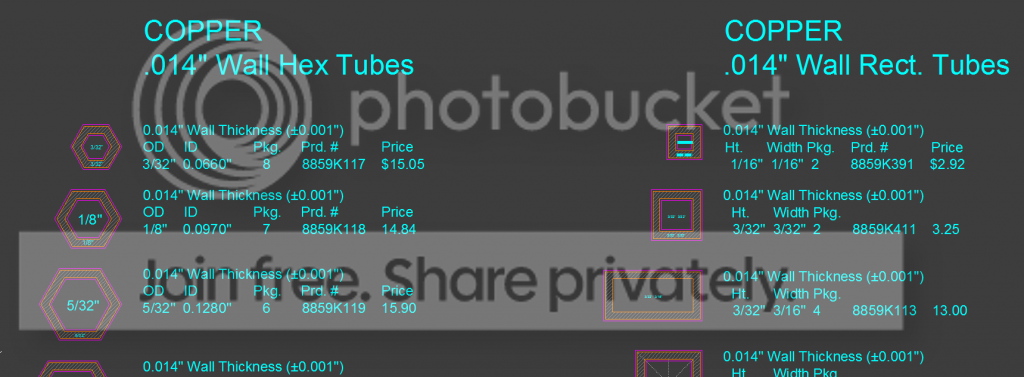
So, in the course of trying to work out some mosaic pin designs I put my CAD skills to use drafting out a design on screen to check for tolerances and such. Drafting everything from scratch was getting tedious, so I started making blocks that are easier to move around and copy over and over. Then, instead of going out on the web to to find one particular tube or rod size to fit my design I thought, why not draft the supplier's whole catalogue so I have all the blocks ready to go and I can just go nuts?
The point of this database is to work from stock sizes I know are available, so I don't have to tear my hair out trying to find the last piece for my design.
I will make this CAD file available here soon (dropbox link) along with a link to an open source CAD program for those who want to try it out.
If someone has a supplier for small diameter copper, brass, nickel silver, etc, PLEASE let me know. So far I've been googling "copper tube" and seeing what I find, but no one seems to have a really comprehensive selection. This will go much faster if you guys have some tips. I've already been referencing McMaster.com alot as well as redmetals.com.
Thanks for looking!



The point of this database is to work from stock sizes I know are available, so I don't have to tear my hair out trying to find the last piece for my design.
I will make this CAD file available here soon (dropbox link) along with a link to an open source CAD program for those who want to try it out.
If someone has a supplier for small diameter copper, brass, nickel silver, etc, PLEASE let me know. So far I've been googling "copper tube" and seeing what I find, but no one seems to have a really comprehensive selection. This will go much faster
if you guys have some tips. I've already been referencing McMaster.com alot as well as redmetals.com.Thanks for looking!


Last edited:


 It's not as hard as you think.


