CAD Software for designing knives?

synthesist

So many knives so little time
Joined
Sep 14, 2004
Messages
933
I'd like to try designing on a computer.

Suggestions please.

Syn
 
I guess it depends on what CAD you have, how proficient you are in it, and what value the finished data is. Some people use CAD daily, and use it to program machinery, so it is logical to incorporate CAD into their knife design process.

Knives designed on a computer often look like it, which is a bad thing. And there isn't an easy way to get a design out of the computer and into your hand.


AutoCAD is fairly intuitive and might help you work out folder details. It is not a great product design tool.

SolidWorks is a very good program, and in skilled hands can develop good product designs. It is intuitive and relatively powerful.

On the upper end, just in case anyone is interested.

There is Unigraphis, which is used at some large companies.

Pro/ENGINEER is a very powerful CAD program, and in skilled hands develops very sophisticated designs.

CATIA is considered by some to be the ultimate computer aided design tool. $$$


On a more pragmatic note, Rhino might be a good computer design tool for knife makers. FormZ is easy to use 3D. For those with CNC, BOBCAD may be useful.

If you have no CAD skills and a limited budget, AutoCAD light is popular. The downside to things designed in AutoCAD LT is the limited power of the system limits your creativity, yielding ugly knives. You're better off designing on paper. However there would be a great benefit to working out some elements of a folding design this way.

In "the real world" things are often designed and styled on paper (much the same way as Michelangelo's day), then engineered and documented in CAD. Most product designers already have a design fairly well worked out before moving to CAD.

So, to finish my long winded dissertation on CAD; without the need to document a design (prints) or generate tool paths (CNC), I think CAD may have more drawbacks than advantages for most knife makers.

I think something like Adobe Illustrator may be a better tool. It isn't CAD, it is just a drawing program.
 
I have never made a knife, but I have some experience designing things in Solidworks and then fabricating them.
Solidworks is very powerful, yet quite easy to learn. It lets you quickly sketch up parts, then combine the parts into "assemblies", and simulate movement, spring forces, etc.
I recommend spending a week of evenings going through the included tutorials, they'll show you the basics quickly.
I have a design for a folder I'm itching to fabricate....
 
I don't have any CAD software (yet, that is............) I do have several pretty powerful computers and good monitors and printers to go with them. I also have access to AutoCad if I ask nicely. Solidworks sounds interesting also.

I appreciate the ideas I will give them a look and see how it goes. I'm certainly open to other ideas as well.

I wasn't thinking about using these to go into production, simply to design and refine my ideas and make sure they fit before I start buying materials and g making sparks.

Thanks

Syn
 
I use AutoCAD and I know its some expensive software. About $4,000. If I were you I would find Solidworks since it might be cheaper.
 
Autocad is the one teached at my college to engineers. Easy to learn. Easy to... hum... ;) get.
 
CorelDraw! is what I use. 2D only but cheaper and easier to learn than AutoCad. I have both and prefer CorelDraw!...
 
I'm sorry but I abhor CorelDraw, I had to use it for the laser engraver at my school and it's so constrictive that I found it hard to do much. I much prefer the precision of a real CAD program. It doesn't have to look computer designed.

ironwoodscrap.jpg
 
Hi Syn,

I used CAD to refine my design of my knife. Unless you are doing a folder and want to create a 3D animation, I would just use 2D design. Like the guys above say, you can land up with an ugly knife that is too "geometric" if you know only the basics of CAD.
I used CAD purely so that I could play around with size and proportion to fit the design on an old file. It worked wonderfully for that. To begin with, if I was you I would search the net for some free CAD applications and see if they fit your needs. Unfortuantely I dont have this info with me now, but if I recall correctly, a year or so ago I downloaded a freeware CAD prog named "JustCAD" (I think)... try that out... Good luck
 
My personal procedure is to draw it until it looks "about right", then transfer it to the computer and do all the precise stuff there, especially the lock. Then print it out, transfer to balsa wood, cardboard &c, modify as needed and repeat. Main advantage over doing it all on paper is that you can have multiple copies, and I hate tracing and don't have a photocopier.
 
I use Illustrator. It will export as CAD if you need to. Not sure what format, but I think it gives you a couple of options. It's a really good tool for working out the kinks in a design. I'm using it to help with my folder designs.

With a little practice, you can get some pretty cool results with the gradients to get a fairly good rendering. You can then remove the color and just use the outlines to apply to your steel for profiling.
Here's an example: http://wommackcustomcutlery.com/images/mini_utility_folder.pdf
 
I can see I have some software evaluation to do. Luckily I'm off till Monday unless my wife decides we're taking a trip or doing some garden project.

I'm thinking that 2D is all I need right now and rather then sink a buncha money into something I may not like. The shareware route seems like a good place to start looking at it from that perspective. A friend down the block suggested SketchUp from Google. I am downloading that as I type this and will give it a try. When I've created a knife pic I'll post it and y'all can dissect it for me.............. I have a friend who sails ( you really can sail on Lake Michigan btw ) who has been bugging me to make him a "yachting" knife, 4 1/2" straight edge, no point, a couple of hollow rivets/lanyard holes and maybe a couple inches of serrations and a fingerhole on the end ( kinda like a Karambit has ). I'd, at least like to show him a picture before I make the knife, just in case he objects to something about what I've thought up. I'd emailed Gene Martin about this and he seemed willing to modify one of his stock blade designs for me ( basically turn it upside down ) which would speed making this up quite a bit. I'd like to get it for him while it's still possible to sail in Chicago.

Thanks for all the suggestions

Syn
 
If you'e planning on buying software for hobby/home use – as oppossed to using cracked software – then you should try AutoDesk Sketch which is a simplified AutoCAD. It would give you a start into professional software and you can take the next step into AutoCAD if you like.

There are some freeware/shareware programs you try but I don't know the names.

Drawing and illustration software is also not a bad choice. I use Adobe Illustrator for a lot of stuff. It's anexcellent program and well worth the cost. Illustrator CS has a very good export to .DWG/.DXF feature that works. One problem that can happen is that the exactness of the dimensions is not good enough for industrial application but that is a rare problem you probably won't have.

Corel Draw is crap, or at least every version I've ever seen was crap.

Programs like Solid Works and ProEngineer cost many thousands of $! Yes, thousands and generally require service contracts too. If you have $5000 laying around, then knock yourself out. Otherwise you are limited to hot software.

You might try taking a community college course in one of these programs and would then be able to get a time limited student version cheaply ... who knows, if you get good at Solid Works or ProE you might have a career change in the works! If you are good at either of those programs you can make good money.
 
A very good friend of mine draws and generates tool paths for a high end furniture manufacturer in montreal. I spoke with him in depth about what type of software would be the best for knife design. He suggested, for the same reason someone mentioned knives drawn on cad/cam look like they were drawn on cad/cam, that Art/Cam or a similar software may be better suited to the geometry that is exibited in knives. Any of you cad/cam wizards have experience or thoughts on what my friend suggested ? I have a seat of BobCad & never use it. I really wish I had the time & the smarts to be more proficient with it.
 
A very good friend of mine draws and generates tool paths for a high end furniture manufacturer in montreal. I spoke with him in depth about what type of software would be the best for knife design. He suggested, for the same reason someone mentioned knives drawn on cad/cam look like they were drawn on cad/cam, that Art/Cam or a similar software may be better suited to the geometry that is exibited in knives. Any of you cad/cam wizards have experience or thoughts on what my friend suggested ?QUOTE]


A professional CAD user, using a good CAD system, can develope perfectly organic designs without the slightest hint of "CAD generated" look. There are two ingredients to get there.

1: The styling is more or less worked out before going into CAD. This prevents the computer from driving or influencing the design too much.

2: When you draw or forge or grind something by hand, you are not using true constant radius curves, and straight line segments. So, if you are using a lot of perfectly straight lines, or constant radius curves in your computer based design, you are letting the computer drive the design. This is what NURBS splines are for and why it may be better for a novice to use Adobe Illustrator to develop part shapes than a CAD program, because Illustrator uses these natural looking splines. Splines give better "flow".

Case in point. Look at the knife design above by Jared. No offence to Jared. I like the overall shape and proportion of the design, but the design tool left its imprint on it. All the constant radius curves give it a mechanical appearance that doesn't work well with the overall organic shape of the thing.

Now look at clw3 womamack's design. The varying curvature, smooth transitions and elegant shape are the result of his good eye for design, and are made possible through the use of the NURBS splines used in Adobe Illustrator.

I don't know how much experience he has in Illustrator, but I do know it is common to see people make great shapes like that in Illustrator. I also know it is extremely uncommon to find people able to make shapes like that in CAD. Some CAD is not even capable. For example, unless they've changed it, SolidWorks can not create a curve through points and maintain curvature continuity (C2 continuous) to the adjoining edge or surface. And I'm about sure that AutoCAD can't do it (lousy design tool IMO). Pro/E can, and CATIA can, but there is a big learning curve to get there and they're very expensive.

A final point. The Illustrator design can be exported to a CAM system and profiled into steel.
 
Thank you for that excellent explanation Nathan. Any experience using any of the Art/Cam type software ? I think Art/Cam was originally developed by MasterCam. -0- experience here other than messing around with BobArt, I'm looking for another opinion. You are obviously very knowledgable and your opinion(s) is very much appreciated :thumbup:

And yeah, super job clw3 :thumbup:, you too Jared ;) And JCasewell, IMHO you are doing an great job of marketing your most excellent clip design :thumbup: :thumbup: :) Nice sig line too :cool:
 
CAD programs are vastly different than CAM programs, they do totally different things.

Mastercam is an excellent CAM program in which it is possible to creat or modify geometry. Most people prefer to design in another program and import the file into their CAM software if they are producing in house.

BobCad has a pretty bad rep as far as I know. I tried a demo of it and thought it was crap.

Illustrator has a decent learning curve and isn't too expensive. It will do most things neede for 2D knife design and the export capabilities are usually enough for most knifemakers projects. There are limits for industrial applications.
 
Thanks Kevin, CAD to make the part, CAM to generate the tool paths/machining operations related to that part.:thumbup:

I'm still interested to hear about the art programs and their worth for knife making apps. I know they are capable of generating a DXF file and tool paths for knifemaking, but are they any good ??

Also, I can't remember if I saw it on Darrel Ralphs Site or BobCad/CAMs site. One of them advertises that he uses that software(among others I'm sure). :confused: A pretty respected knifemaker, at least in my book.
 
Thank you for that excellent explanation Nathan. Any experience using any of the Art/Cam type software ? I think Art/Cam was originally developed by MasterCam. -0- experience here other than messing around with BobArt, I'm looking for another opinion. You are obviously very knowledgable and your opinion(s) is very much appreciated :thumbup:
:

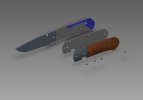

My experience is with Pro/E and Pro/NC. If you're interested, these are links to a folder blade I designed in CAD and milled. Yup, I milled a 10" hollow "grind".

http://www.metalworking.com/dropbox/blade.jpg

http://www.metalworking.com/dropbox/blade4_making_blade.jpg
 
Back
Top

