Drawing Program

Joined
Jun 13, 2006
Messages
202
Can anyone recommend a good drawing program for the computer? I've seen some guys show some nice patterns here and am wondering what programs they've used. I'd like to make a catalog of my knife patterns - when I start to have some - :) OK, I have one so far.
 
OK - don't laugh but I use Microsoft Word :o
Hey! That's what I have so...

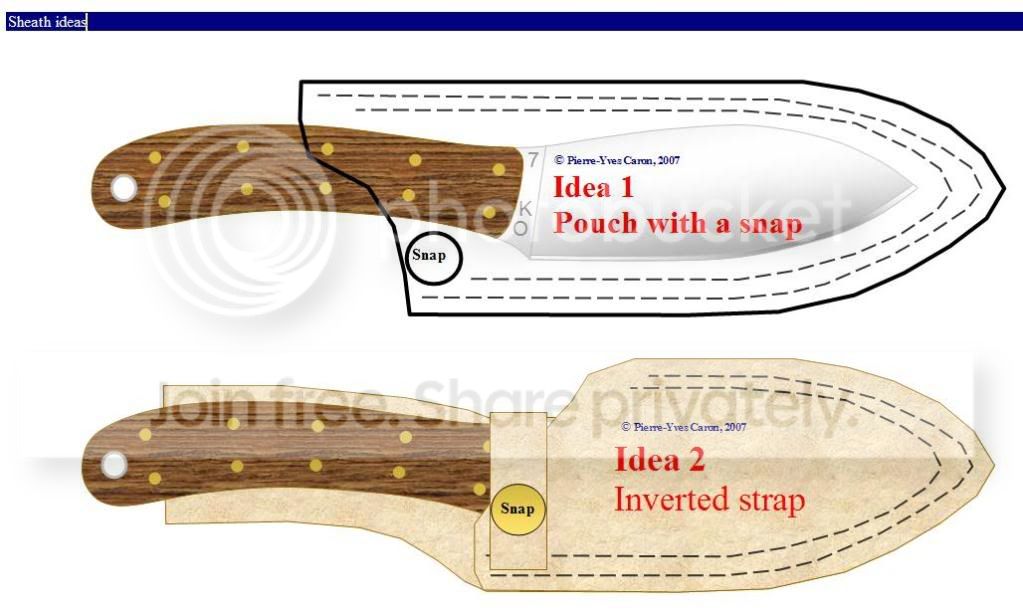
Here's some .jpg as an example:

defaultuser_CustomerAppreciationGiv.jpg


NessmukSheathIdeas.jpg


Works OK...nothing fancy. The measurement is a little approximative, and the texturing options are pretty basic, but it works!
 
How in the world do you do that with WORD?

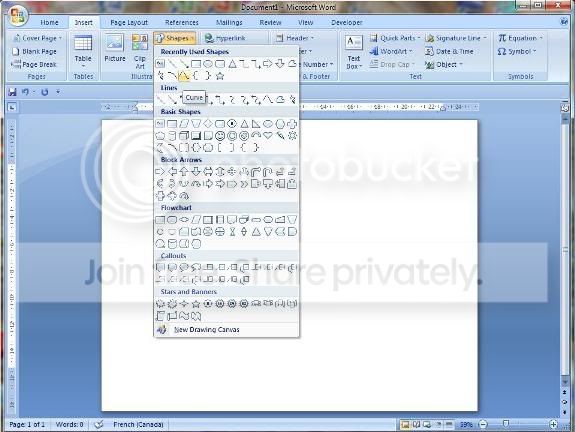
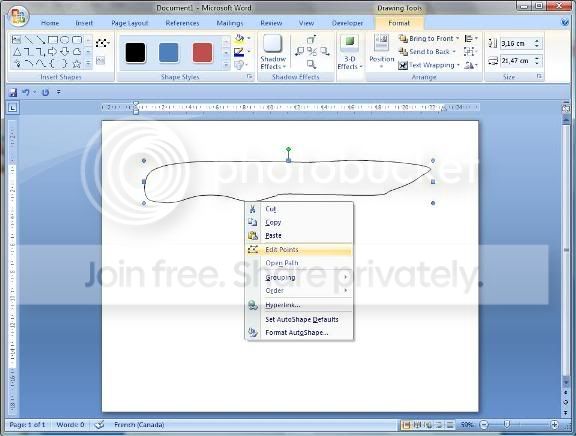
Word (and the other MSOffice suite tools, for that matter) have a pretty nifty drawing tool. In Word 2007, do "Insert", "Shapes", and then select the "Curve" item. Create a KSO (Knife Shaped Object) than right click to edit the points. Play around; most of the basic CAD functions are there :eek:
 
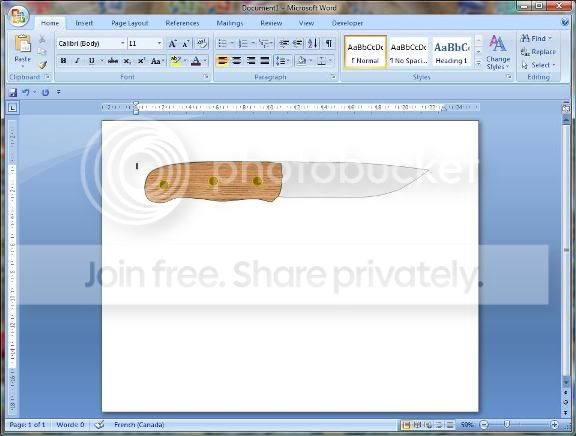
What version do you have? With the CURVE tool, you can draw anything you'd like...Here's some screen shots of a KSO I just created in 2 minutes...I took more time to upload the pictures to my photobucket account and insert the link than creating the drawing :eek:

Word_Drawing_01.jpg


Word_Drawing_02.jpg


Word_Drawing_03.jpg


Don't hesitate to PM or email me for any questions.
 
I am not sure of the word version I have but it looks nothing like your screenshot

It was on my computer when I got it, I have the Vista os

I just looked and it says its the 2005 version I will have to try to download the 2007 version, thanks for all the info
 
I run Vista too. In Word, do you have an "About" menu item? The version will be identified there. You might have Office 2003, which contains all the same drawing tools (organized in menus/toolbars instead of "ribbons" in Office 2007). Take a look at your toolbars; there's gotta be a "Drawing" toolbar there, no matter the version :)
 
I just looked and it says its the 2005 version I will have to try to download the 2007 version, thanks for all the info

No need for a new version; look in your menus for the drawing tools. I'm pretty sure they're all there!
 
Oh I guess you cannot download Word 2007, I need to buy it.......
I guess I will have to keep drawing them on paper!!!
 
If you do a google search for Free CAD software you will come up with many, just try a few out and you will find one that works for you
 
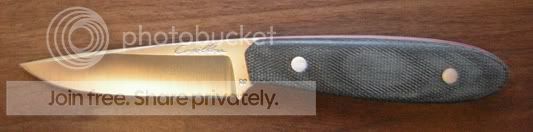
steak_knife.jpg


This is an excellent question. It is my opinion that the most serious problem with designing on a computer is the unnatural etch-a-sketch true radius arc and straight line segments you see.

I much prefer something with good spline tools such as NURB splines etc. In my opinion, there has never been a better pure drawing program than Adobe Illustrator for generating refined attractive and natural profiles without the tool driving the design (don't design in AutoCAD)

Personally, I use ISDX inside of Pro/ENGINEER


Edit to add:

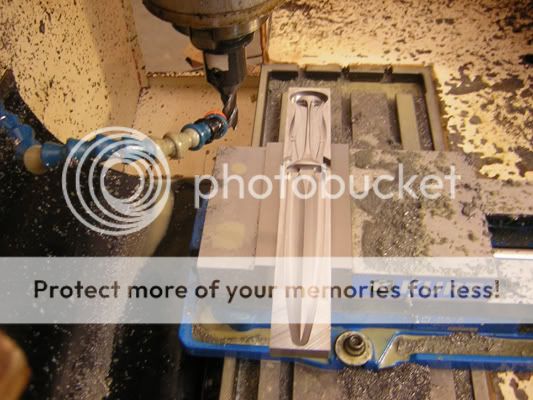
An upside to having a design in the computer is you can then utilize the computer to aid you in its construction.

milled_dagger_project.jpg
 
Last edited:
I much prefer something with good spline tools such as NURB splines etc

I agree, I learned on AutoCAD, but moved to a Nonuniform Rational B-Splines (NURBS) based software not long after. I have gotten bad enough that I don't even pick up a pencil anymore:o Everything I do is scetched up in a 3D program then rendered with MentalRay. This way I can rotate it around and look at it from all angles, when I am happy with it I create a line drawing complete with diamentions print it up to scale and go from there. I really wish at times that I hadn't let my ability to draw slip away, that way I could scetch up ideas any where I felt like it instead of in front of a computer.
 
http://sketchup.google.com/

Pretty sure that is the free one. There is a sketchup Pro that you have to pay for but there is also a free one they offer.

I am really a fan of this. I was thinking of doing a video on how to design knives in sketchup but haven't done it yet. Feel free to ask questions on it (I have more experience with it than the knifemaking itself :foot:)
You can make a parabola like shape with some tweaking like Nathan said by doing several curves, which I like to do sometimes. I downloaded the pro version off of my "friend" in Sweden, it doesn't have many more features, but the one that I like is the ability to import and export the 3d files. That way you can sent it to somebody running auto cad (waterjet cutting would be an example) (it costs about $500usd for the pro version)
 
I am really a fan of this. I was thinking of doing a video on how to design knives in sketchup but haven't done it yet. Feel free to ask questions on it (I have more experience with it than the knifemaking itself :foot:)
You can make a parabola like shape with some tweaking like Nathan said by doing several curves, which I like to do sometimes. I downloaded the pro version off of my "friend" in Sweden, it doesn't have many more features, but the one that I like is the ability to import and export the 3d files. That way you can sent it to somebody running auto cad (waterjet cutting would be an example) (it costs about $500usd for the pro version)

I would love to see a how to I tried this program a while back and didn't like it. I currently use photo shop cs, the Google program looks like it definitely has benefits to it.

MG
 
Back
Top