
-
The BladeForums.com 2024 Traditional Knife is available! Price is $250 ea (shipped within CONUS).
Order here: https://www.bladeforums.com/help/2024-traditional/
You are using an out of date browser. It may not display this or other websites correctly.
You should upgrade or use an alternative browser.
You should upgrade or use an alternative browser.
Idiot-proof Guide Of Awesomeness On How To Post Pictures: Sticky Me Please
- Thread starter madcap_magician
- Start date

nozh2002
BANNED
- Joined
- Jun 9, 2003
- Messages
- 5,736
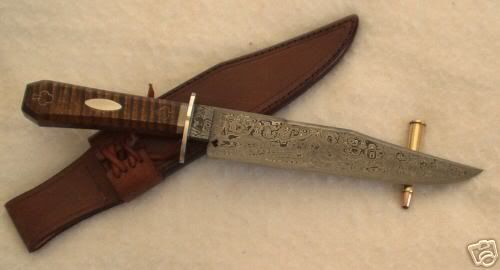
leatherbird said:http://s60.photobucket.com/albums/h1/leatherbird_2006/?action=view¤t=Gambler1.jpg
Another Damascus,this one a fixed blade by Rodrigo Sfreddo.
Doug
I have Netscape 7...
Little exesize:
1. Follow the link.
2. LeftClick on image and choose ViewImage
3. Highlight with mouse URL of the image and copy it (by mouse menu or press Ctrl-C). You may do also choose "Copy Image Location" on the step 2.
4. Click "Image" (looks like small picture of mountans and sun).
5. Paste copied URL in the poped window by mouse or Ctrl-V.
Should work.
It does! for me.
Thanks, Vassili.
nozh2002
BANNED
- Joined
- Jun 9, 2003
- Messages
- 5,736
leatherbird said:http://s60.photobucket.com/albums/h1/leatherbird_2006/?action=view¤t=txtoothpix19.jpg
Don Hanson's Texas Toothpick slippy from his sale last November.
You may try it youself with this one...
Thanks, Vassili.
P.S. Leatherbird, you have pretty nice album there - fitchhanter, fitchbowie...!

- Joined
- Mar 15, 2005
- Messages
- 26,811
Vassili,
Thank you for your comment,acquired the Fitch Bowie and hunter from G2 aka Gary Graley,IIRC,they were the first knives I got here and Gary is top shelf.:thumbup:
Only uploaded 18 knives since I wanted to see if I could get them to appear here but I'll upload more when I get the hang of this,problem is I have a Mac so no right click,left click.Should be able to figure it out though.
Thanks again for your help.:thumbup oug
oug
Thank you for your comment,acquired the Fitch Bowie and hunter from G2 aka Gary Graley,IIRC,they were the first knives I got here and Gary is top shelf.:thumbup:
Only uploaded 18 knives since I wanted to see if I could get them to appear here but I'll upload more when I get the hang of this,problem is I have a Mac so no right click,left click.Should be able to figure it out though.
Thanks again for your help.:thumbup
oug
nozh2002
BANNED
- Joined
- Jun 9, 2003
- Messages
- 5,736
leatherbird said:Vassili,
Thank you for your comment,acquired the Fitch Bowie and hunter from G2 aka Gary Graley,IIRC,they were the first knives I got here and Gary is top shelf.:thumbup:
Only uploaded 18 knives since I wanted to see if I could get them to appear here but I'll upload more when I get the hang of this,problem is I have a Mac so no right click,left click.Should be able to figure it out though.
Thanks again for your help.:thumbup:
Doug
Well - just put Image URL somehow in popup window when you click on "Insert Image". Or just type '[' 'I' 'M' 'G' ']' then Image URL and then '[' '/' 'I' 'M' 'G' ']'.
Thanks, Vassili.

- Joined
- Aug 27, 2004
- Messages
- 12,957
I signed on with Imagecave some time back and use them now and then for my pictures including the one in my signiture line. Once on with Image cave you can upload pics easy. Simply click on 'Add pictures' and when it opens click on the browse button and find the picture you want to upload by searching for it where you stored it on your computer. My documents, my pictures is where I store mine.
Double click the pic you want and then continue to the next browse button. Note: you can load more than it gives by changing the settings here. Read the tutorial to learn all that.
I recommend resizing the pictures to small before uploading them to the site. This way they are pretty much ready to go when you upload them. To do that right click on them after finding them in your computer and click on advanced, then click how you want it to do the pic, either a copy or resize the actual picture. I resize the actual pics because I don't want doubles crowding my computer all up. If you don't have the windows resizing tool for XP on your computer you can get that free by going here. http://www.microsoft.com/windowsxp/downloads/powertoys/xppowertoys.mspx
Once the pictures are in imagecave and the album you have selected or made up, go to the main page and find it. Left click on the "URL" and highlight it so you can then right click on it and hit copy.
Then open a new browser by clicking on Internet Explorer again or NetScape or whatever browser you use. Find the forum you want while leaving the image cave sight up also.
When making a post you will see a little yellow square somewhere at the top of the screen usually under the size of the print menu bar down arrow. Click on that box and when the new window comes up right click in the space provided and paste the link you copied in there and then click OK. That is all there is to it. Do as many as you need for the post. I usually click preview before finally posting when I'm doing pictures so that I am sure it is sized right. If you use the image resizer tool you should be fine though.
Vassili. If you don't have the resizing tool for XP and use Explorer to browse the net get that and simply resize the pictures before posting them. Its very easy to use by simply right clicking on any picture and making either a new copy in a smaller size or changing the size of the same picture. The smaller pics take less time to download for viewers and are less likely to be moved.
STR
Double click the pic you want and then continue to the next browse button. Note: you can load more than it gives by changing the settings here. Read the tutorial to learn all that.
I recommend resizing the pictures to small before uploading them to the site. This way they are pretty much ready to go when you upload them. To do that right click on them after finding them in your computer and click on advanced, then click how you want it to do the pic, either a copy or resize the actual picture. I resize the actual pics because I don't want doubles crowding my computer all up. If you don't have the windows resizing tool for XP on your computer you can get that free by going here. http://www.microsoft.com/windowsxp/downloads/powertoys/xppowertoys.mspx
Once the pictures are in imagecave and the album you have selected or made up, go to the main page and find it. Left click on the "URL" and highlight it so you can then right click on it and hit copy.
Then open a new browser by clicking on Internet Explorer again or NetScape or whatever browser you use. Find the forum you want while leaving the image cave sight up also.
When making a post you will see a little yellow square somewhere at the top of the screen usually under the size of the print menu bar down arrow. Click on that box and when the new window comes up right click in the space provided and paste the link you copied in there and then click OK. That is all there is to it. Do as many as you need for the post. I usually click preview before finally posting when I'm doing pictures so that I am sure it is sized right. If you use the image resizer tool you should be fine though.
Vassili. If you don't have the resizing tool for XP and use Explorer to browse the net get that and simply resize the pictures before posting them. Its very easy to use by simply right clicking on any picture and making either a new copy in a smaller size or changing the size of the same picture. The smaller pics take less time to download for viewers and are less likely to be moved.
STR
nozh2002
BANNED
- Joined
- Jun 9, 2003
- Messages
- 5,736
I resize my pictures - they all 1000 width. There is no reason to set up lights etc to make small pictures and Coguar like to move it before when they all were 620 width, this is just up to him will you call it "reasonable download time" or "I like to move it, move it", does not matter to me, I have to post twice and this feels ridiculos.
Again download time (I have slow connection) for pictures does not prevent at least me reading posts - I have Netscape however, I do not understand why it is an issue at all.
Thanks, Vassili.
Again download time (I have slow connection) for pictures does not prevent at least me reading posts - I have Netscape however, I do not understand why it is an issue at all.
Thanks, Vassili.
madcap_magician,
While I appreciate the time and effort you took to help, I think the advice you gave to sign up with a free image hosting service is bad. As I said in this thread...
http://www.bladeforums.com/forums/showthread.php?t=382831
By the way, the person in the other thread who recommends photobucket right before my post has, since then, lost almost all of his photobucket-hosted pictures.
While I appreciate the time and effort you took to help, I think the advice you gave to sign up with a free image hosting service is bad. As I said in this thread...
http://www.bladeforums.com/forums/showthread.php?t=382831
I don't want this to sound harsh, but you need to be aware of the harsh reality about this:
As long as you go with free photo hosting services, unpredictable disappearance of pictures, slow loads, and other issues, will remain likely possibilities. And when these issues occur, you will likely have very little recourse in dealing with those who have no financial nor contractual obligation to you, and owe you nothing.
In fact, there was a particular free photo hosting service (I'm forgetting the name, at the moment) that was widely used by most BF members, up until a couple of years ago, or so. Then, one day, everybody's pictures with that service disappeared.
Now we have broken links and red Xs everywhere throughout the archives.
History will probably repeat itself.
By the way, the person in the other thread who recommends photobucket right before my post has, since then, lost almost all of his photobucket-hosted pictures.
- Joined
- Mar 15, 2005
- Messages
- 26,811
- Joined
- Aug 27, 2004
- Messages
- 12,957
Thats what you get for free. Even still I've never had but very few problems with any of the free hosting sites I've used. So what if the pics don't show up after three months. Most threads die well before that anyway.
If you are a paid member you can just click on the 'manage attatchments' button when you want to add a pic. (At least I think its for paid members only.) That is the easiest way to add attatchments and the way I usually do it but for those that are just registered and not paid members a free hosting site is the next best thing IMO. Your advice to not use a free host site is kind of surprising considering so many people do it. I have three different accounts with various sources and all the pics have been there and are still there now going on years and years and years and years. On some forums a third party site is the only way to add a pic if you want one in your post. Also, I've found them to be a very convenient way to store pics so I can show family and friends when I visit by simply using their home computer and showing them from the stored pics at the site. Sure, as with anything sites can go down sometimes. That happens here too. Its just one of the risks. Truth be told just because you pay a company for storage doesn't mean there won't be problems there either.
Steve
If you are a paid member you can just click on the 'manage attatchments' button when you want to add a pic. (At least I think its for paid members only.) That is the easiest way to add attatchments and the way I usually do it but for those that are just registered and not paid members a free hosting site is the next best thing IMO. Your advice to not use a free host site is kind of surprising considering so many people do it. I have three different accounts with various sources and all the pics have been there and are still there now going on years and years and years and years. On some forums a third party site is the only way to add a pic if you want one in your post. Also, I've found them to be a very convenient way to store pics so I can show family and friends when I visit by simply using their home computer and showing them from the stored pics at the site. Sure, as with anything sites can go down sometimes. That happens here too. Its just one of the risks. Truth be told just because you pay a company for storage doesn't mean there won't be problems there either.
Steve

- Joined
- Dec 28, 2005
- Messages
- 8
If the print is too large and goes off your sceen, highlight what you want to print, right click the highlight, click "copy", then go to Micosoft Word, paste it and print it.



- Joined
- Sep 18, 2013
- Messages
- 2,870


[video]s1360[/video] sorry still trying to post pictures but im getting closer
And you not very close. Ask in Tech Support.