stock removal WIP

43.jpg

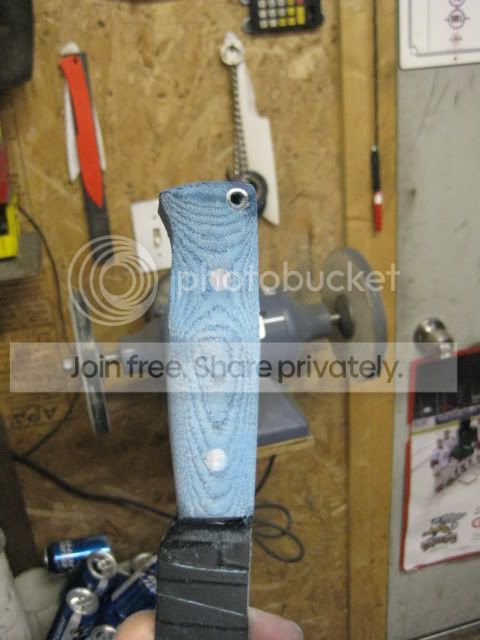
42.) Here is a shot of the handle after it is pretty much done. Next I’ll use files and sand paper to finish it.

44.jpg

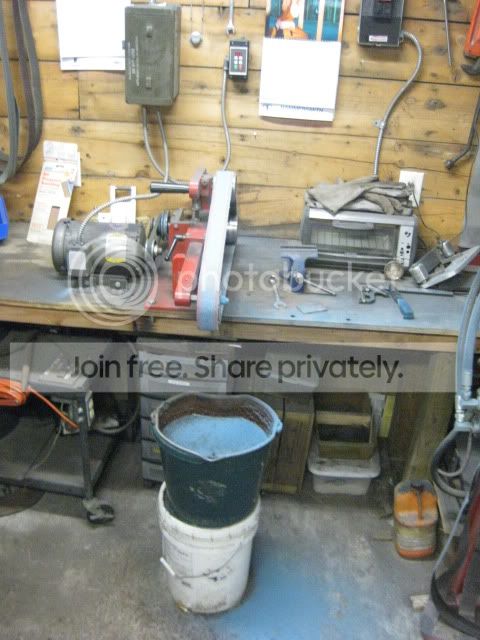
43.) One thing I noticed about grinding the denim was afterwords my shop looked like a smurf had been massacred.

Finally once everything is done I'll make a sheath for it. I haven't had a chance to do this yet but I'll be sure to post some pictures once everything is finished.
 
Thanks for taking the time to do this build-a-long! As a newbie I have find it very educational to see how others do things. And a lot of the time it is easier than the way I'm trying to do it. Good stuff here!
 
This build-a-long has been very, very helpful. You've included some nice tricks to make things easier (your sanding sticks, drilling jig etc.). Thank you for putting in so much time to spread your knowledge!
 
Many, many thanks. One of the best tutorials I've seen on stock removal. I learned a lot!

Phil Millam
Winthrop WA
 
Good tutorial, rtj. I like to read these to see if there are any ideas to steal. :D I quit using layout fluid quite a while ago. I draw a lot of my blades out freehand with soapstone. If I draw a pattern I use white posterboard and just trace around the cutout with a fine line marking pen which dries almost instantly. I also use the marking pen to trace around the tang onto my handle blanks. Also use it on the edge to scribe my center line into.
 
I wish I could get my plunge cuts to look even on both sides. I noticed you must leave your file guide on while grinding and grind up to it. I find it awkward to try & grind with the file guide attached. Maybe I need to get that system down. Any advice on that area is appreciated.Thanks in advance.
 
Excellent thread. Like Tim and others, I want to thank you again for some very cool tips. Keep up the great work! :)
 
I wish I could get my plunge cuts to look even on both sides. I noticed you must leave your file guide on while grinding and grind up to it. I find it awkward to try & grind with the file guide attached. Maybe I need to get that system down. Any advice on that area is appreciated.Thanks in advance.

On this knife the final grit was 600. The lowest I will go is 400 grit though. One key to the final finish is the backing that you use on your sanding block. I use a hard rubber backing which makes 400 grit look a lot higher. As far as the file guide I've just started using it recently. It can get in the way though so on my last couple passes I take it off. Once the plunge lines are established they act like a stop similar to the file guide. I used to use tape to mark where I stop when grinding my plunge cuts in but I found that having the guide on there is easier for me to keep them straight.
 
I am a newbie and was wondering how you scribe the edge of the blade, down the entire length after finding the center line. I am getting ready to make my first knife and can't figure out how you made those perfectly parallel marks on the edge of the blade.
 
I am a newbie and was wondering how you scribe the edge of the blade, down the entire length after finding the center line. I am getting ready to make my first knife and can't figure out how you made those perfectly parallel marks on the edge of the blade.

I'd had this question as well, and someone recommended using a drill bit half the thickness of your blade stock material. If you lay the bit down flat and drag it along the edge of the blade stock, it will scribe your line. That's how I did it and it worked quite well. I actually chose a bit that was slightly less than half the thickness of my blade stock, so that I would have two lines etched down the center with a slight gap in between.
 
I am a newbie and was wondering how you scribe the edge of the blade, down the entire length after finding the center line. I am getting ready to make my first knife and can't figure out how you made those perfectly parallel marks on the edge of the blade.

Sorry I should have explained this better, I used the calipers (the one that I showed the thickness of the steel with) to scribe the lines. The tip on the calipers is very sharp and works great for scribing lines on the dykem. When I made the two parallel lines I simply dragged the calipers down where the edge where bevel is going to be ground. Tim's method would work as well although I have never used it.
 
Oh thanks that makes sense. Did you freehand the scribe with the calipers or set them on an offset surface? Thanks Tim that drillbit method sounds like a pretty sure thing too.
 
Set them to half the thickness of the steel and hang one jaw off the edge, run the other one along the center. Then flip the blade around and do from the opposite site. The space (if any) between the lines will be your center mark. Ironically, this usually works out to be my pre-HT edge thickness if I grind down to that mark on either side :D
 
I very much appreciate the tutorial, but I just don't understand how you guys get the taper exactly flat without some sort of jig. If the tang isn't perfectly flat, the handle will not fit, right? I know, I know. Keep grinding, experience, experience. But any more tips appreciated.

Phil Millam
Winthrop WA
 
I'd had this question as well, and someone recommended using a drill bit half the thickness of your blade stock material. If you lay the bit down flat and drag it along the edge of the blade stock, it will scribe your line. That's how I did it and it worked quite well. I actually chose a bit that was slightly less than half the thickness of my blade stock, so that I would have two lines etched down the center with a slight gap in between.

Something is fishy here...

If you use a drill bit with the diameter half the thickness of your blade stock material, you'll get your line scribed at 1/4 of your blade stock material thickness.
Do it again on the other side and you'll get two lines with a lot of space between them ( 1/2 of your blade thickness, or even more ).
That's pretty too much...Isn't it?

To make a long story short, by using a drill bit:
a) the same diameter as your stock material thickness, you'll get one (thick) center line
b) slightly less diameter then your stock material thickness, you'll get two parallel lines (better solution, perfect pre-HT grinding guidelines)

BTW: I can hardly believe that someone is using the calipers (vernier or dial) to scribe the lines. :eek:
I was taught not to do so. That tool is made for precision measuring, not for scribing. That's kind of blasphemy, as well as using a knife as a pry bar or....or a screwdriver...

Just my 2 cents....and excuse my French! ;)
 
I very much appreciate the tutorial, but I just don't understand how you guys get the taper exactly flat without some sort of jig. If the tang isn't perfectly flat, the handle will not fit, right? I know, I know. Keep grinding, experience, experience. But any more tips appreciated.

Think of grinding the tang as the same as flat grinding the blade bevels if that helps you visualize it. I make the tang absolutely flat by using the flat platen on my grinder and then finishing it off by using my disc grinder. Believe it or not grinding the taper in the tang is easier than grinding the blade bevels, at least to me anyways.

BTW: I can hardly believe that someone is using the calipers (vernier or dial) to scribe the lines. :eek:
I was taught not to do so. That tool is made for precision measuring, not for scribing. That's kind of blasphemy, as well as using a knife as a pry bar or....or a screwdriver...

Just my 2 cents....and excuse my French! ;)

http://www.harborfreight.com/cpi/ctaf/displayitem.taf?Itemnumber=47256 and I got them when they were 50% off.;)
 
Back
Top