

- Joined
- Oct 1, 1999
- Messages
- 6,490
Well Folks, aside from the questions that may come up here, these lessons are finished. I think Ive achieved what I set out to do, which was to help you learn a Tool (Photoshop) that may aide you in your design capabilities.
Maybe even you Pencil, Paper and French Curve guys can find something usefull in this thread. You could certainly draw your designs on paper, scan them into PS and render them as a Virtual knife. Or maybe take your knife pics or scans and drop them into a new background. My purpose wasnt to show you how to design a knife, but just to offer ways to make someone else look at your work.
Several people have asked me why I did it?
My answer is, to share what I know and enjoy with you folks. Im not the first or the last to take the time to write a Tutorial for BFC.
Ill admit, Kit and I were both surprised at the number of Hits this thread has got. I hope the Topic didnt mislead too many. Of course it would be nice to see more results from people that have actually applied some of the techniques, but that may come in time.
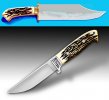
As a way to demonstrate that there is a learning curve to this, and to encourage others to show their work Ive attached a pic below here. The top pic is the first knife illustration I ever did, it was done with Appleworks a Mac wordprocessing/paint program. :barf
The other is one I just finished up, and its as good as I can do today. Of course Im working at getting better...Im still learning.
To all who have thanked me for doing this...Youre welcome!
If you want to know what Id like in return, Id like to see you to support BladeForums.Com with your membership.
Kit & Spark, thanks for the space.
Sincerely,
Phil La Barbera
Maybe even you Pencil, Paper and French Curve guys can find something usefull in this thread. You could certainly draw your designs on paper, scan them into PS and render them as a Virtual knife. Or maybe take your knife pics or scans and drop them into a new background. My purpose wasnt to show you how to design a knife, but just to offer ways to make someone else look at your work.
Several people have asked me why I did it?
My answer is, to share what I know and enjoy with you folks. Im not the first or the last to take the time to write a Tutorial for BFC.
Ill admit, Kit and I were both surprised at the number of Hits this thread has got. I hope the Topic didnt mislead too many. Of course it would be nice to see more results from people that have actually applied some of the techniques, but that may come in time.
As a way to demonstrate that there is a learning curve to this, and to encourage others to show their work Ive attached a pic below here. The top pic is the first knife illustration I ever did, it was done with Appleworks a Mac wordprocessing/paint program. :barf
The other is one I just finished up, and its as good as I can do today. Of course Im working at getting better...Im still learning.
To all who have thanked me for doing this...Youre welcome!
If you want to know what Id like in return, Id like to see you to support BladeForums.Com with your membership.
Kit & Spark, thanks for the space.
Sincerely,
Phil La Barbera


 I bet I'm not the only one to be starting now OR in the weeks to come.


