WIP, Setting up and milling a few blades. Picts, machining, CNC.

Nathan the Machinist

KnifeMaker / Machinist / Evil Genius
Moderator
Knifemaker / Craftsman / Service Provider
Joined
Feb 13, 2007
Messages
18,955
The purpose of this thread it to detail how I go about making a blade, from my perspective as a machinist. That and I just haven't posted anything in a while...

You might pick up a few ideas because I may approach things differently than you. I'll also try to go into some detail about what I'm doing and why, you might pick something up about machining.

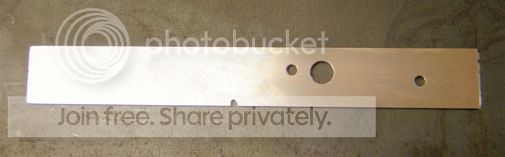
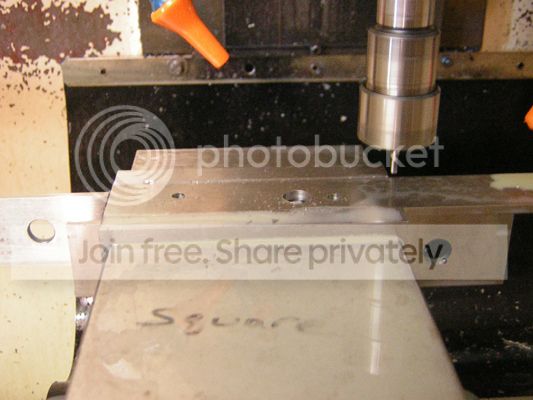
The first thing I do for this knife is saw off bar stock and pop it in the small mill for a few holes. This goes pretty fast, the mill and saw keep pace with each other while I crank out a few blanks. The features here are all created in the same setup, so they are accurate relative to each other, but not necessarily to the rest of the work piece. Remember, the ends are just saw cut etc. I'll deal with that in the next operation
1.jpg


I'm making this:

2.jpg


This is the beginnings of a knife. You have your two pin holes, which will eventually hold the scales and will also be used as locating features for fixturing, and a larger clearance hole, also used during fixturing later.

The next operation (profiling) is going to go faster on a heavier machine
 
Last edited:
4.jpg


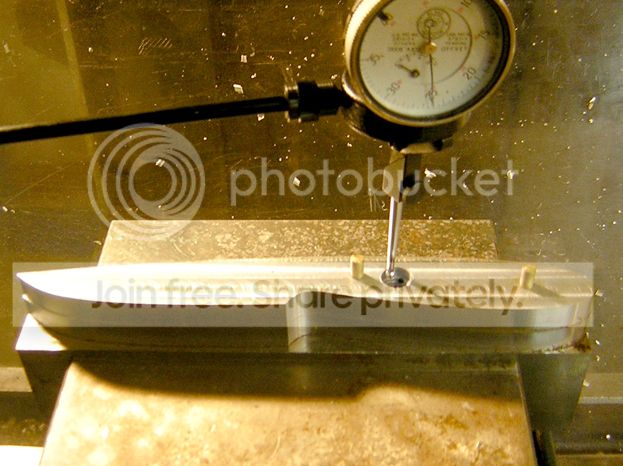
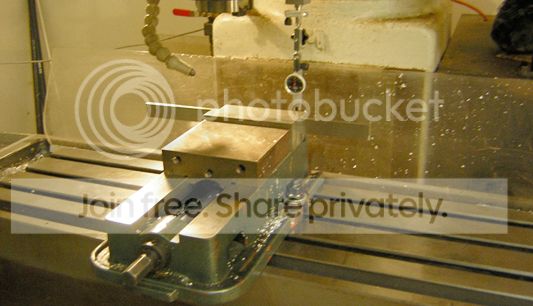
The first thing I do is square up a vise. TIP: I don't directly indicate a vice jaw because things can move around a little bit when you clamp down, so I find it better to clamp onto something and indicate off that, hence the ground flat stock. Notice I'm sweeping the side touching the stationary jaw, that is in case the flat stock has any taper it won't affect the setup. Then I tighten it down to the table and double check square one more time.

5.jpg


Next I put my fixture in the vice and indicate zero. I'm using a coaxial indicator to sweep a hole that was bored into the fixture at program zero when the fixture was made. In my opinion this is one of the fastest and easiest ways to zero a fixture accurately. Very robust and fool proof way to get in under a thou. In comparison I think using an edge finder on planes is slower and fraught with more opportunities for errors to accumulate.

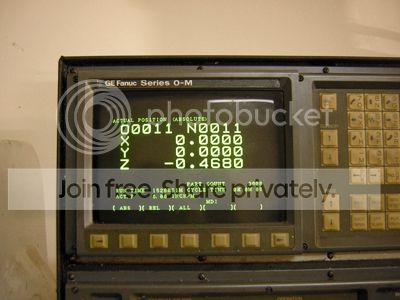
Zero out the X and Y axis:

6.jpg


The Z axis will get zeroed with the cutter. I do this differently if I'm using multiple tools or using a machine with a tool changer, but for this I literally just run the cutter down to the part and use G92 Z.010 (to get under the part a tad).
 
Last edited:
keep em coming, we're all eyes and ears ! :)

I have to get the kids around for bed and go make a screen dump from the CAM system for the next post, but I'll get it up tonight.

This will probably be a fairly long thread before I'm done...
 
7b.jpg


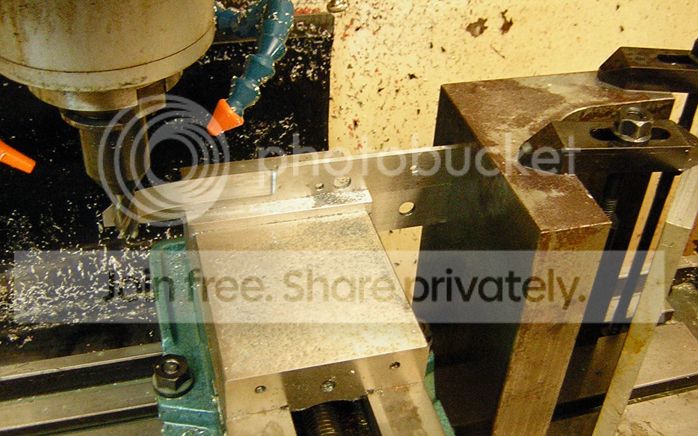
With the fixture and cutter zeroed out and the part in the fixture I cut the profile of the edge. I don't do this all in one pass, but I start on the outside and work in. I don't start at the top and work down and cut a drop, but instead reduce everything to chips for slug control. These are some fairly heavy cuts (for D2) so you can feel it through your feet. The larger mill weighs nearly three tons but you can definitely tell it is working. The small mill could do it too, but would require more cuts to get there.

7a.jpg


I also take a skim cut to "zero" off the back and end of the blank for accuracy in the next setup. So now those surfaces are accurate relative to the internal features I fixtured from. Tip: I've fed the cutter deeper (into air) so these cuts are made with a fresh bit of the endmill for better accuracy.

Next post: milling the bevels…
 
Last edited:
Good thread - i'll be watching.

That Plexiglas at the back of the table is so simple and such a nice solution.
 
Great idea for a thread Nathan, It's always cool to see what a CNC mill can do with an experienced machinist running it. How many lines of code does it take just to profile the blade?

Brad
www.AndersonKnives.ca
 
Awesome stuff Nathan!!!

Er... Uh... I mean... Uh... Hey, you're cheating!!! You can't use CNC in a REAL knife! :p ;) :D

I'm stoked about this thread Nathan. I love seeing how other guys do this stuff. Especially when it's so different from how I've come to do it. Makes it even more interesting to me, to see this end of it. I wish I understood it better, but if you keep it in simple terms like you have so far, I can probably keep up :)


Are these machines at your workplace, or at home? Or is that one in the same?

Thank you for doing this Nathan! :thumbup: :cool:
 
I'll post the next bit tonight. I don't mean to drag on, but this is a WIP, so these are not finished...

Brad,

The number of lines of code to profile the belly is quite a bit. There is not a true radius arc anywhere in the profile of the knife. Hands don't draw in true arcs, people don't forge or grind in true arcs, eyes don't like to see true arcs (or perfectly straight lines) so it isn't programmed in true arcs, which would only require a couple dozen lines of code. The knife was designed on paper and traced and tweaked in the computer. I used Non Uniform Rational B Splines (NURBS) type geometry to create the profile for smooth curves with constantly changing curvature. The profile of the entire blade is basically just two splines.

Long winded huh..

So to answer the question, there are probably thousands of lines of code to create that simple two minute program. The CAM software breaks the motions into minuscule short straight lines that are allowed to deviate from the theoretical geometry by a predetermined setting, in this case .0002". That creates a lot of lines of code. Both mills are designed to machine smoothly through these points, they don't start and stop at each point, they move in a smooth constant velocity motion. The little dyna didn't when I first got it, which is why it received the controller retrofit.

Long winded, huh...


Awesome stuff Nathan!!!


Are these machines at your workplace, or at home? Or is that one in the same?

:


Nick,

That is a simple question with a confusing answer. I own these machines, they're currently sitting in my shop. I work at a contract design, engineering and sales company with light contract manufacturing. I owned a small machine shop when I moved to North Carolina to take this job and we used my shop for R&D for years before we built a lab there. My "other" shop (which I do not own) has nicer newer stuff, but not much of it. So I am still back and forth some. I still do independent jobs in my shop, but not like I used to.
 
Awesome stuff Nathan!!!

Er... Uh... I mean... Uh... Hey, you're cheating!!! You can't use CNC in a REAL knife! :p ;) :D


When does the CNC forge/hammer/anvil come into play?:D

Just kiddin' hehe. Very cool work Nathan, thanks for showing how you do it the cnc stuff is fascinating! it's like you are the mind telling the machine what to do as if it was your hands at a grinder, VERY precise hands though!
 
Great thread Maestro ! :thumbup:

I think I've already told you this but I'll tell you again so you don't leave anything out ;) You're light years ahead of where I left off in the shop Nathan. The 3D CNC machining you're prepping for beats the heck out of a rotary table and cross slide :o

Question : I've been back and forth looking at your fixture set-up for your profile program you just ran. Do you have what could be called a "cap" , a thicker, but undersized profile of the geometry you're getting ready to create that is bolted over the top of your blade stock ? And if so, is it to help stop the thin D2 blade from flopping and chattering when milling the profile ?

Do you use the same software to "draw" the knife as you use to create the G code ?

Or......... ;) Do use one program for your CAD and another for your CAM applications ? And if so, as simple a "why" as you can muster :D

Thank you for taking the time to do this Nathan :thumbup: :thumbup: :thumbup: If there was a "bow" smiley I would put it right here * * * * * * and here * * * * * and ....... well, you get the idea :) You're awesome buddy !

 
Question : I've been back and forth looking at your fixture set-up for your profile program you just ran. Do you have what could be called a "cap" , a thicker, but undersized profile of the geometry you're getting ready to create that is bolted over the top of your blade stock ? And if so, is it to help stop the thin D2 blade from flopping and chattering when milling the profile ?

Do you use the same software to "draw" the knife as you use to create the G code ?

]

Hey Dave!

The answer to most all of your questions is yes! I'll go into more detail the next time I put that fixture on, when I finish the profile.

I use a CAD/CAM program which combines both functions nicely. An advantage to this is changes in the design propagate to the tool paths automatically, so changes simply require you to click the regenerate button and you can post new G-code for the machines. This is a handy time saver, but is not going to be that important to most folks here. I think it is important to use a good design tool when creating in the computer. It would be a shame to force yourself to use the built in tools of a CAM program to create your designs. Better to use something like Adobe Illustrator to create profiles then import them into a CAM system as a profile than to try to create an elegant shape in BobCAD etc...
 
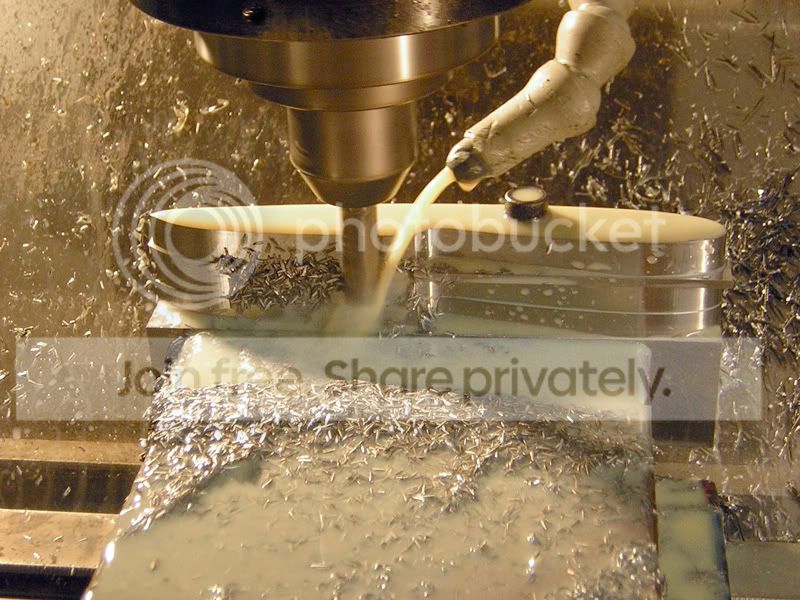
This might be everybody's favorite part here, I'm milling the bevel. I've gone over this a couple times before, but people have a hard time understanding what I'm talking about, so I'll try to explain better.

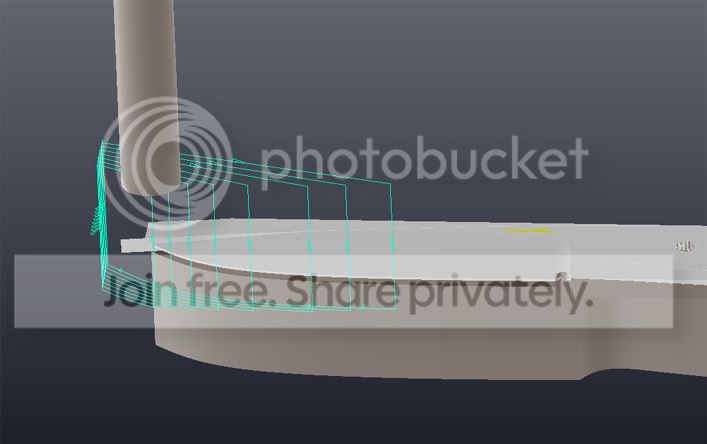
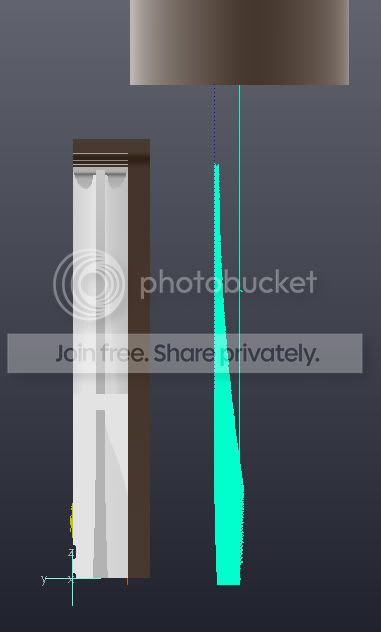
I'm milling a 10" hollow "grind" into the blade on a CNC mill. The "grind" remains *perpendicular* to the edge as it wraps around the belly, which is not something you could do with a "form tool" or by angling the vise unless you’re cutting something with a straight edge, no curvature or belly...

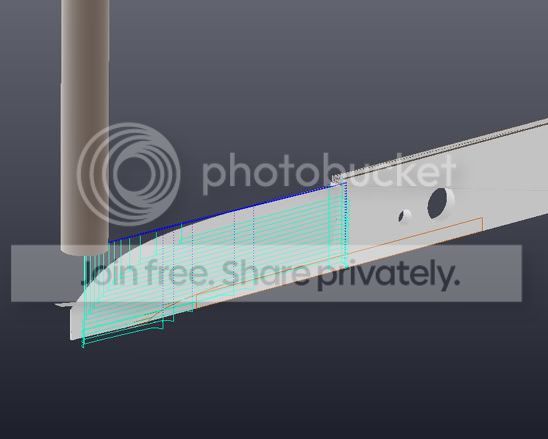
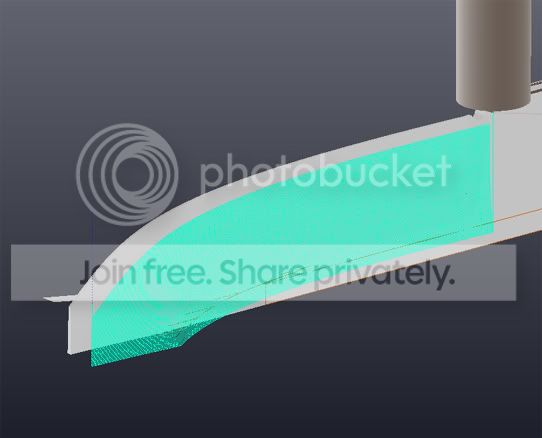
I'm "surface milling", or using a cutter to follow the desired part shape back and forth in a series of fine cuts. In this case I roughed out the bevel with basic "profile" cuts, leaving .005" rough stock allowance, then I surface milled following the surface iso lines when developing the tool paths.

Roughing:

surface1.jpg


Surfacing:

surface2.jpg


Detail:

surface3.jpg


End view:

surface4.jpg


This cuts in three axis simultaneously, leaving a more natural surface finish which speeds up polishing out tool marks later. It also leaves a set distance between cuts (.008 step over) as measured in the cut, it would otherwise vary as the curvature of the "grind" comes close to approaching vertical at the edge. I have the surface accuracy tolerance set to .0002" to reduce tessellation, this increases the program length to thousands of lines, which on a PCNC is moot.


8.jpg


I'm using a square end cutter, rather than the more commonly used ball endmill generally used for surface milling for a couple reasons. 1: It requires less clearance between the cut and the vice. 2: it minimizes the amount of the cutter in the cut and the cutting forces required, reducing chatter and deflection on a fairly tall thin unsupported cut. I could use a corner radius cutter to split the difference for a better finish, but it is not necessary for this.

I mill bevels rather than grind them for a couple reasons:

1: it generates chips, not dust, so it is cleaner, cheaper, faster, cooler and safer.

2: The bevels are perfectly symmetrical and the edge is perfectly straight and a specific thickness. I tinker around with this cut in the computer until it is exactly the "grind" I want. I can get "under the hood" in the computer simulation and look at cross sections, and the grind height and make choices based upon what I think will look and cut the best. If I wanted to blend from a hollow grind to a convex grind I could. If I wanted to use a parabolic or conic shaped grind profile rather than a true radius I could. I can vary the edge thickness or grind height with perfect control with this approach.


So for me, milling my grind, or at least roughing the bevels on the mill, is faster and better than grinding them. The end result is higher quality (for me, I can't grind like Bruce Bump). For those here using CNC (at least three of you come to mind), I think you should try this, at least in some form.

And... The next step is:
 
Last edited:
Grinding the bevels anyway

9.jpg


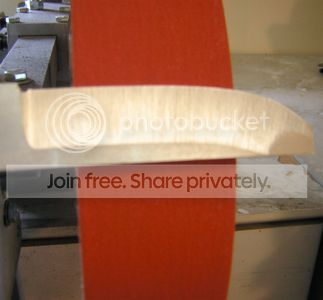
A milled surface finish doesn't look right on a blade, milled tool marks will never be as nice as a good grind. If I was going to hand rub these, I'd probably just do that from here, but I want a ground finish, so the grinder is still necessary after machining to remove cutter marks. I start with 120 grit and I take it up to 400, a fairly good finish. Takes me about 15 minutes. Someone better at offhand grinding could probably do it in half that. It will get tumbled before HT and scotchbrite after.

10.jpg


You'll notice I don't give much attention to the "tip". Many here will recall that I don't like grinding tips. Stresses me out. I used to botch it about half the time. I've gotten a lot better, but this approach makes it a non-issue. I order my operations to do away with it all together. That bit gets removed later. You'll see, Ta-Da!, perfect tips...
 
Last edited:
i cant wait to see what the blade looks like after milling the bevels. i'm curious to see the finish thats left. it would be neat to have a webcam set up so we could watch the progress.
 
Looks good Nathan. I was coming back from N. Wikesboro last Friday afternoon and was going to call you, but I was running late.
BB
 
i cant wait to see what the blade looks like after milling the bevels. i'm curious to see the finish thats left. it would be neat to have a webcam set up so we could watch the progress.

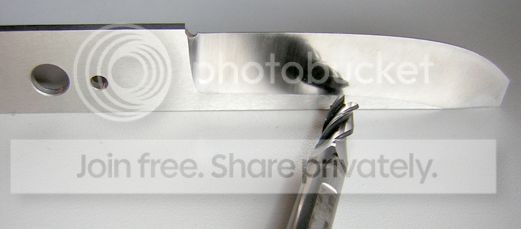
I don't think you'd like this finish very much. Compaired to a ground finish it is kind of rough.

kindarough.jpg
 
Back
Top